Reglyph translates scanned and image-only PDF files into selected languages while preserving original page formatting, tables, and visual elements.
Translation & TranscriptTranslating scanned or image-only PDF…Preserving multi-column layouts, table…Maintaining original signatures,…Exporting translated output as a…scanned PDF translationPDF translatortranslate scanned documentsdocument translationcertificate translationbilingual PDFOCR translationlayout-preserving translation
Estimated monthly visits
1K
Data period:
Listed on AIToolly
What Is Reglyph? Product Overview
What the product does and how it is positioned
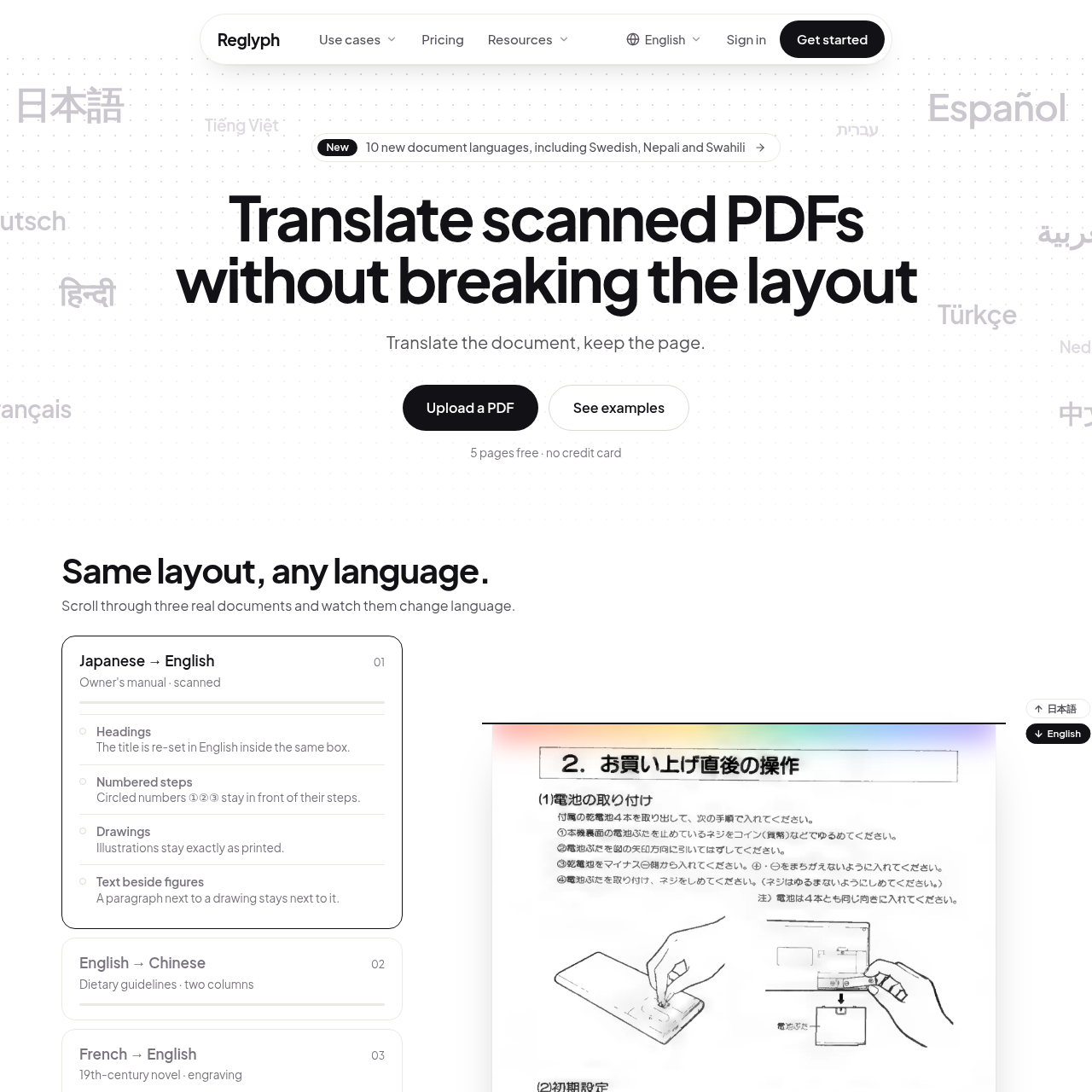
Reglyph translates scanned and image-only PDFs and gives them back in the original layout. Each page is read, the source text is removed, and the translation is set back in the same place, so columns, tables, stamps, signatures and numbers stay where they were.
It is built for documents that ordinary translators break: birth and marriage certificates, transcripts and diplomas, contracts, bank statements, manuals, books and academic papers. It works in 40+ languages, in both directions, and also handles digital PDFs.
You can download the translated PDF, or a side-by-side bilingual PDF to check every line against the original. Input is PDF only: a scan, a digital file, or a PDF from a phone scanner app.
It is machine translation, not a certified translation. For official submissions, a certified translator can work from the layout-faithful draft instead of retyping the document.
Reglyph is a document translation tool designed specifically for scanned and image-based PDF files that lack a selectable text layer.
The service executes automated optical character recognition on uploaded pages, replaces text in place across multi-column layouts and tables, and provides both standard and bilingual PDF downloads.
What Can You Use Reglyph For?
Source-supported ways to use the product
Academic Transcripts
Translating educational records while preserving grade table rows, column alignments, and header structures.
Bank Statements
Converting financial statements to another language while retaining tabular balance rows and account numbers in their original positions.
Legal Documents
Translating agreements and contracts while maintaining section numbering, clause sequences, and original layout formatting.
How to Use Reglyph
The documented workflow, where available
1
Upload Document
Upload a scanned or image PDF up to 100 MB and 300 pages, with source language detection available.
2
In-Place Translation
The system applies optical character recognition and inserts translated text directly into the original page positions.
3
Verify and Download
Review the translated pages against the original document and download either a translated PDF or a side-by-side bilingual PDF.
In-Place Reconstruction and Layout Preservation
Standard translation tools frequently fail on scanned PDF files because image-based documents do not contain an underlying text layer, resulting in blank output or corrupted characters. Reglyph addresses this issue by running optical character recognition directly on the image prior to translation, removing the need for manual transcription or separate OCR tools.
Rather than extracting text into an unformatted document, the system replaces source text directly within its original bounding area. Multi-column structures, tables, headings, and numbered steps stay positioned as originally printed, while non-text graphics such as signatures, seals, stamps, and photos remain unmodified.
Performs optical character recognition on scanned pages prior to translation.
Preserves table cells, row boundaries, and multi-column formatting.
Leaves seals, stamps, signatures, and photographic elements in their original positions.
Outputs standard translated PDFs or side-by-side bilingual comparison documents.
Reglyph Pricing
Human-maintained commercial information
creditsfreemium
USD 3
Pricing can change. Confirm the current plan and billing terms on the official site before purchasing.
What to Test Before Choosing Reglyph
Checks to run with your own material and workflow
Verify that document files do not exceed the platform limits of 100 MB or 300 pages per file.
Check whether non-text elements like stamps, seals, or signatures require translation, as the platform preserves them as images without translation.
Confirm that the target document language pair is supported by the platform.
Answers based on the source-checked product record
Why do standard translation services fail or produce garbled text on scanned PDFs?+
Scanned PDFs consist of images without an embedded text layer. Translation systems expecting selectable text fail or produce garbled text unless optical character recognition is performed first to extract the readable characters.
Does Reglyph require manual OCR before uploading a document?+
No manual OCR step is required. Reglyph runs automated optical character recognition directly on scanned and image PDFs before initiating translation.
What document size limits apply to uploads?+
Uploaded PDF documents can contain up to 300 pages and must not exceed a maximum file size of 100 MB per file.
Are stamps, seals, and signatures translated?+
Stamps, seals, signatures, numbers, drawings, and photographs are not translated or redrawn; they are left intact in their original positions on the page.
What file formats are provided after translation?+
Users can download a translated PDF maintaining the original layout, or a bilingual PDF featuring the original and translated pages side by side.
More Translation & Transcript AI tools
Explore other recently added tools in the same category.