Zen Whisper
Zen Whisper: Private Mac Dictation Software
Zen Whisper provides private Mac dictation software for local-first speech recognition. Transcribe audio files and dictate into any app across 110 languages.
2026-08-04
2.0K
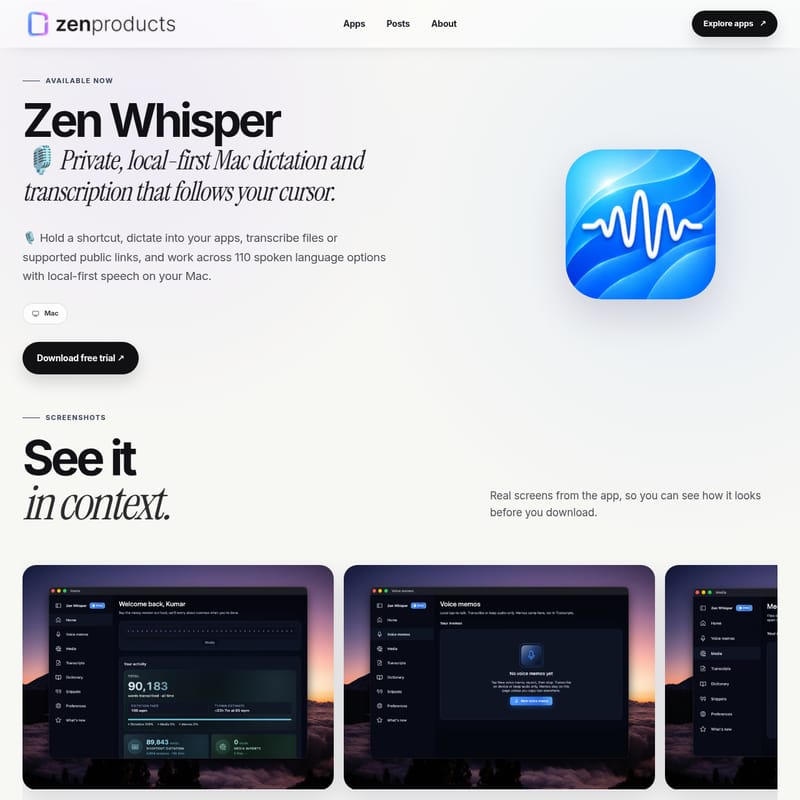
Zen Whisper Product Information
Zen Whisper is a native application designed for users who require high-privacy audio processing on macOS. As a specialized Private Mac Dictation Software, it moves the speech recognition process from the cloud to the user’s local hardware. This architectural choice is intended to ensure that sensitive audio data remains on the device, providing a solution for individuals and organizations that must adhere to strict data residency requirements. The software supports both live voice input and the processing of existing media files.
Local-First Speech Recognition on macOS
One of the defining characteristics of Zen Whisper is its reliance on local-first speech recognition. Rather than sending audio streams to a remote server for processing, the application uses downloadable speech packs that reside on the user's computer. This setup makes it a functional Private speech to text app for those who prefer not to use cloud-based recorders. By performing the core speech recognition on-device, the application maintains a disconnected workflow, where the primary transcription engine does not require an active internet connection to convert spoken words into text.
This on-device speech to text for macOS is optimized to work with the specific hardware found in modern Apple computers. According to the provider, the application is designed to be lightweight, avoiding heavy idle pre-warming on machines with lower memory and automatically unloading native models after a period of inactivity to preserve system resources.
Transcription Capabilities and Media Support
Beyond live dictation, the software serves as a comprehensive Mac transcription software solution. It allows users to transcribe audio files on Mac by uploading existing media directly into the application interface. The tool is compatible with various audio and video formats, as well as supported public links. Once a file is processed, the resulting text is stored in a searchable history, allowing users to revisit past transcriptions, voice memos, and snippets as needed.
For those seeking versatile voice to text for Mac, the software includes features such as a dictionary memory to handle specific vocabulary over time. The application is also capable of handling complex media workflows, including translation in specific tiers. All processed text remains accessible through the app’s internal management system, which organizes transcriptions for quick retrieval.
Workflow Integration and Multilingual Support
Zen Whisper is designed to integrate into a user's existing writing environment. The software follows your cursor, meaning that when a user activates the dictation shortcut, the text is inserted directly into the active application. This functionality eliminates the need to copy and paste text from a separate editor, making it compatible with most Mac apps where a standard typing cursor is present. This direct insertion method is intended to facilitate a low latency multilingual voice to text experience, where the delay between speaking and the text appearing is minimized on supported hardware.
As a multilingual dictation app, it offers 110 spoken language options. This extensive support covers a wide range of linguistic needs, including:
- Standard English and its regional variants.
- Hindi and Hinglish.
- Various Western and Indian regional languages.
This breadth of language support is powered by the selected speech model, allowing users to switch between different linguistic profiles depending on their specific project requirements.
System Requirements and Private Mac Dictation Software Setup
To ensure proper performance, Zen Whisper is built as an Apple Silicon Mac app. It requires macOS 14 or later to run natively on Apple’s proprietary processors. Because the speech models are stored locally, users must have sufficient disk space to accommodate the language packs they intend to use. The initial setup involves downloading the application and then selecting the appropriate speech models for the desired languages.
The developer notes that while core speech recognition is designed to stay on the Mac, certain optional features that utilize network resources are treated as opt-in. Users should review the privacy policy to understand the specific data flow for these non-core components. Deployment usually involves activating the software with a license key, which then allows for continuous use across one or more authorized Mac devices depending on the specific license bundle selected.
Zen Whisper FAQ
Which Mac models can run Zen Whisper?
Zen Whisper is a native Apple Silicon Mac app and is compatible with devices running macOS 14 or later. It is specifically tuned to utilize the architecture of Apple's M-series chips.
Can I transcribe public links on Mac using this tool?
Yes, the software allows users to transcribe files or public links from supported platforms. This feature enables the conversion of remote audio or video content into searchable text without needing to manually download the media first.
How does the software handle different languages?
The application currently exposes 110 spoken language options. This includes Hindi, Hinglish, various English regional variants, and a wide selection of other Western and regional languages supported by the user’s selected speech model.
Does my audio data leave my computer?
The provider states that core speech recognition is designed to stay on your Mac. The application uses on-device models to process speech. Users should be aware that optional network-backed features are separate and function as opt-in services.