Lispr
Lispr: The Ultimate Voice Translation and Dictation Tool for Mac Users
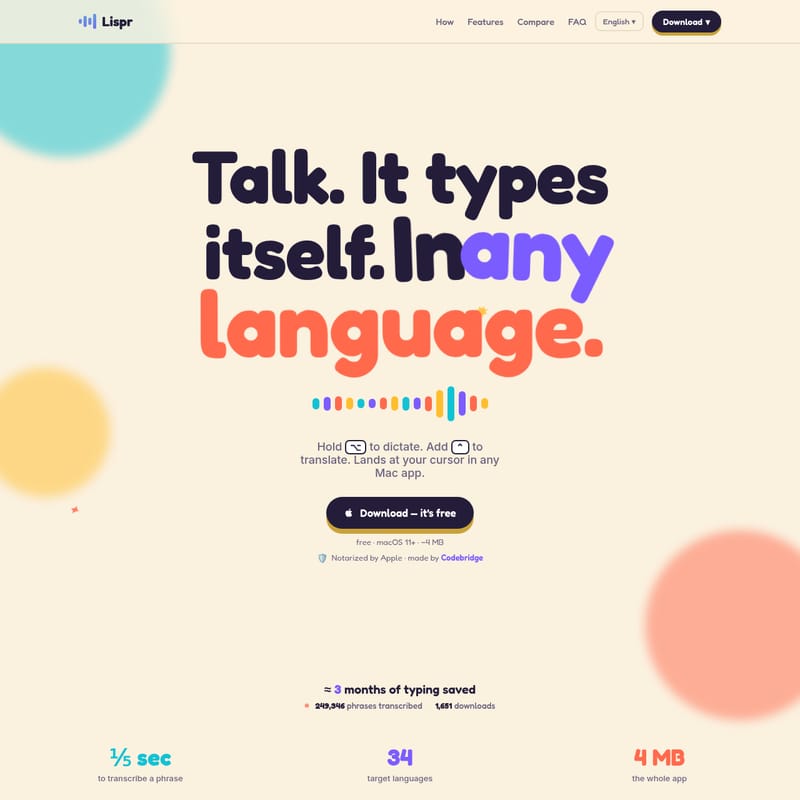
Lispr is a lightning-fast macOS tool for instant voice dictation and translation. Supporting 34+ languages and powered by the Whisper large-v3 model, it works seamlessly in any app with no subscription required.
2026-07-11
0.3K
Lispr Product Information
Lispr: The Ultimate Voice Translation and Dictation Tool for macOS
In the modern digital workspace, speed and communication are paramount. Lispr emerges as a revolutionary solution for Mac users, offering a seamless way to bridge the gap between thought and text. This lightweight yet powerful application is designed to handle both simple dictation and complex translation with a single gesture. Whether you are drafting an email in a foreign language or taking quick notes in your native tongue, Lispr ensures that your words land exactly where you need them, instantly.
Built by Codebridge Technology, Inc., Lispr is more than just a transcription tool; it is a productivity powerhouse that has already saved users approximately three months of collective typing time. With its minimalist design and robust performance, it has become a go-to utility for those who value efficiency and privacy.
What’s Lispr?
Lispr is a voice-to-text and translation utility specifically crafted for macOS (version 11 and above). The core philosophy behind Lispr is simple: "Talk. It types itself." Unlike traditional dictation software that may require multiple clicks or complex setups, Lispr operates directly at your cursor in any Mac application.
Whether you are using Slack, Notes, Figma, or even the Terminal, Lispr types your spoken words directly into the active text field. It leverages the advanced Whisper large-v3 speech model to provide high-accuracy transcriptions and translations. Currently in early access, Lispr is a free tool that prioritizes speed, simplicity, and user privacy, requiring no account registration or recurring subscriptions.
Key Features of Lispr
1. Lightning-Fast Performance
Speed is the hallmark of the Lispr experience. Dictation is processed in as little as 0.2 seconds, while full translation takes approximately 0.5 seconds. There are no "thinking" spinners or long delays; the text simply appears as you finish speaking.
2. Native Support for 34 Languages
Lispr offers a comprehensive list of 34 native languages for translation. This isn't just marketing—the support is deep and functional. Supported languages include:
- English, Español, Português (and Brasil)
- Français, Italiano, Deutsch, Nederlands
- 日本語, 简体中文, 繁體中文, 한국어
- हिन्दी, ไทย, Tiếng Việt, Bahasa Indonesia, Bahasa Melayu
- العربية, עברית
- Русский, Українська, Polski, Čeština, Slovenčina, Magyar, Română, Hrvatski
- Svenska, Norsk bokmål, Dansk, Suomi, Ελληνικά, Türkçe, Català
3. Custom Vocabulary and Dictionary
To ensure maximum accuracy, Lispr allows users to add a custom vocabulary. This means the app can recognize specific product names, unique code identifiers, or your personal client list. Both the dictation and translation engines respect this dictionary, preventing common errors with specialized terminology.
4. Minimal Footprint and Clipboard Safety
At only ~4 MB, Lispr is incredibly lightweight. It lives quietly in your menu bar without intrusive windows or popups. Furthermore, it is clipboard-safe. It temporarily inserts your transcribed text and then immediately restores whatever you previously had copied, ensuring your workflow remains uninterrupted.
5. Privacy-First Architecture
Lispr is built with security in mind. It is Notarized by Apple, meaning every release is scanned for malware. Because there is no account or sign-up process, there is no personal data to breach. Your voice is transcribed over an encrypted connection and then immediately discarded; nothing is stored on servers or used to train models.
How to Use Lispr
Lispr utilizes a simple "push-to-talk" mechanism that integrates perfectly with your existing typing habits. There is no need to switch apps or copy-paste text.
Step 1: Hold to Talk
To begin dictating in your native language, press and hold the right Option key (⌥). Speak naturally—whether it is Japanese, Hindi, or Spanish, Lispr will listen.
Step 2: Tap to Translate (Optional)
If you wish to translate your speech into another language, simply add a second key mid-speech. Press the Control key (⌃) while still holding the Option key. If you only want plain dictation, skip this step.
Step 3: It Lands Typed
Release the keys, and the text will appear right at your cursor. In about half a second, your translation or transcription is finished and typed out for you.
Use Cases: Real-World Efficiency
Communicating in Foreign Languages
Imagine replying to a colleague on WhatsApp. You can say, "On my way—five minutes out" in English while holding ⌥+⌃. Lispr will instantly type the Spanish equivalent, "En camino, a cinco minutos," directly into the chat. What would normally take 45 seconds to type manually in a language you barely speak now takes only 3 seconds with Lispr.
Professional Workflows
For developers and designers, Lispr works in the Terminal or Figma. Use the custom vocabulary feature to dictate specific code identifiers or project names without worrying about typos.
Quick Note-Taking
Use Lispr in Notes or Slack for rapid-fire brainstorming. The instant 0.2s dictation speed ensures that your thoughts are captured as fast as you can speak them, without the lag associated with built-in system tools.
Comparing Lispr to Alternatives
| Feature | Lispr | Wispr Flow | Apple Dictation | | :--- | :--- | :--- | :--- | | Price | Free | $15/mo | Free | | Translation Built-in | Yes | No | No | | No Subscription | Yes | No | Yes | | No Account Required | Yes | No | Yes | | Languages | ~99 (Auto-detect) | ~100 | Manual | | App Footprint | ~4 MB (Menu bar) | Full App | Built-in | | Speech Model | Whisper large-v3 | Proprietary | On-device |
FAQ
Q: Which Macs are supported by Lispr? A: Lispr requires macOS 11 or higher. It is optimized to run efficiently on modern Mac hardware with a tiny 4MB footprint.
Q: Is Lispr really free? A: Yes, Lispr is currently free during its early access phase. There are no hidden subscriptions or sign-up requirements. The company, Codebridge, will provide advance notice if pricing models change in the future.
Q: Does Lispr work offline? A: Lispr uses an encrypted connection to transcribe your voice via the Whisper large-v3 model, requiring an active internet connection to ensure the highest speed and accuracy.
Q: What permissions does Lispr need? A: To function, Lispr requires microphone access to hear your voice and Accessibility permissions to type text at your cursor in various applications.
Q: How is translation different from dictation in Lispr? A: Dictation (holding ⌥) simply turns your spoken words into text in the same language. Translation (holding ⌥+⌃) takes your spoken words and converts them into one of the 34 supported target languages before typing them out.
Q: Is my data safe with Codebridge? A: Absolutely. Lispr is notarized by Apple and developed by a registered company, Codebridge Technology, Inc. Voice data is discarded immediately after transcription, and no accounts are created, ensuring there is no data to store or breach.