Kai Resolve by Gleap favicon

Kai Resolve by Gleap

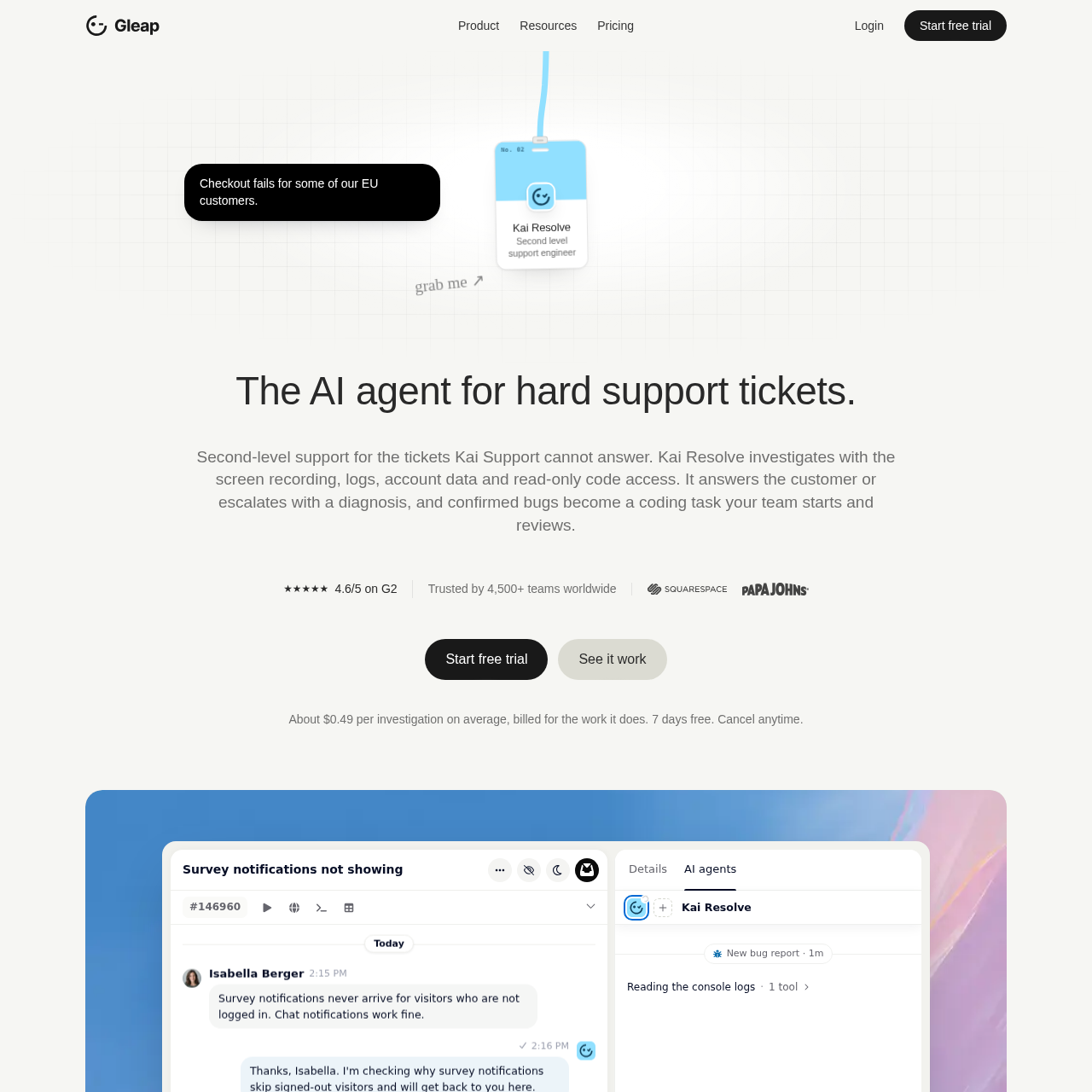
Kai Resolve by Gleap is an AI second-level support agent that investigates software issues using session recordings, logs, and read-only code sandboxes to diagnose root causes and prepare coding tasks.

Customer SupportTraces reported software defects across…Automatically triages incoming bug…Produces structured engineering tasks…Queries external data sources in…
Kai Resolve by Gleap product interface screenshot
Listed on AIToolly

What Is Kai Resolve by Gleap? Product Overview

What the product does and how it is positioned

Kai Resolve operates as a second-level (tier 2) support agent within the Gleap platform ecosystem. When first-tier support systems or human agents encounter complex software tickets, Kai Resolve investigates the issue by correlating customer communication, telemetry captured by the Gleap SDK, and application source code.

The system clones designated repositories into sandboxed environments with read-only access to isolate defect causes down to specific files. Depending on the investigation outcome, Kai Resolve provides grounded explanations directly to customers, asks human teammates for directional input via decision cards, or formats detailed coding tasks for development teams.

What Can You Use Kai Resolve by Gleap For?

Source-supported ways to use the product

Automated Inbound Bug Triage

Analyzes newly reported bugs before team inbox arrival, tagging each ticket with confidence levels, category classifications, and relevant diagnostic evidence.

Tier 2 Support Ticket Escalation

Takes over customer inquiries when first-tier agents cannot answer, using network logs, console errors, and session replays to determine the root problem.

Root Cause Code Diagnosis

Traces customer-reported behavior across sandboxed source repositories to pinpoint the exact file paths and code logic responsible for the defect.

How to Use Kai Resolve by Gleap

The documented workflow, where available

  1. 1

    Telemetry and Evidence Ingestion

    Kai Resolve ingests the conversation history, device and SDK versions, network errors, console traces, click trails, screenshots, and screen recordings captured by the Gleap SDK.

  2. 2

    Sandboxed Code Investigation

    The system clones designated repositories into a secure sandbox in read-only mode, tracing the reported issue through relevant application files without writing code.

  3. 3

    Diagnosis and Action Generation

    Kai Resolve produces an outcome based on its findings, which may include a customer-facing explanation, a decision prompt for the team, or a coding task with file citations.

  4. 4

    Review and Customer Follow-Up

    Engineering teams review and merge any resulting code fixes, and upon confirmation that the fix is live, the platform sends an update to the customer.

Investigation Architecture and Safety Controls

Kai Resolve conducts second-level technical triage by isolating code analysis inside dedicated sandbox environments. The agent operates strictly with read-only permissions across connected source repositories and external database connections via Model Context Protocol servers.

Write actions, record deletions, and billing operations are prevented by platform security controls. When an investigation confirms a bug, the tool generates diagnostic tasks citing specific files and line numbers, leaving code generation, pull request creation, and deployment reviews to engineering agents and human developers.

  • Clones code repositories exclusively into isolated sandboxes under read-only access restrictions.
  • is intended to reduce execution of data modification commands, deletions, and billing actions.
  • Treats inconclusive results as unknown issues rather than assuming absence of defects.

What to Test Before Choosing Kai Resolve by Gleap

Checks to run with your own material and workflow

  • Confirm which code repositories and MCP data sources require read-only access for sandboxed investigations.
  • Verify whether incoming bug reports should be analyzed automatically before inbox routing or triggered upon escalation.
  • Check compatibility with preferred engineering handoff tools such as Kai Code, Claude Code, Cursor, or Codex.
  • Review regional data residency settings to ensure compliance alignment between EU and US hosting options.

Kai Resolve by Gleap Sources and Last Checked

What was checked and when

Last checked

Kai Resolve by Gleap Frequently Asked Questions

Answers based on the source-checked product record

Does Kai Resolve commit or push code changes to repositories?

No. Kai Resolve inspects source code exclusively through read-only sandboxed clones. It identifies defects and creates coding tasks with file citations, but it never commits or pushes changes to repositories.

What evidence does Kai Resolve use during an investigation?

Kai Resolve examines ticket text, device and SDK versions, network requests, console logs, click trails, screenshots, and screen recordings from the Gleap SDK, along with read-only source code and MCP data sources.

How does Kai Resolve handle tickets when the root cause is unclear?

Kai Resolve marks the result as inconclusive rather than dismissing the issue. It attempts a single re-investigation from an alternative angle, asks the customer for missing details, or presents an option card to human teammates.

What outcomes can Kai Resolve generate after investigating a ticket?

The agent can reply directly to the customer explaining an expected setting, present decision cards to teammates, link and subscribe the user to a roadmap request, or produce a coding task for developer review.

From which channels can Kai Resolve investigate customer reports?

Investigations can be run on tickets originating from the Gleap chat widget, email, Slack, or connected integrations, with maximum telemetry available on reports captured via the Gleap SDK.

Explore other recently added tools in the same category.