Famulor favicon

Famulor

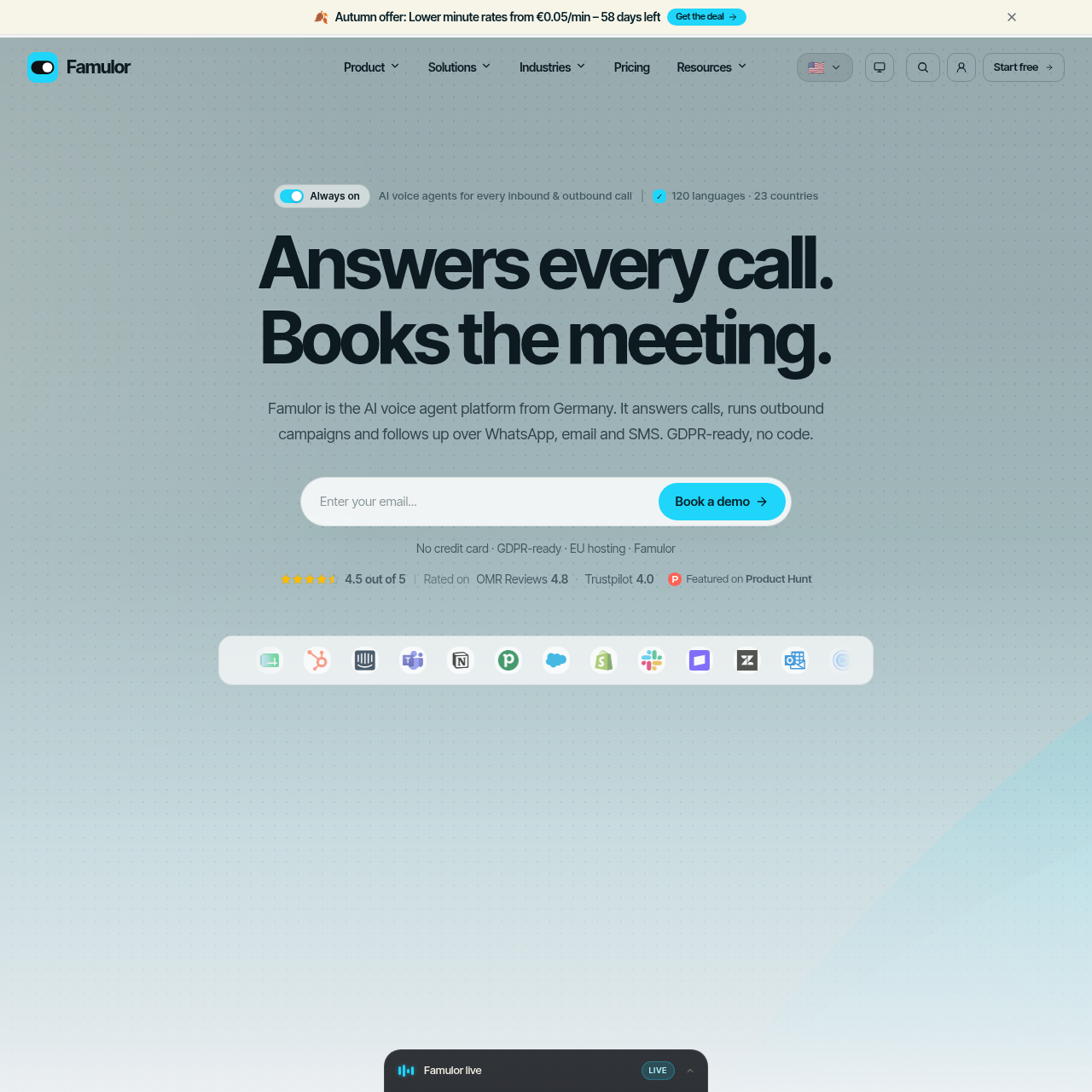
Famulor is a no-code conversational AI platform that automates inbound call reception, outbound voice campaigns, and omnichannel messaging across voice, chat, and email.

Customer SupportAutomated calendar booking and…Contact and lead synchronization with…Automated website crawling and document…Live operator intervention via whisper,…
Famulor product interface screenshot
Listed on AIToolly

What Is Famulor? Product Overview

What the product does and how it is positioned

Famulor provides an AI voice and messaging agent platform developed by BEK Service GmbH. The platform enables organizations to design automated voice agents that answer inbound calls, conduct outbound calling campaigns, and execute text-based follow-ups across messaging channels including WhatsApp, SMS, and email.

Agents are constructed in a visual browser-based flow builder and draw information from centralized knowledge bases comprising uploaded files and synchronized website crawls. The platform supports multilingual interactions, integration with multiple calendar systems and customer relationship management tools, and live call supervision tools such as listening in, whispering, and taking over calls.

What Can You Use Famulor For?

Source-supported ways to use the product

Inbound Call Answering and Scheduling

Handling inbound inquiries, screening callers, answering questions from knowledge documentation, and booking calendar appointments directly during the call.

Outbound Lead Outreach and Engagement

Placing automated outbound voice calls from CRM records within designated time windows, retrying unanswered calls, and transferring conversations to WhatsApp or SMS.

Customer Support and Ticket Follow-Up

Addressing routine support questions across phone calls, website widgets, and messaging tools with live transcript generation and post-call sentiment analysis.

How to Use Famulor

The documented workflow, where available

  1. 1

    Build the agent

    Design conversational logic visually in the browser flow builder, choosing from voice models and setting multi-language handling.

  2. 2

    Add knowledge sources

    Connect documentation such as PDFs, run automated website crawls, and integrate target calendar systems for scheduling.

  3. 3

    Connect a phone number

    Provision phone numbers across supported countries or connect an existing telephony setup via SIP trunk integration.

  4. 4

    Test and deploy

    Execute a verification test call to evaluate the agent before publishing and routing live production customer calls.

Omnichannel Conversation Architecture and Governance

Famulor centralizes agent behavior by running a single conversation design and knowledge repository across telephony and digital communication channels. An agent built within the flow builder can converse over standard phone lines while coordinating follow-up messaging over WhatsApp, SMS, email, Slack, and Microsoft Teams without maintaining disparate configurations.

Operational oversight includes live call monitoring capabilities where human operators can listen in, whisper guidance to the agent, or take over calls. Transcripts feature automatic redaction of personally identifiable information on write, accompanied by post-call sentiment scoring, goal completion tracking, and configurable data retention.

  • No-code visual agent flow builder accessible directly in the browser
  • Support for 120 spoken languages with automated mid-call voice switching
  • Knowledge base synchronization spanning uploaded documents and website indexing
  • Live supervisor intervention tools including call monitoring, whispering, and takeover
  • PII redaction on write and customizable workspace data hosting regions

What to Test Before Choosing Famulor

Checks to run with your own material and workflow

  • Verify that supported telephony options, such as numbers in 23 countries or custom SIP trunking, align with your technical and regional infrastructure requirements.
  • Confirm that existing calendaring and CRM tools, such as Cal.com, Calendly, Salesforce, or HubSpot, integrate with Famulor native connectors.
  • Check that the workspace processing regions, data retention defaults, and consent workflows satisfy your internal compliance and data protection mandates.

Famulor Sources and Last Checked

What was checked and when

Official source
https://famulor.io/
Last checked

Famulor Frequently Asked Questions

Answers based on the source-checked product record

How does Famulor handle inbound telephone calls?

Famulor routes incoming calls to an AI agent designed via the visual flow builder. The agent answers callers, references the shared knowledge base, gathers required information fields, and schedules appointments on connected calendars.

Can the platform conduct outbound calling campaigns?

Yes, Famulor supports outbound voice campaigns that parallel-dial contacts from CRM records or lead lists within designated calling windows, handle voicemail retries, and trigger follow-ups across messaging channels.

Which voice providers and language options are supported?

The platform supports 120 languages with mid-call switching capabilities and includes a catalog of over 10,000 voices powered by providers like Cartesia, ElevenLabs, and OpenAI, alongside voice cloning options.

How are call recordings and personally identifiable information managed?

Call recording begins only after the caller grants consent. Transcripts have personally identifiable data redacted upon write, and workspaces can select specific AI processing regions such as EU Only, US Only, or Global.

Which external applications and calendar services can integrate with Famulor?

Famulor connects with calendar systems including Cal.com, Calendly, and eTermin, as well as CRM platforms such as Salesforce, HubSpot, and HighLevel, alongside support for REST APIs, webhooks, and MCP connectors.

Explore other recently added tools in the same category.