Timely
Timely: The Ultimate Productivity Tool for Sharing Calendar Availability in Seconds
Timely is a professional-grade availability sharing tool for Mac and Windows that allows users to paste their free time slots into any app in just three seconds. By using a global keyboard shortcut, Timely gathers availability from multiple Google and Outlook calendars, automatically adjusts for timezones, and generates clean, recipient-friendly text. It prioritizes privacy by processing all calendar data locally on the user's device, ensuring that meeting details never touch external servers. With features like Calendar Quick-View, smart meeting buffers, and sensible hour filtering, Timely streamlines scheduling for executives, recruiters, and busy professionals.
2026-07-19
--K
Timely Product Information
Timely: The Fastest Way to Share When You're Free
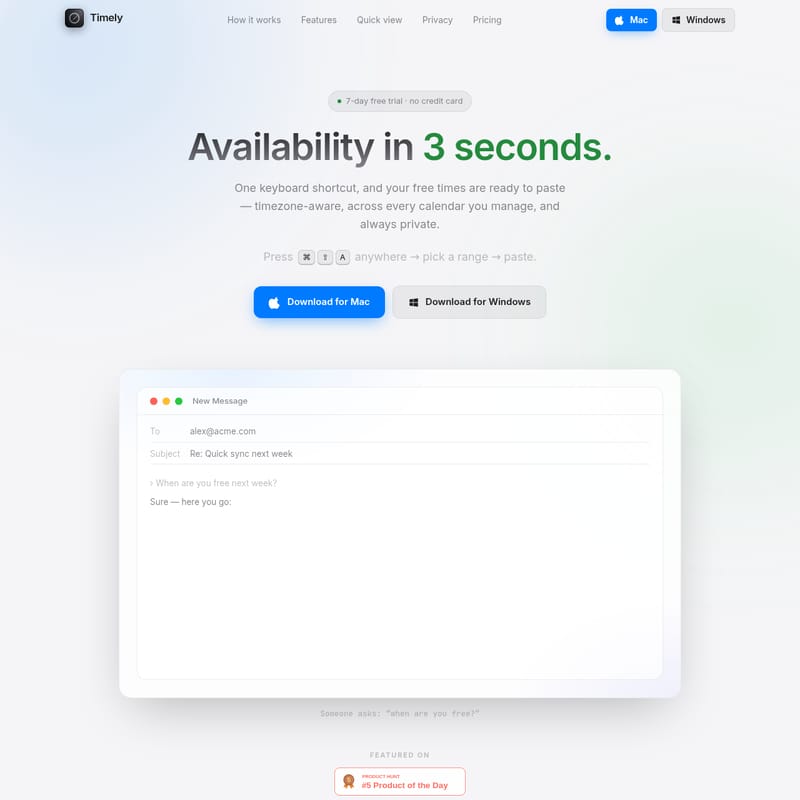
In the modern professional landscape, the simple question "when are you free?" often triggers a tedious cycle of context switching, mental math, and manual typing. Timely is designed to eliminate this friction entirely. As a high-performance productivity tool for Mac and Windows, Timely allows you to share your availability in as little as three seconds using a simple keyboard shortcut. Whether you are managing a single schedule or coordinating across multiple executive calendars, Timely ensures your free times are ready to paste—timezone-aware, private, and perfectly formatted.
What's Timely?
Timely is a specialized calendar utility that lives in the background of your operating system, ready to assist the moment you need to schedule a meeting. Unlike traditional calendar apps that require you to click through various views to find open slots, Timely operates via a Spotlight-style popup triggered by a global hotkey.
It is built for speed and privacy. Timely does not require a central account on its own servers; instead, it connects directly to your calendar providers (such as Google and Microsoft 365) to compute availability locally on your machine. The result is a clean list of free slots that you can paste into emails, Slack messages, or LinkedIn DMs, formatted specifically to be recipient-friendly.
How to Use Timely
Sharing your availability with Timely is a streamlined three-step process that requires no mouse movement and no mental timezone conversions.
1. Press the Shortcut
From any application—be it your email client, a browser, or a messaging app—simply hit your global hotkey. On Mac, the default is ⌘ ⇧ A. A lightweight, distraction-free popup will appear instantly. There is no dock icon and no traditional window management required, ensuring you stay in your flow state.
2. Pick Your Timezone and Range
Once the interface appears, use the arrow keys to navigate. You can choose the recipient's timezone and select how far ahead Timely should look for gaps in your schedule. Options include looking at today, or the next 3, 5, 10, or 30 days. Because the interface is entirely keyboard-driven, this step takes only a fraction of a second.
3. Paste Your Availability
After selecting your range, Timely automatically generates your free slots, adjusts them for the recipient's timezone, and copies the text to your clipboard. Simply press ⌘ V (or Ctrl+V on Windows) to paste the results. Your recipient receives a professional, grouped list of times that are easy to read and act upon.
Key Features of Timely
Timely is packed with features designed to make calendar management and availability sharing as professional as possible.
Professional Text Formatting
When you share availability, Timely doesn't just dump a list of numbers. It generates a structured message that includes:
- Timezone Banner: The first line clearly states the recipient's timezone (e.g., Eastern Time).
- Daily Grouping: Free slots are grouped by day with clear, bold headers.
- Friendly 12-Hour Format: Times are presented in a readable format (e.g., 9:00 AM - 10:30 AM).
- Plain Mode: For those who prefer a minimalist look, an optional mode drops bullet dashes for a cleaner text appearance.
Multi-Calendar Integration
Timely can pull availability from multiple sources simultaneously.
- Connect several Outlook / Microsoft 365 and Google accounts.
- Automatically discover shared and delegated calendars.
- Find combined availability when multiple executives need to be free at the same time.
Smart Scheduling Logic
To ensure you aren't overbooked or scheduled at inconvenient times, Timely includes several intelligent filters:
- Sensible Hours: Timely automatically clamps slots to reasonable hours (default 08:00–20:00) so you never accidentally suggest a 4 AM meeting.
- Smart Buffers: You can add optional padding (e.g., 15 or 30 minutes) before and after existing meetings to ensure you have time to breathe between calls.
Calendar Quick-View
Beyond sharing availability, Timely provides a Calendar Quick-View via the shortcut ⌘ ⇧ C (Mac) or Ctrl+Shift+C (Windows). This opens a near-fullscreen grid that allows you to glance at your entire day's schedule without opening a heavy calendar application.
- Overlaps: Event blocks sit side-by-side to show busy periods clearly.
- Live Tracking: A "now" line tracks your progress through the day.
- Instant Close: Hit
escto close the view and return to your work immediately.
Use Case Scenarios
Timely is a versatile tool that fits into various professional workflows:
- The Executive Assistant: Manage several calendars for different stakeholders. You can rename accounts within Timely (e.g., "CEO Calendar") so the picker reads naturally, allowing you to quickly grab times for any executive you support.
- The Global Recruiter: When scheduling interviews across different timezones, use the timezone picker to ensure the candidate sees times in their local clock, preventing embarrassing scheduling errors.
- The Sales Professional: Quickly respond to "when can we talk?" inquiries with a clean list of options, making it easier for prospects to say yes without the back-and-forth of time conversion.
Privacy-First Architecture
Privacy is a core pillar of the Timely experience. Unlike other scheduling tools, your calendar never touches Timely's servers.
"Availability is computed on your device and talks straight to your provider. We designed it so there's simply nothing to leak."
- Direct Computation: All availability calculations happen locally on your Mac or Windows machine.
- Limited Data Access: For availability, Timely only reads free/busy information. It only accesses meeting details locally to render the Calendar Quick-View grid.
- Secure Storage: All OAuth tokens and license keys are stored encrypted within your operating system's keychain, never in plain text.
Pricing and Availability
Timely is available for both macOS (Universal build for Apple Silicon and Intel) and Windows 10 & 11.
Timely Pro
- Solo: £5 per month (or save 17% with annual billing).
- Teams: Discounted per-seat pricing is available for organizations.
- Free Trial: A 7-day free trial is available with no credit card required, offering full access to all features.
FAQ
Q: Which calendar providers are supported? A: Timely currently supports Microsoft 365 / Outlook and Google Calendar accounts, including any shared or delegated calendars associated with those logins.
Q: Does Timely store my calendar data? A: No. Timely computes everything on your device. Your data stays between you and your calendar provider (Google or Microsoft).
Q: Can I use Timely on both my Mac and Windows PC? A: Yes, Timely is available for both platforms. After purchasing, you simply paste your license key into the settings to unlock the full version.
Q: How do I handle multiple timezones? A: When you fire the shortcut, you can use the keyboard to pick the recipient's timezone. Timely will instantly convert all your free slots to that specific zone before copying them to your clipboard.