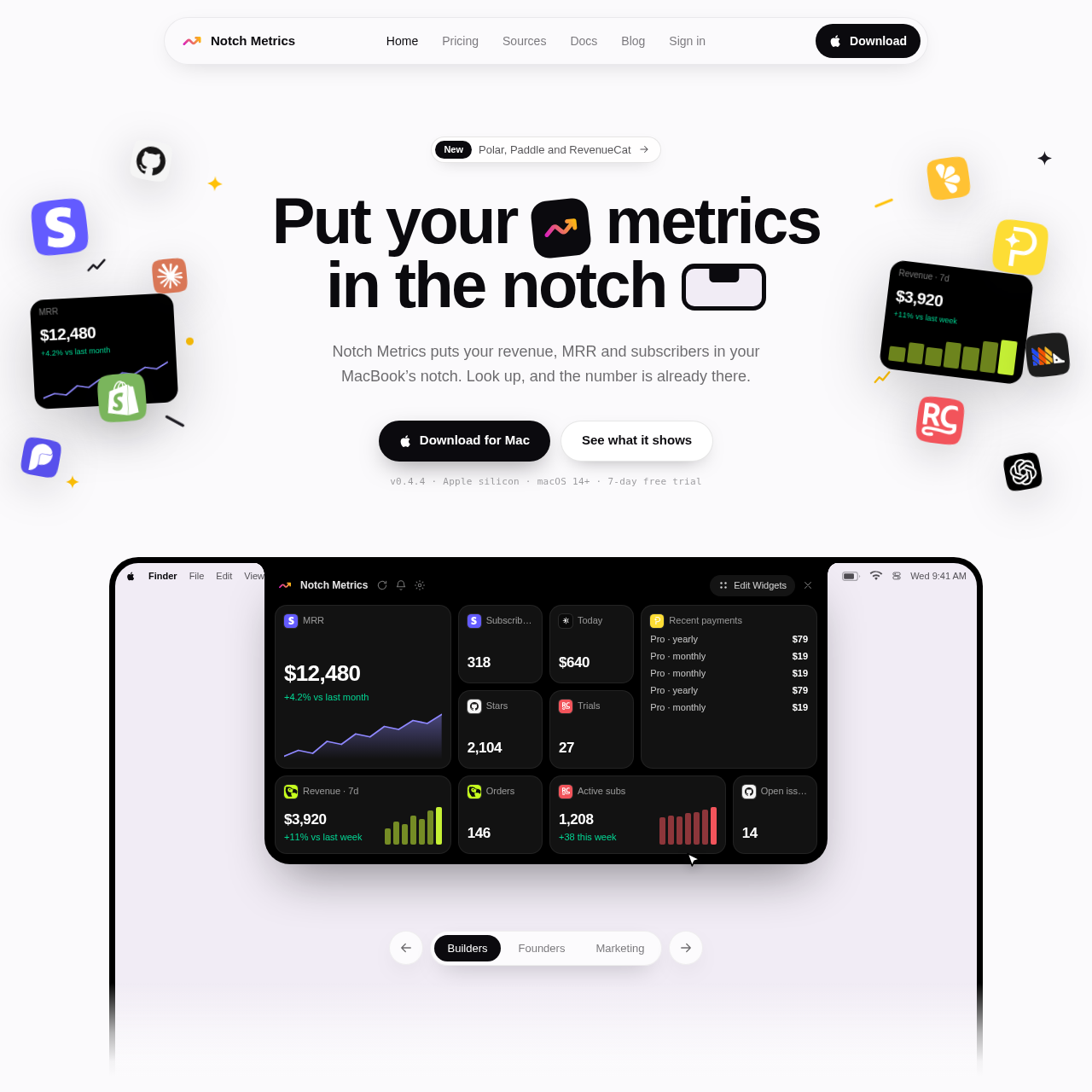
Notch Metrics places business revenue, subscription counts, and live operational numbers directly into the MacBook notch with hover-activated widgets.
ProductivityDisplay revenue, subscriber, and…Expand and collapse widget views based…Connect data sources via a web…Encrypt provider integration keys on…
Listed on AIToolly
What Is Notch Metrics? Product Overview
What the product does and how it is positioned
Notch Metrics is a native macOS application designed to display real-time business and development metrics inside the MacBook camera housing area. It eliminates the need to constantly open browser dashboards by bringing headline numbers, subscription counts, and recent transaction feeds straight to the top of the screen.
Built as a lightweight Swift application for Apple silicon, the software remains quiet by default without a dock icon or menu bar clutter. Users can connect multiple third-party services on the web, arrange widgets in various tile sizes, and sync their custom layouts across multiple Mac computers.
What Can You Use Notch Metrics For?
Source-supported ways to use the product
Tracking Recurring Revenue
Founders and builders can monitor monthly recurring revenue and recent incoming payments at a glance without switching contexts.
Monitoring Development Activity
Developers can keep track of repository stars, open issues, and project activity alongside financial metrics in a single strip.
Security and Key Management
Notch Metrics routes provider data connections through a server architecture designed to protect sensitive API keys. When a user pastes a provider key, it undergoes immediate encryption using an isolated cryptographic key bound specifically to the user account, integration provider, and service instance. This is designed so that a key copied elsewhere decrypts to nothing.
Provider keys remain stored on the server rather than local Mac storage.
Local applications on the Mac receive only processed numeric values from server queries.
Removing an integration automatically purges its associated encrypted key from the server.
What to Test Before Choosing Notch Metrics
Checks to run with your own material and workflow
Confirm that the target MacBook runs macOS 14 or later and features an Apple silicon processor.
Verify which specific data providers and third-party services are currently supported for live metric feeds.
Review the key storage and encryption mechanisms to ensure alignment with internal data governance policies.
Answers based on the source-checked product record
What operating systems and hardware are supported?+
Notch Metrics is built natively for Apple silicon running macOS 14 or later.
How are third-party service integrations connected?+
Integrations are connected through a web interface, and connected sources automatically sync across every Mac signed into the account.
Where are API provider keys stored?+
Provider keys are encrypted upon entry and stored securely on the server, so that local apps on your Mac cannot read them directly.
What happens to keys when an integration is removed?+
Disconnecting an integration immediately deletes its encrypted key from the server with no residual copies left behind.
Does the application clutter the desktop or menu bar?+
The application is written in Swift as a native tool that operates entirely within the MacBook notch, leaving no dock icon or menu bar clutter while working.
More Productivity AI tools
Explore other recently added tools in the same category.