NeatScribe
AIToolly product video
See NeatScribe in motion
NeatScribe: Professional AI Audio and Video to Text Transcription Service
NeatScribe is a high-accuracy AI transcription tool that converts audio and video into text within seconds. Supporting 98 languages and platforms like YouTube, TikTok, and Instagram, it offers features like speaker diarization, AI mind maps, and browser-based editing for seamless workflows.
2026-07-02
2.0K
NeatScribe Product Information
NeatScribe: The Ultimate Solution for Converting Audio and Video to Text
In the digital age, the ability to quickly and accurately convert spoken words into written documents is essential for productivity. NeatScribe is a cutting-edge platform designed to simplify this process, offering a robust suite of tools for anyone needing to transcribe audio and video to text. Whether you are a content creator, a business professional, or a researcher, NeatScribe provides a fast, browser-based environment to generate high-quality transcripts, subtitles, and notes.
With a focus on speed and precision, NeatScribe has become a trusted choice for thousands of users. Boasting an average transcription time of under 60 seconds and support for a wide range of platforms and formats, it is the go-to AI transcription service for modern content workflows.
What's NeatScribe?
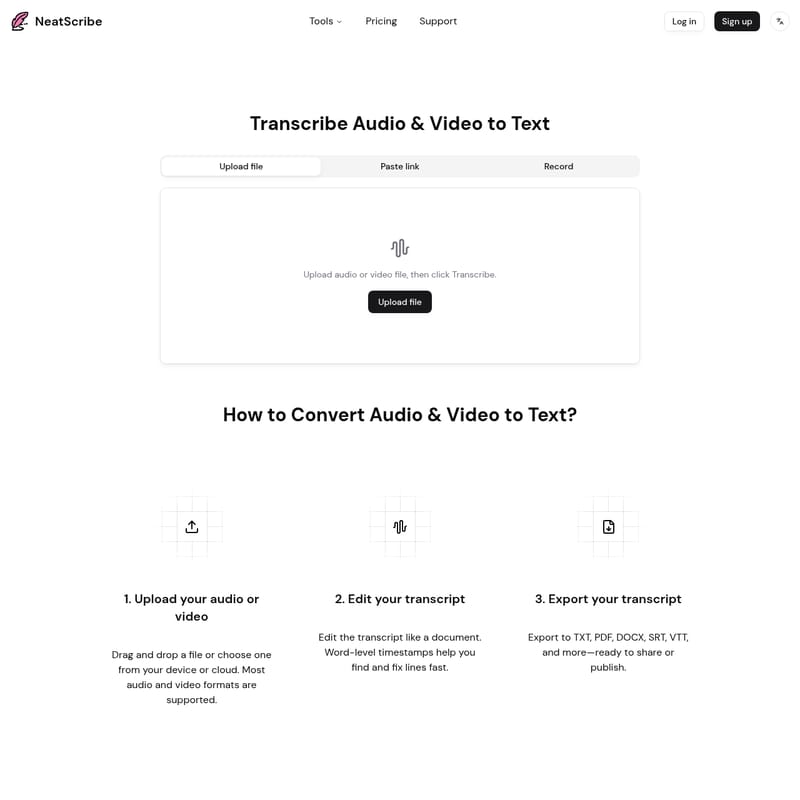
NeatScribe is an advanced AI-powered transcription engine that allows users to upload audio or video files and receive a timestamped transcript almost instantly. It is more than just a simple converter; it is a comprehensive transcription workspace. The tool operates directly in your browser, meaning there is no need to download heavy software. Users can upload files from their devices, record audio live, or simply paste links from major social media platforms.
NeatScribe is designed to handle various media types, from podcasts and meetings to interviews and social media clips. By combining high-accuracy speech-to-text technology with user-friendly editing tools, NeatScribe ensures that your final document is clean, professional, and ready for publication.
Key Features of NeatScribe
NeatScribe offers a variety of specialized tools tailored to different transcription needs. Below are the primary features that make NeatScribe a leader in the transcription space.
Audio and Video to Text Conversion
- Audio to Text: Upload any audio file and NeatScribe will generate a timestamped transcript. You can review the text directly in the browser and export it as clean text or detailed notes.
- Video to Text: Similar to the audio tool, this feature allows you to upload video files to receive a timestamped transcript. It is perfect for creating written records of webinars, lectures, or video calls.
Platform-Specific Transcript Generators
NeatScribe stands out by offering dedicated tools for the most popular social media and video-sharing platforms. You can paste public URLs from:
- YouTube Transcript Generator: Get clean text, notes, or subtitle files from any public YouTube video.
- Instagram Transcript Generator: Generate timestamped transcripts from Instagram links for better content analysis.
- Facebook Transcript Generator: Create editable transcripts for Facebook videos for free, with no signup required for basic use.
- TikTok, X (Twitter), and Vimeo: Easily extract text from videos on these platforms to streamline your social media management and content repurposing.
Advanced Transcription Tools
- Subtitle Generator: Generate timestamped captions and subtitles in SRT or VTT formats, ready to be published alongside your videos.
- AI Mind Map: Automatically generate a mind map from your transcription to visualize the key points and structure of your content.
- AI Translation: Translate your transcripts into different languages to reach a global audience.
- Speaker Diarization: Identify and label different speakers within a single transcript, which is essential for interviews and multi-person meetings.
- Subtitle Converter: A versatile tool to convert existing subtitle files between various formats including SRT, VTT, TXT, ASS, SSA, SBV, TTML, SMI, LRC, CSV, and XML.
- Audio Compressor: Compress your audio files online using simple presets to ensure smaller file sizes and reliable playback.
How to Use NeatScribe
Converting your media to text with NeatScribe is a straightforward three-step process designed for maximum efficiency.
1. Upload Your Audio or Video
To begin, you can drag and drop your file into the interface or choose one from your device or cloud storage. NeatScribe supports most audio and video formats. Alternatively, you can paste a link from supported platforms like YouTube or Instagram, or even record audio directly within the tool.
2. Edit Your Transcript
Once the AI has processed your file, you can edit the transcript like a standard document. NeatScribe provides word-level timestamps, allowing you to find and fix specific lines quickly. This browser-based editor ensures you don't need external word processors to clean up your text.
3. Export Your Transcript
After you are satisfied with the text, you can export your transcript into various formats. Supported export options include:
- TXT
- DOCX
- SRT
- VTT
- CSV
Use Cases for NeatScribe
NeatScribe is a versatile tool that caters to a wide array of professional and personal needs:
- Podcasts: Transcribe episodes to create show notes, blog posts, or searchable archives.
- Meetings and Interviews: Use speaker diarization to create accurate records of business meetings or journalistic interviews.
- Social Media Management: Generate subtitles for TikTok, Instagram, and X videos to increase engagement and accessibility.
- Content Repurposing: Turn video content into written articles or social media posts using the AI mind map and translation features.
- Academic Research: Convert recorded lectures or research interviews into organized text for analysis.
Pricing Plans
NeatScribe offers flexible pricing plans to suit different levels of usage, from casual users to professional content creators.
Free Plan
- Price: $0/month
- Basic features for personal use.
- 3 transcriptions per week.
- Up to 30 minutes per transcription.
- 98 transcription languages supported.
- Includes AI mind map and multiple export formats.
Pro Plan
- Price: $6/month (Billed monthly or yearly with a 40% discount).
- 1,200 credits per month.
- No free usage limit.
- Supports files up to 5GB.
- Includes AI translation and Speaker diarization.
- Allows for commercial use.
Premium Plan
- Price: $18/month (Billed monthly or yearly with a 40% discount).
- 6,000 credits per month.
- Includes all Pro features.
- Ideal for heavy users and professionals requiring high-volume transcription.
FAQ
Can I try the NeatScribe service for free?
Yes, NeatScribe offers a Free plan that includes 3 transcriptions per week with a limit of 30 minutes per transcription. This allows you to test the accuracy and features of the service before committing to a paid plan.
Can I edit the transcript after it's generated?
Absolutely. NeatScribe features a built-in document-style editor. With word-level timestamps, you can easily navigate the text and make corrections directly in your browser.
Which audio/video formats do you support?
NeatScribe supports a wide range of popular audio and video formats. Additionally, you can paste links from YouTube, Instagram, Facebook, X, Twitter, TikTok, and Vimeo for direct transcription.
Can I change my plan?
Yes, you can choose between Monthly and Yearly billing, and you can upgrade to Pro or Premium plans as your transcription needs grow.