Sheet Ninja
Sheet Ninja: Turn Any Google Sheet into a Live API Instantly
Sheet Ninja is a revolutionary tool designed to transform Google Sheets into fully functional, live APIs without writing backend code. Ideal for developers, AI builders, and 'vibe coders,' it allows users to use a spreadsheet as a database. By simply pasting a sheet link, Sheet Ninja deploys an API that integrates seamlessly with AI tools like Claude, ChatGPT, and Replit. It supports reading, writing, and editing data in real-time, making it perfect for rapid prototyping, waitlists, CMS management, and internal tools. With a generous free tier and scalable pro plans, Sheet Ninja enables users to ship products faster than ever.
2026-03-31
4.0K
Sheet Ninja Product Information
Sheet Ninja: Turn Any Google Sheet into a Live API Instantly
In the modern era of rapid development and "vibe coding," the traditional backend setup can be a significant bottleneck. Sheet Ninja solves this problem by allowing you to turn any Google Sheet into a live API instantly. Whether you are building a niche job board, a viral waitlist, or an AI-powered application, Sheet Ninja provides the infrastructure so you can focus on shipping your product.
What's Sheet Ninja?
Sheet Ninja is a powerful tool that bridges the gap between simple spreadsheets and professional application backends. It essentially allows you to use a Google Sheet as a fully functional database. By pasting your Google Sheet link into the Sheet Ninja platform, you generate a live API that can read from and write to your rows in real-time.
Designed specifically for speed, Sheet Ninja eliminates the need for complex server setups, database migrations, or hours spent debugging backend code. It is built to work harmoniously with modern AI coding tools, enabling developers to build and deploy applications in a fraction of the time it usually takes.
Features
Sheet Ninja is packed with features that cater to both solo founders and scaling businesses:
- Instant API Deployment: No servers, no code, and no infrastructure management. Paste your link and go live.
- Real-Time Synchronization: Edit a cell in your Google Sheet, and the Sheet Ninja API updates immediately.
- AI Tool Compatibility: Seamlessly integrates with AI coding assistants like Cursor, Claude, ChatGPT, Lovable, Replit, V0, Bolt.new, and Windsurf.
- Full CRUD Support: Not just for reading data; you can add, edit, and delete rows programmatically.
- Flexible Database Structure: Your first row acts as the header/JSON keys. Change a column name in the sheet, and the API updates instantly.
- Secure Authentication: Keeps your sheets private via Google OAuth and provides secure API keys for access.
- Scalable Infrastructure: From a free starter tier to a Max plan handling 750,000 requests per month.
- No Migration Required: Your data stays exactly where it is—in Google Sheets.
How to Use Sheet Ninja
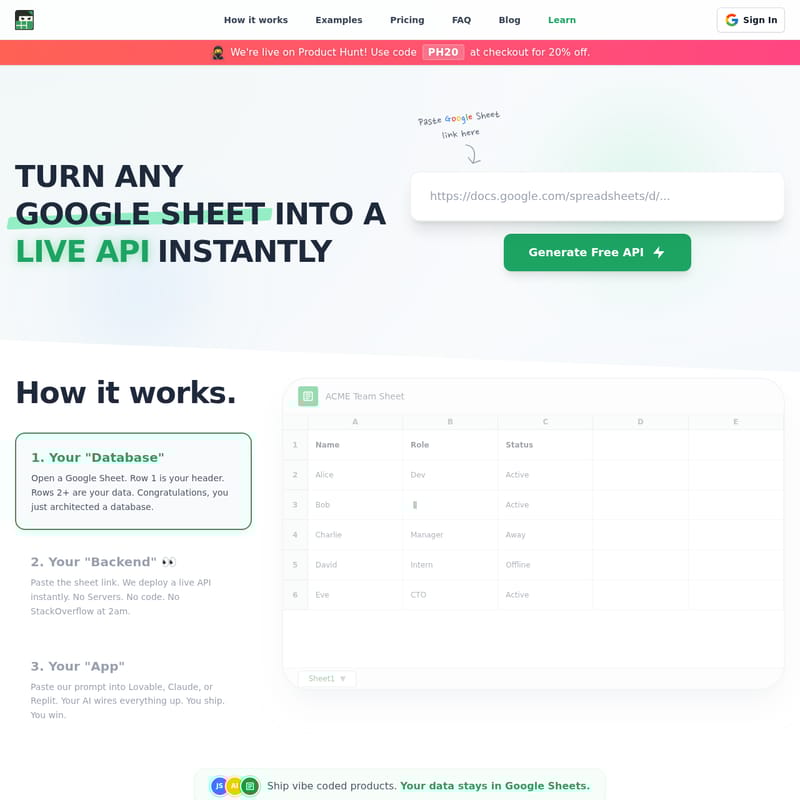
Setting up your backend with Sheet Ninja is a simple three-step process:
- Your "Database": Open a Google Sheet. Use Row 1 for your headers (e.g., Name, Role, Status) and Row 2+ for your data. You have now successfully architected your database.
- Your "Backend": Paste the Google Sheet link into Sheet Ninja. The platform deploys a live API instantly. No servers or complex code required.
- Your "App": Copy the provided prompt from Sheet Ninja and paste it into your AI tool of choice (like Claude or Replit). Your AI will wire everything up, and you are ready to ship.
Use Cases
Sheet Ninja offers endless possibilities for creators and enterprises alike:
AI Agents and RAG
Give your AI agent a readable "brain." Use Sheet Ninja to store Q&A pairs or long-term memory in rows. If the bot hallucinations occur, simply edit the cell in the spreadsheet to fix the context.
Viral Waitlists and Pre-Launches
Validate your ideas at lightning speed. Capture emails instantly to a Google Sheet from a simple HTML form or V0.dev project.
Marketing and CMS
Stop waiting for engineering sprints to change website copy. Store your marketing headers and text in a sheet. With Sheet Ninja, your site updates the moment marketing saves the spreadsheet.
Hospitality and Retail
Create a digital QR Menu. Instead of re-printing PDFs, just edit the price of an item in your Google Sheet, and the menu updates for your customers instantly.
Niche Job Boards
Curate listings for specific industries and display them beautifully on your frontend. You can even charge for "Featured Rows" by simply bolding or marking a row in your sheet.
FAQ
Is this secure? Yes. Your sheet remains private. You only share it with the Sheet Ninja service account. We use Google's OAuth for authentication, and we cannot see your other files.
Can I write data back to the sheet? Absolutely. You can add, edit, and delete rows. These changes appear in your Google Sheet instantly.
What happens if I change the sheet columns? The API updates immediately. Since JSON keys are pulled from your first row, changing "Name" to "FullName" in the sheet reflects in the API response right away.
I'm building with AI. Will this work? Yes. Sheet Ninja provides copy-paste prompts designed for Replit, Claude, and ChatGPT so your AI knows exactly how to integrate the API.
What if I need more requests? If you exceed the 750,000 requests on the Max Plan, Sheet Ninja offers custom enterprise plans to help your growing business scale further.
Do I need to migrate my data? No. Sheet Ninja acts as the bridge. Your data lives in Google Sheets, where you can edit it manually or programmatically via the API.