Spacefast by Automattic favicon

Spacefast by Automattic

Spacefast by Automattic provides hosting infrastructure and backend tools that allow AI agents and developers to deploy websites, web applications, and static files via MCP, Git, or command-line workflows.

Code & ITDeploying web pages, decks, and…PublishingAutomating deployments on Git branch…Executing scriptable rollbacks, sharing…
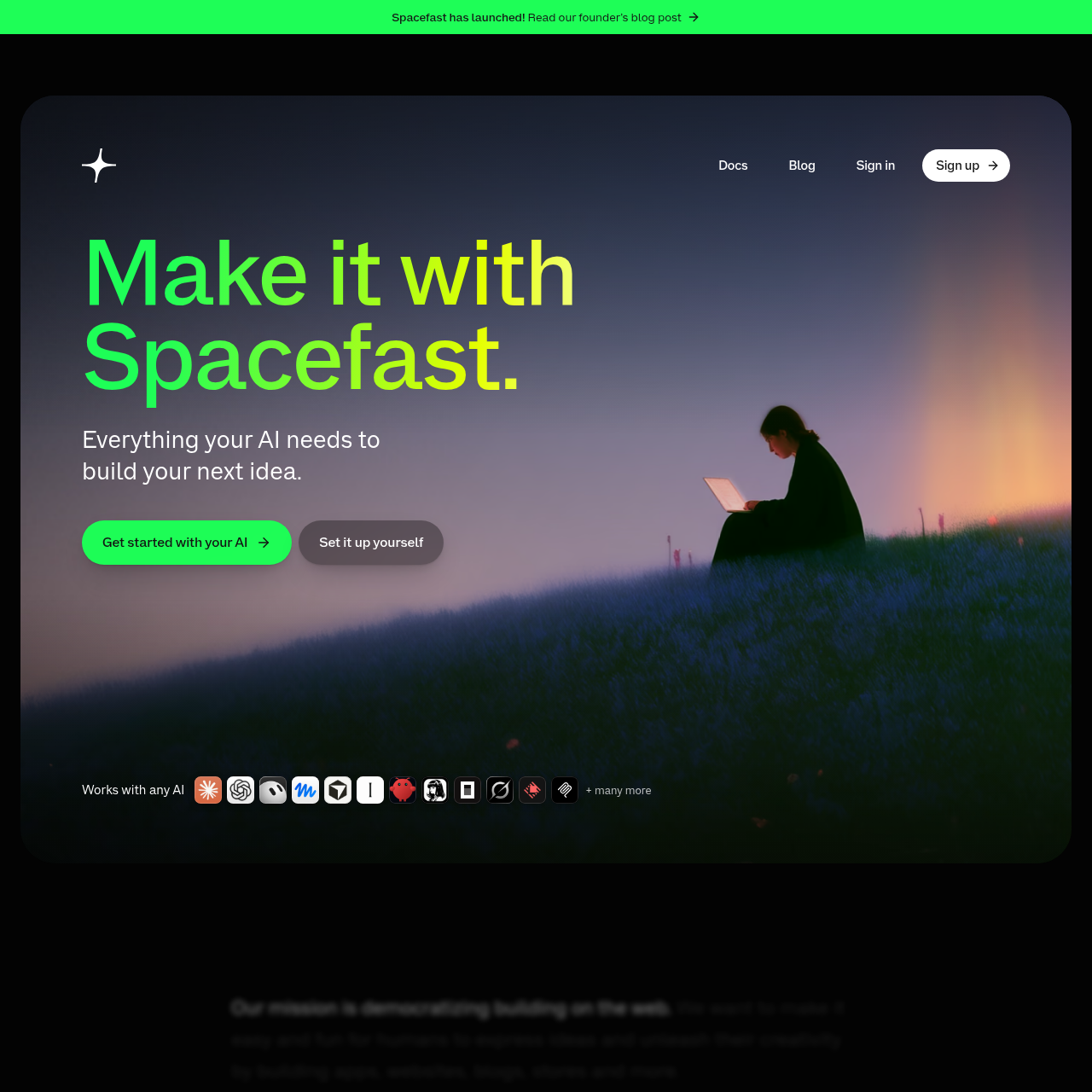
Spacefast by Automattic product interface screenshot
Listed on AIToolly

What Is Spacefast by Automattic? Product Overview

What the product does and how it is positioned

Spacefast by Automattic is a hosting and deployment platform designed to provide infrastructure, databases, and operational tools for AI agents and web developers. Rather than functioning as an AI site generator itself, the platform connects to external AI assistants and MCP clients to convert conversational outputs into live, shareable web environments.

Every deployed Space includes native capabilities such as built-in data storage, file upload handling, automated version history with rollback support, visitor analytics, and on-page commenting. Deployments can be initiated directly within conversational AI sessions, through a command-line interface, by connecting Git repositories, or by uploading files in a web browser.

What Can You Use Spacefast by Automattic For?

Source-supported ways to use the product

Deploying from AI Conversations

Users prompt connected AI assistants to generate and publish web pages or slide decks directly to a live address.

Git-Based Branch Previews

Developers connect code repositories to automatically deploy main branch updates to production while generating preview links for feature branches.

No-Setup Prototype Hosting

Users drag and drop project folders or zip archives into a browser upload interface to obtain temporary live links without registering an account.

How to Use Spacefast by Automattic

The documented workflow, where available

  1. 1

    Request Deployment via AI

    Instruct a connected AI assistant or MCP client to publish a project using Spacefast.

  2. 2

    Receive Generated Live Address

    The AI deploys the project files and returns a live web link directly within the chat interface.

  3. 3

    Configure Sharing Permissions

    Set access controls by creating a viewer link, inviting collaborators, setting passwords, or making the space public.

  4. 4

    Iterate and Manage Versions

    Issue updates through subsequent AI prompts or scriptable CLI tools, with all changes tracked in a restorable version history.

Deployment Mechanisms and Runtime Infrastructure

Spacefast supports multiple deployment pathways tailored to both conversational AI workflows and conventional development environments. Through the Model Context Protocol, connected AI agents can package and upload files directly from a chat prompt, returning a live address without manual server setup. Alternatively, developers can publish via terminal commands, automated Git branch integrations, or web-based drag-and-drop archive uploads.

The platform provides hosting for static HTML, slide presentations, games, and web applications built with frameworks such as Next.js, Astro, TanStack Start, and PHP. Runtime feature availability depends on the chosen deployment path and framework specifications. To facilitate collaboration, each Space incorporates pinned on-page feedback threads, an embedded database, file upload endpoints, and native visitor analytics without requiring external tracking scripts.

  • Supports MCP chat triggers, CLI execution, Git branch pushes, and browser file drops.
  • Provisions native databases, media uploads, and analytics trackers out of the box.
  • Includes restorable version history for inspecting diffs and rolling back updates.

What to Test Before Choosing Spacefast by Automattic

Checks to run with your own material and workflow

  • Confirm framework compatibility and runtime requirements for Next.js, Astro, TanStack Start, or PHP applications before deployment.
  • Verify that anonymous Spaces are claimed before the 33-hour-and-20-minute inactivity expiration window lapses.
  • Review export requirements to ensure that application data and custom runtime logic can be adapted if migrating away from the platform.
  • Check default privacy settings to verify whether share links, passwords, or public access configurations match project visibility requirements.

Spacefast by Automattic Sources and Last Checked

What was checked and when

Official source
https://spacefast.com/
Last checked
Category
Code & IT

Spacefast by Automattic Frequently Asked Questions

Answers based on the source-checked product record

Is an account required to publish a project on Spacefast?

An account is not required to publish initially. Users receive a live address and a claim link upon publishing, though unclaimed spaces expire after 33 hours and 20 minutes unless claimed by signing up.

What types of frameworks and projects can be published?

Spacefast supports static HTML, presentations, games, and applications built with Next.js, Astro, TanStack Start, and PHP. Runtime feature support varies depending on the specific deployment path.

How does Spacefast handle access control and privacy for new sites?

New spaces are private by default, meaning access is restricted until the user invites individuals, generates a share link, adds password protection, or explicitly enables public access and search indexing.

Can deployed applications be updated or rolled back to prior versions?

Yes. Publishing changes updates the existing web address while preserving previous iterations in a version history, allowing users to inspect file diffs and restore earlier deployment states at any time.

How can projects and data be exported if moving to another host?

Users can download project files from any retained version in their history. While static sites can typically migrate unchanged, applications using platform-specific runtime features require code adjustments, and application databases export separately.

Explore other recently added tools in the same category.