Bitgrain
Bitgrain: A Professional Creative Studio for Advanced PNG and SVG Design Workflows
Bitgrain is a comprehensive digital design platform specializing in high-quality image processing and creative workflows. It supports multiple file formats including PNG, JPG, WEBP, and HEIC, offering users the ability to export in professional PNG and SVG formats. With features like studio templates, batch processing, and advanced texturing tools, Bitgrain provides a robust environment for designers to create, adjust, and optimize their visual assets efficiently.
2026-05-03
--K
Bitgrain Product Information
Bitgrain: Your All-in-One Studio for PNG and SVG Creative Design
In the modern landscape of digital creativity, the need for a streamlined, powerful, and versatile design tool is paramount. Bitgrain emerges as a premier solution for creators looking to elevate their visual content through a specialized studio environment. Whether you are working with PNG files or require the scalability of SVG exports, Bitgrain provides a robust suite of tools designed to facilitate every step of the creative process, from initial upload to final batch export.
What's Bitgrain?
Bitgrain is a creative design platform and digital studio that allows users to process, edit, and generate high-quality visual assets. It is built to handle a variety of input formats, including PNG, JPG, WEBP, and HEIC, ensuring that users can work with their existing libraries without compatibility issues. At its core, Bitgrain is designed to bridge the gap between simple image editing and professional-grade design production, offering specialized workflows for both raster and vector outputs.
By focusing on the user’s need for both speed and precision, the Bitgrain studio integrates an intuitive interface with powerful underlying algorithms. It is a space where "Premium Designer Starts" meet user-driven customization, allowing for the creation of unique textures, color palettes, and haze effects that define professional aesthetics.
Key Features of Bitgrain
Bitgrain is packed with features that cater to both individual designers and production-heavy environments. Below are the core functionalities available within the Bitgrain ecosystem.
Comprehensive Workflow Selection
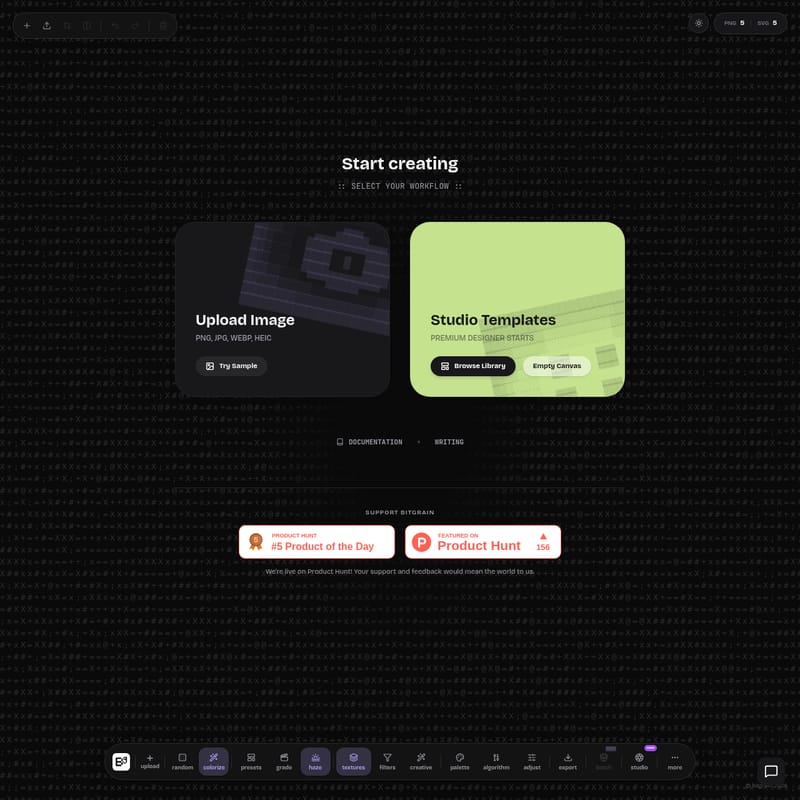
Bitgrain allows users to choose their path as soon as they "Start creating." The platform offers three distinct entry points:
- Upload Image: Start by bringing in your own assets. Bitgrain supports PNG, JPG, WEBP, and HEIC files.
- Studio Templates: For those who need a head start, the Studio Templates provide "Premium Designer Starts." Users can Browse Library to find the perfect foundation for their project.
- Empty Canvas: For total creative control, start from scratch within the Bitgrain environment.
Advanced Adjustment and Creative Tools
The Bitgrain toolbar is populated with a wide array of tools that allow for deep manipulation of visual elements:
- Colorize and Palette: Take control of the color story of your design. Use the colorize tool to shift moods or the palette feature to ensure color consistency.
- Textures and Haze: Add depth to your projects with the textures and haze tools. These features are essential for creating the signature "grain" look that the platform is named for.
- Grade and Filters: Professional-grade color grading and a variety of filters allow for instant stylistic transformations.
- Algorithm-Driven Adjustments: Utilize the algorithm and adjust buttons to fine-tune your images with mathematical precision.
- Creative and Random: For those seeking inspiration, the creative and random features can generate unexpected and high-quality design variations.
Professional Export Options
Bitgrain understands the importance of high-fidelity output. The platform prominently features:
- PNG 5: High-quality raster export for detailed imagery.
- SVG 5: Scalable vector graphics for designs that need to maintain clarity at any size.
- Batch (Beta): A powerful feature currently in beta that allows for the processing of multiple files simultaneously, significantly increasing efficiency for large-scale projects.
How to Use Bitgrain
Using Bitgrain is designed to be a seamless experience, regardless of your skill level. Follow these steps to maximize the potential of the Bitgrain studio.
Step 1: Select Your Workflow
Upon entering the Bitgrain interface, you are prompted to "SELECT YOUR WORKFLOW." You can choose to Upload Image, browse the Studio Templates, or start with an Empty Canvas.
Step 2: Import Your Assets
If you choose to upload, ensure your file is in one of the supported formats: PNG, JPG, WEBP, or HEIC. You can also "Try Sample" to explore the tools before committing your own assets.
Step 3: Apply Creative Tools
Navigate to the tool menu to begin your transformation. You can use the presets for quick changes or dive deep into the textures, haze, and grade settings. If you are feeling experimental, the random button provides a unique way to see your design in a new light.
Step 4: Fine-Tuning
Use the adjust and palette tools to refine the visual balance of your project. The algorithm settings allow for precise control over how effects are applied across the image.
Step 5: Export Your Work
Once satisfied with your design, use the export function. Choose between PNG 5 for high-quality pixels or SVG 5 for vector scalability. For professional users, the batch mode is available to handle multiple designs at once.
Bitgrain Use Cases
Professional Graphic Design
Designers can use the Bitgrain studio to create textured backgrounds, brand assets, and complex visual compositions. The ability to export in SVG makes it ideal for logo work and iconography that requires infinite scalability.
High-Volume Image Processing
With the Batch (Beta) feature, Bitgrain is perfect for projects requiring the same set of filters or textures across dozens of images. This is particularly useful for maintaining a consistent look across a digital gallery or product catalog.
Rapid Prototyping with Templates
By utilizing the Studio Templates and the "Premium Designer Starts," users can quickly prototype concepts. The Browse Library function allows for immediate access to high-quality design foundations, saving hours of manual labor.
FAQ
Q: What file formats can I upload to Bitgrain? A: Bitgrain supports a wide range of popular image formats for upload, including PNG, JPG, WEBP, and HEIC.
Q: Can I export my designs in vector format? A: Yes, Bitgrain offers SVG 5 export options, which are perfect for vector-based workflows.
Q: Is there a way to process multiple images at once? A: Yes, Bitgrain features a batch mode (currently in beta) specifically designed for handling multiple assets simultaneously.
Q: Are there pre-made designs available? A: Absolutely. You can access the Studio Templates section and "Browse Library" to find various "Premium Designer Starts" to begin your project.
Q: What are the primary creative tools available? A: The Bitgrain studio includes tools such as colorize, haze, textures, filters, presets, grade, and palette adjustments.
Q: How can I stay updated on Bitgrain's progress? A: Bitgrain is active on Product Hunt, where users can provide feedback and support the community. The platform is continuously evolving with "new" features and updates regularly added to the studio environment.
© bitgrain 2026. All rights reserved. Start creating your next masterpiece with Bitgrain today!