RemoveAILabel
Sponsored product video
See RemoveAILabel in motion
RemoveAILabel: Strip SynthID and C2PA Signals from Gemini and Veo Content for Clean Social Media Uploads
RemoveAILabel is a professional SEO-optimized tool designed to strip invisible AI watermarks, SynthID signals, and C2PA metadata from images and videos generated by Gemini, Veo, and Imagen. Ensure your content remains clean and untagged on platforms like TikTok, Instagram, and YouTube by removing hidden "Made with AI" flags without losing pixel quality.
2026-07-16
6.0K
RemoveAILabel Product Information
RemoveAILabel: The Professional Solution to Remove AI Labels and SynthID Signals
In the modern era of digital creation, tools like Google's Gemini, Veo, and Imagen have revolutionized how we produce high-quality media. However, these platforms often embed invisible signals into your files. These signals, such as SynthID and C2PA Content Credentials, are detected by social media platforms like Instagram, TikTok, and YouTube, which then automatically apply an "AI info" or "Made with AI" label to your posts.
RemoveAILabel is specifically designed to address this challenge. By using RemoveAILabel, you can strip these invisible markers from your videos and images, ensuring your content uploads clean and remains fully yours, both visibly and invisibly.
What is RemoveAILabel?
RemoveAILabel is a specialized utility that allows creators to remove AI labels and invisible watermarks from their digital assets. While many users focus on removing visible logos, machines and platform algorithms look for deeper signals baked into the file's data.
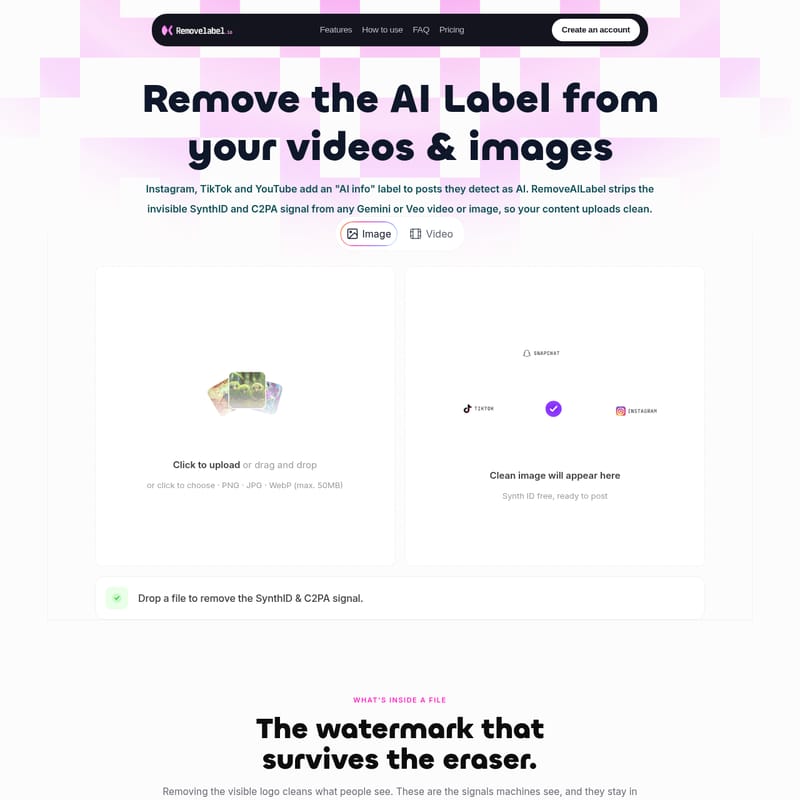
RemoveAILabel strips the invisible SynthID and C2PA signals from any Gemini or Veo video or image. This process ensures that when you upload your content to major social media platforms, it is not flagged as AI-generated. Whether you are working with a single image or a complex video clip, RemoveAILabel walks through the file to rewrite the data, leaving you with a "SynthID free" file that is ready to post.
Key Features of RemoveAILabel
RemoveAILabel offers a comprehensive suite of features designed to provide a seamless experience for creators who want to maintain the original integrity of their work without the baggage of AI metadata.
Comprehensive SynthID Removal
SynthID is Google’s digital watermarking system, woven directly into the image data and across every single frame of a video. It is undetectable to the human eye but acts as a clear flag to any model or platform scanner. RemoveAILabel isolates the SynthID frequency-domain pattern and removes it entirely, ensuring the signal does not survive even if the file is cropped or re-saved.
C2PA Content Credentials Stripping
Generators often attach C2PA metadata, a provenance tag that acts as a signed record stating "AI-made." This tag travels with the file across various apps and platforms. RemoveAILabel strips this provenance data in one pass, ensuring the C2PA Content Credential is gone for good.
Frame-by-Frame Video Processing
For video content created with Veo, the AI signal is baked into every individual frame. RemoveAILabel is built to walk the entire clip, cleaning the signal from every frame so that nothing slips through to the detectors.
Privacy-First Browser Processing
Privacy is a core pillar of the RemoveAILabel experience. The tool is designed so that nothing ever leaves your device. All files are processed within your local browser session and are never archived or stored.
- 0 uploads to external servers.
- 0 files stored or used for training.
Pixel-for-Pixel Quality Retention
One of the biggest concerns for creators is quality loss. RemoveAILabel ensures that resolution, detail, frame rate, and bitrate stay identical to the original export. Whether it is a 1080x1920 clip at 30fps or a high-resolution WebP image, the output is pixel-identical to what Gemini or Veo rendered.
How to Use RemoveAILabel
Using RemoveAILabel is a straightforward, three-step process designed for maximum efficiency. There is no need to create an account to start, and no files are uploaded to a server.
- Drop your file: Simply drag and drop your image or video clip (from Gemini, Veo, Imagen, or Nano Banana) into the interface. The file stays in your browser.
- Locate the signal: The engine automatically isolates the SynthID frequency-domain pattern and the C2PA tag across the pixels or video frames.
- Rewrite and Clean: The tool reconstructs the marked regions. The hidden signals are removed while the visual content remains untouched.
- Download clean: Once the process is complete, you can download a file that reads as untagged to detectors and platform upload scanners alike.
Use Cases: Who is RemoveAILabel For?
RemoveAILabel is built for the community of creators and professional teams who want full ownership over their generated work.
- Client Deliverables: If you deliver professional client work, you want to ship images and videos that read as original. RemoveAILabel ensures no hidden tags tie your deliverable back to a specific AI model.
- Professional Publishers: For those who publish on TikTok, IG, and YouTube for a living, avoiding the "Made with AI" label is crucial. This label can often throttle reach or affect how the audience perceives the content. RemoveAILabel strips the signals that trigger these labels.
- Personal Ownership: If you are using AI to generate wallpapers, personal projects, or social posts, you deserve to have those files without a tracker baked in. RemoveAILabel makes the file fully and invisibly yours.
FAQ: Questions About SynthID and AI Label Removal
What exactly is SynthID? It is Google's digital watermarking system. Every file from Gemini, Veo, Imagen, and Nano Banana carries an invisible signal embedded directly into the pixels that machines can detect even after a visible logo is removed.
Does it remove C2PA Content Credentials too? Yes. RemoveAILabel strips both the SynthID pixel signal and the C2PA provenance tag in a single pass.
Will my file still look the same? Absolutely. The tool is designed for pixel-perfect quality. The visual aspects of your image or video remain identical to the original AI export.
Are my files uploaded or stored? No. Your files are processed entirely within your browser session. RemoveAILabel follows a strict privacy policy where zero files are stored or archived.
What formats are supported? You can clean images (PNG, JPG, WebP up to 50MB) and video files. The tool is optimized for content originating from Gemini, Veo, and Imagen.
Why is this tool necessary? While watermarks made sense during the experimental phase of AI, many creators now use these tools for professional campaigns. A hidden tag that flags content as AI can quietly throttle its performance on social platforms. RemoveAILabel ensures your file is untagged and ready for any scanner.