AI Manga Translator favicon

AI Manga Translator

AI Manga Translator is a web-based translation tool that detects and translates text in manga, manhwa, manhua, and webtoons, rendering translated dialogue directly into speech bubbles while preserving artwork and layout.

Photo & Image EditingDetects horizontal and vertical…Translates text between supported…Processes chapter archive uploads…Fits translated dialogue into original…AI Manga Translator
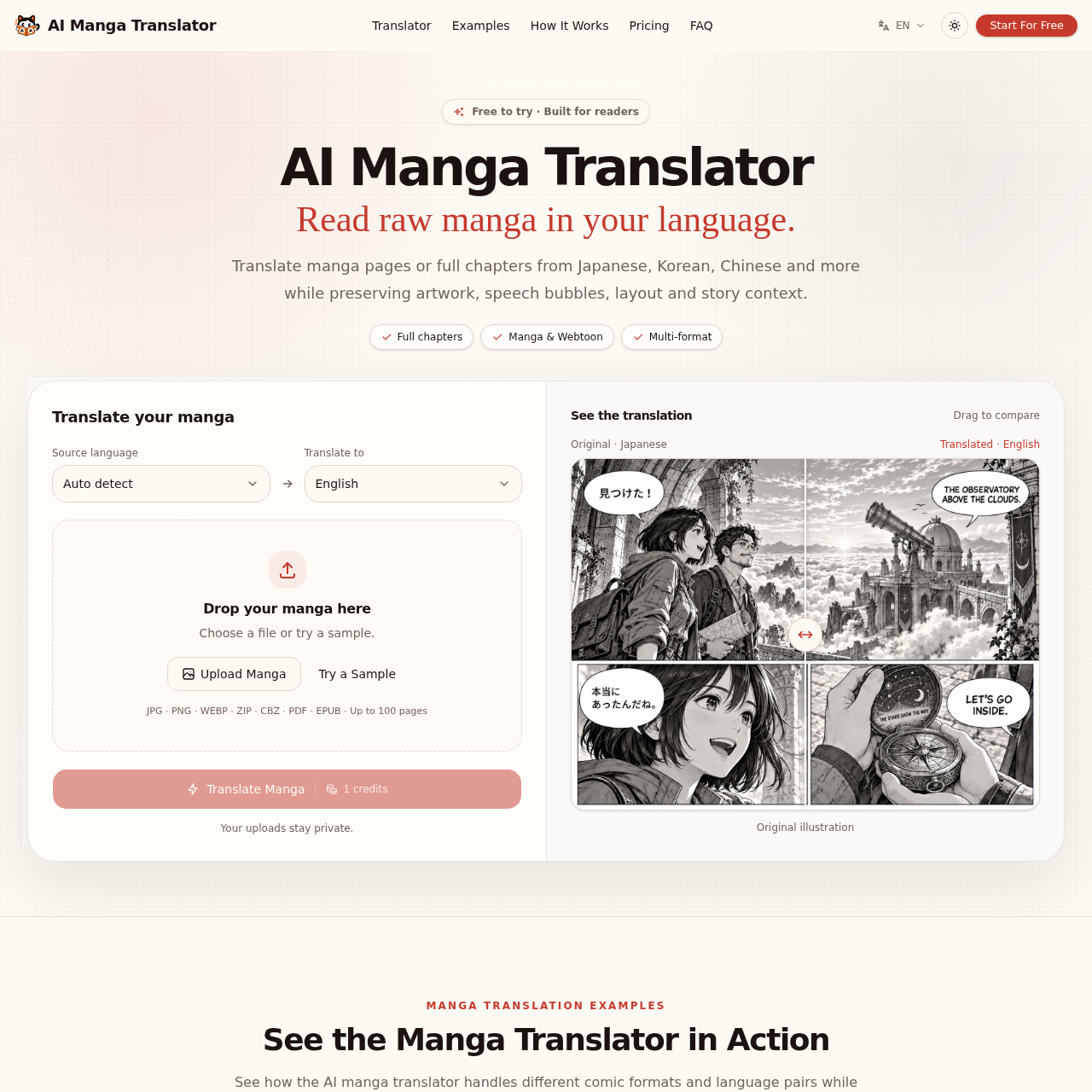
AI Manga Translator product interface screenshot
Listed on AIToolly

What Is AI Manga Translator? Product Overview

What the product does and how it is positioned

AI Manga Translator provides an automated comic translation workflow that processes single images, multi-page sets, and chapter archives. It recognizes Japanese, Korean, and Chinese text, including vertical dialogue and narration, and translates it into target languages such as English, Spanish, and Portuguese.

Rather than exporting disconnected text, the tool places translated text back onto the page, fitting dialogue into speech bubbles while maintaining underlying linework, colors, and panel composition. It includes a browser-based continuous reader that retains page order and allows users to compare original and translated pages.

What Can You Use AI Manga Translator For?

Source-supported ways to use the product

Translating Raw Manga Chapters

Readers upload multi-page manga or manhwa archives to read untranslated chapters continuously with translated speech bubbles and preserved visual artwork.

Reading Multi-Language Comics

Translating Japanese, Korean, or Chinese webtoons and manhua into languages such as English, Spanish, or Portuguese while keeping original panel pacing.

How to Use AI Manga Translator

The documented workflow, where available

  1. 1

    Upload Manga

    Add manga images, multiple pages, or chapter archives in formats such as JPG, PNG, WEBP, ZIP, CBZ, PDF, or EPUB.

  2. 2

    Choose Your Language

    Select the target language and either manually set or auto-detect the comic source language.

  3. 3

    Translate and Read

    Run the translation to view the processed pages in the continuous reader, compare original panels, and download the output.

Artwork Inpainting and Chapter Context Handling

AI Manga Translator processes comic pages by detecting text across narration boxes and speech bubbles, removing the source language, and placing translated dialogue into the designated areas. The system is designed to retain panel composition, backgrounds, and character linework rather than masking entire scenes.

To maintain coherence across multi-page chapters, the platform applies contextual tracking to handle character names, recurring terminology, and speech style preferences consistently across panels.

  • Fits translated text to original speech bubble dimensions without obscuring scene details
  • Preserves vertical dialogue flow for Japanese manga and scrolling layout for vertical webtoons
  • Maintains character name and recurring term consistency across multi-page chapter uploads

AI Manga Translator Pricing

Human-maintained commercial information

one timefreemium
  • USD 5.9

Pricing can change. Confirm the current plan and billing terms on the official site before purchasing.

What to Test Before Choosing AI Manga Translator

Checks to run with your own material and workflow

  • Verify that text in complex or textured backgrounds is replaced without distorting underlying character artwork.
  • Confirm that multi-page archive uploads remain within the documented 100-page limit per translation job.
  • Check how well character names and specialized terminology stay consistent throughout an entire chapter.
  • Review font sizing and text wrapping inside speech bubbles when translating into languages with longer sentence structures.

AI Manga Translator Sources and Last Checked

What was checked and when

Last checked

AI Manga Translator Frequently Asked Questions

Answers based on the source-checked product record

What comic formats does AI Manga Translator support?

The platform supports Japanese manga, Korean manhwa, Chinese manhua, and vertical webtoons, accommodating both horizontal and vertical text layouts.

Which file formats can be uploaded for translation?

Users can upload individual or multiple files in JPG, PNG, WEBP, ZIP, CBZ, PDF, and EPUB formats, with a maximum upload capacity of 100 pages per job.

Which source and target languages are available?

The system supports source languages including Japanese, Korean, and Chinese, with automatic detection available, and can translate into English, Spanish, Portuguese, and Chinese.

Does the translation replace the original comic artwork?

The tool preserves character linework, colors, backgrounds, and panel structures, fitting the translated text directly inside the original speech bubbles.

Can readers compare translated pages with the original comic?

Yes, the reading interface provides comparison tools, allowing readers to toggle or drag between the original source pages and the translated results.

Explore other recently added tools in the same category.