gif face swap
AIToolly product video
See gif face swap in motion
GIF Face Swap Online: Create Personalized AI Animated Memes and Reaction GIFs
GIF Face Swap is a powerful online AI tool that allows users to replace faces in animated GIFs and WebP files while maintaining original motion and timing. Ideal for creators and marketing teams, it offers batch editing, privacy-focused processing, and seamless GIPHY integration for high-quality, share-ready reaction memes.
2026-07-12
--K
gif face swap Product Information
GIF Face Swap: The Ultimate AI Tool for Personalized Animated Memes
In the modern digital landscape, communication is often driven by visual humor. GIF Face Swap technology has emerged as a leading way for creators, social media enthusiasts, and teams to personalize their interactions. By using GIF Face Swap, you can take iconic moments from pop culture and insert yourself, your friends, or your teammates directly into the action. This comprehensive guide explores how you can use GIF Face Swap to create high-quality, engaging animated content with ease.
What is GIF Face Swap?
GIF Face Swap is a specialized online AI application designed to replace a face in an existing animated GIF or WebP file with a new face from a still portrait. Unlike static image editors, a GIF Face Swap tool must account for motion, lighting, and expression across multiple frames. The goal of a GIF Face Swap is to maintain the original animation's timing and energy while seamlessly blending the new facial features into the scene.
Whether you are looking to add a face to a GIF for a quick joke or want to create a high-quality reaction meme, the GIF Face Swap platform provides the necessary tools to do so without requiring complex video editing skills. It is an accessible, web-based solution that supports various file formats and offers both free and professional options for users worldwide.
Key Features of GIF Face Swap
When choosing a tool for your creative projects, it is important to understand what makes a GIF Face Swap engine effective. Below are the core features that define this high-performance AI tool:
Built for Animated GIFs and WebP
The GIF Face Swap platform is specifically optimized for animated formats. It handles both traditional GIF files and modern WebP formats, ensuring that the loop timing, frame rate, and essential "feel" of the original reaction remain intact.
Cleaner Face Results
By utilizing advanced AI models, the GIF Face Swap process results in natural-looking transitions. It excels at close-up loops, providing sharper details and fewer missed frames compared to generic face-swapping software. When you use a clear source portrait, the GIF Face Swap output is indistinguishable from the original in terms of fluid motion.
Private by Default
Security is a priority for any GIF Face Swap user. All uploads and generated results are kept private. Guest download links are designed to expire, ensuring that your personal photos and experimental GIF Face Swap creations do not remain on the server indefinitely.
Fast First Try and GIPHY Integration
You can start your first GIF Face Swap for free to test the results. The platform also features a "Search GIPHY" function, allowing you to find the perfect target GIF without leaving the app. This integration makes the GIF Face Swap workflow incredibly efficient for finding trending memes.
Batch GIF Face Swap Capabilities
For professional creators and social media managers, the GIF Face Swap tool supports batch editing. This allows you to prepare multiple reaction ideas or campaign loops simultaneously, significantly speeding up the content creation cycle.
How to Use GIF Face Swap
Creating your first masterpiece is a straightforward process. Follow these four simple steps to complete a GIF Face Swap:
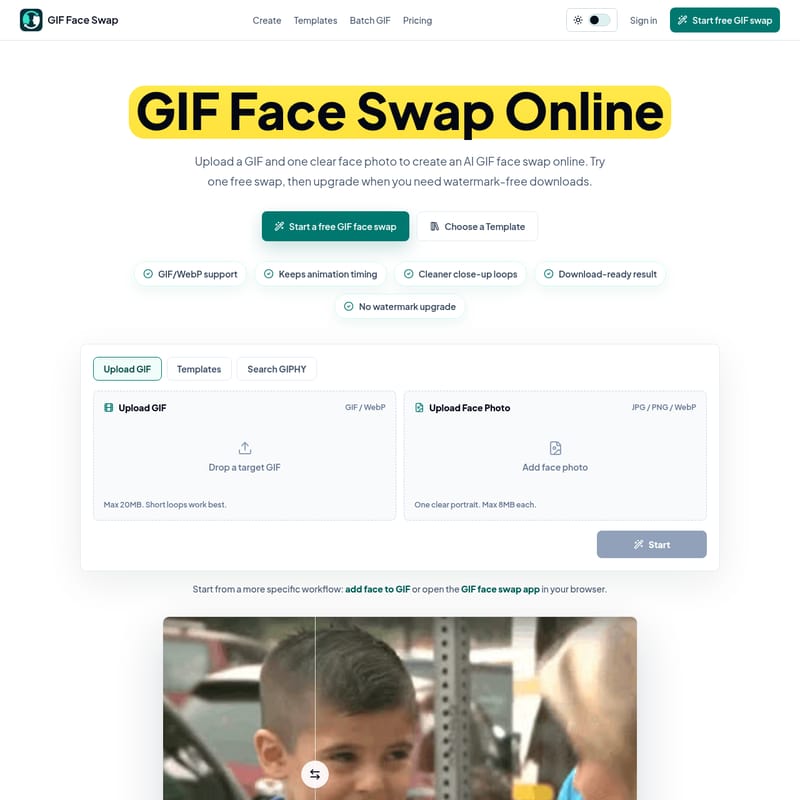
- Upload Your GIF: Select a short animated GIF or WebP file that contains one clear face. You can upload your own file (up to 20MB) or search for one via the integrated GIPHY tool.
- Add a Face Photo: Upload a sharp, well-lit portrait (JPG, PNG, or WebP) that is front-facing. For the best GIF Face Swap result, ensure the photo is clear and up to 8MB in size.
- Start the Swap: Once your files are ready, select the single-face output option and click "Start." The AI will begin the GIF Face Swap process, mapping the new face onto the animation.
- Download the Result: Preview the swapped loop. If you are satisfied with the GIF Face Swap, you can download it. If you are on a free plan, the result will have a watermark; Pro users can download watermark-free versions.
Use Cases for GIF Face Swap
There are countless ways to utilize GIF Face Swap in both personal and professional contexts. Here are some of the most popular use cases:
Meme Makers and Social Creators
In the fast-moving world of social media, being the first to post a relevant meme is key. GIF Face Swap allows creators to turn familiar loops into personalized jokes for group chats, comments, and short-form video platforms while a trend is still active.
Fandom Editors
Fans of anime, movies, sports, and gaming use GIF Face Swap to put themselves or their favorite characters into iconic scenes. It is a quick way to create fandom content without needing a full video editing suite.
Marketing Teams and Brands
Brands can use GIF Face Swap to create lightweight campaign replies or internal celebration loops. By swapping a mascot or a team member's face into an approved source file, marketing teams can humanize their digital presence.
Indie Filmmakers and Previs Artists
Before committing to heavy CGI or expensive video work, filmmakers use GIF Face Swap to test quick expressions and character reactions. It serves as a rapid prototyping tool for scene beats and character dynamics.
Teams and Communities
Within organizations, GIF Face Swap is used to celebrate wins, birthdays, and community moments. It allows teams to create private joke loops that foster a sense of belonging and fun in workplace communication.
Practical Tips for Sharper GIF Face Swaps
To get the highest quality out of the GIF Face Swap tool, consider the following expert advice:
- Use a Clean Source Face: The AI performs best with front-facing photos that have even lighting. Avoid photos with heavy accessories like large hats or glasses that might obscure facial features.
- Choose Clearer Source GIFs: If the original GIF is grainy or has rough edges, the GIF Face Swap will reflect that. Opt for high-quality, bright source files.
- Keep Loops Short: For fast sharing and quick downloads, use short loops. This also ensures the GIF Face Swap remains focused and impactful.
- Handling Missed Frames: One unique feature of this tool is that frames where no face is detected pass through unchanged. This ensures the GIF Face Swap loop remains complete rather than being cut short.
- Upscale When Necessary: If you have a very small, blurry GIF, consider upscaling it before performing a GIF Face Swap to ensure the final output is crisp.
GIF Face Swap Pricing and Plans
The GIF Face Swap service offers flexible plans to suit different needs:
- Free Plan: Perfect for testing. You get 1 guest swap and 5 starter credits after signing up. Note that free exports contain a watermark.
- Pro Monthly: For $13.99/month, users receive 300 credits each month, watermark-free exports, and private creation history with priority processing.
- Pro Yearly: Best for frequent users at $99/year (saving 41% compared to monthly). It includes 300 recurring credits per month, and unused credits can accumulate.
GIF Face Swap FAQ
What is a GIF face swap? It is an AI-driven process that replaces a face in an animated GIF with a face from a photo while keeping the original motion.
Can I try a GIF face swap for free? Yes, you can perform one guest swap for free to see the results before signing up.
Which file types are supported? You can upload GIF and WebP for the animation, and JPG, PNG, or WebP for the face photo.
Will my results have a watermark? Results from the free trial include a watermark. You can upgrade to a Pro plan for watermark-free downloads.
Are my uploads private? Yes, all uploads and GIF Face Swap results are kept private and temporary links expire automatically.
How many credits does one swap use? Typically, one standard GIF Face Swap task uses one credit from your account balance.
Ready to transform your favorite moments? Start your first GIF Face Swap today and become the star of your own viral reaction memes!