AI Image Humanizer favicon

AI Image Humanizer

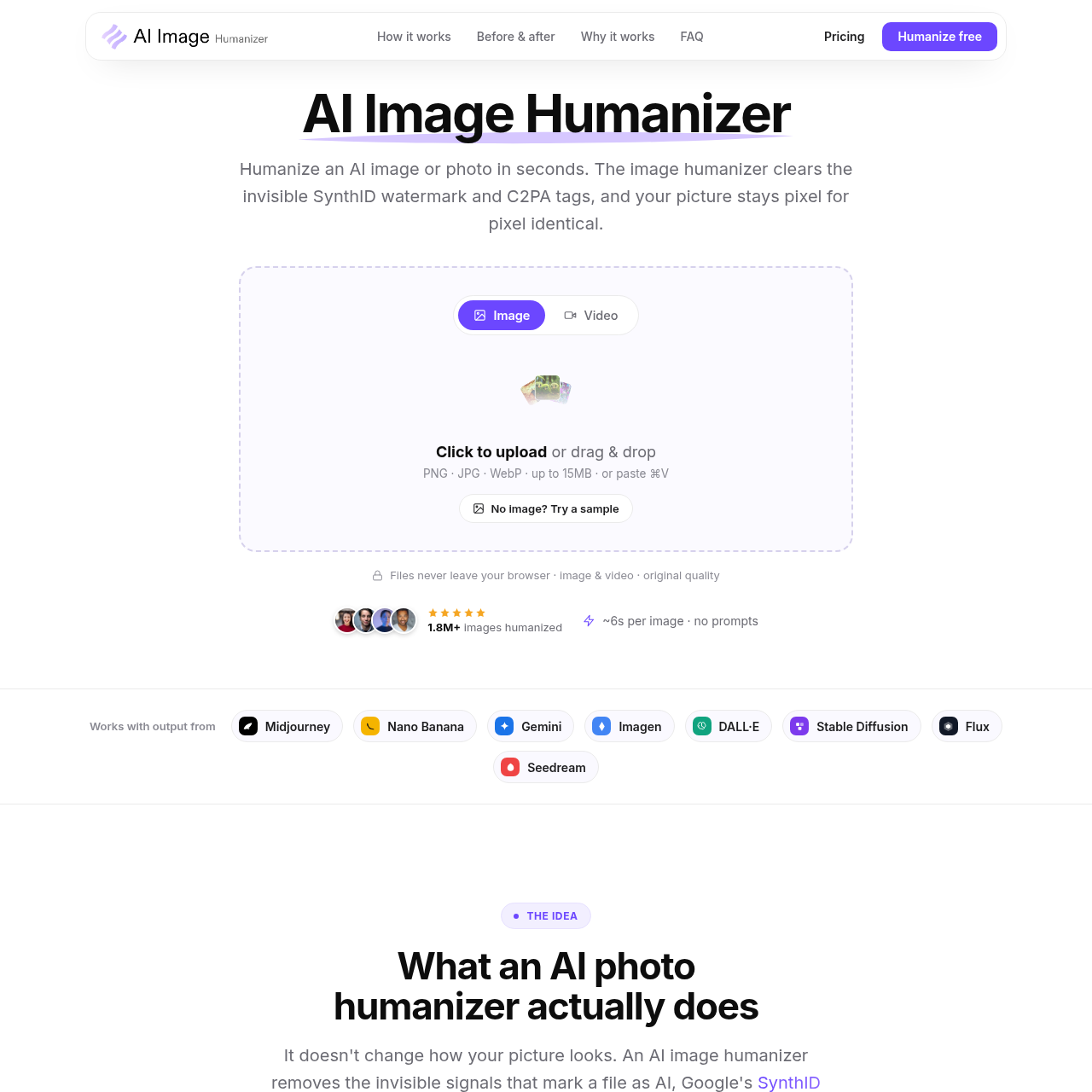
AI Image Humanizer is a privacy-focused browser utility that strips invisible SynthID watermarks and C2PA metadata from AI-generated media while preserving original visual quality.

Photo & Image EditingRemoves embedded AI provenance signals…Processes video content frame-by-frame…Maintains the original resolution and…Clears hidden tags that trigger…
AI Image Humanizer product interface screenshot
Listed on AIToolly
Product video

AI Image Humanizer: AI product overview

Open the full video page

What Is AI Image Humanizer? Product Overview

What the product does and how it is positioned

AI Image Humanizer is designed to remove the technical markers that identify images and videos as machine-generated. By targeting invisible pixel watermarks and metadata tags, the tool helps creators prevent automated platform labeling while keeping the visual content identical to the original export.

The application operates entirely within the user's browser session, meaning media files are handled locally rather than being uploaded to a server. This architecture supports high-speed processing and data privacy, as files are deleted immediately after the session ends.

What Can You Use AI Image Humanizer For?

Source-supported ways to use the product

Brand and Client Work

Designers use the tool to deliver AI visuals that are not flagged as machine-made during professional client reviews.

Social and Short-Form Content

Content creators use the tool to post video frames without platforms applying automated AI-info labels.

Ecommerce

Ecommerce leads use the software to list AI-generated product shots without marketplaces tagging them as AI.

How to Use AI Image Humanizer

The documented workflow, where available

  1. 1

    Media Upload

    The user drops a PNG, JPG, or WebP file into the browser-based engine, where it loads locally without a server upload.

  2. 2

    Signal Detection

    The engine scans the file's pixels for Google's SynthID watermark and reads the C2PA provenance records in the metadata.

  3. 3

    Signal Stripping

    The software rewrites the SynthID watermark and clears the C2PA tags without altering any visible pixels or the original resolution.

  4. 4

    File Download

    The user downloads the processed file, which retains the original color and quality but no longer contains the hidden AI identifiers.

Technical Signal Removal and Privacy

The tool addresses the primary methods used by platforms to detect AI content: pixel-level watermarking and metadata credentials. By specifically targeting Google's SynthID and the C2PA standard, the engine removes the data points that trigger automated labeling systems. This process is designed to be non-destructive, meaning the visible image remains byte-for-appearance identical to the source file.

Privacy is maintained through a local execution model. Because the processing engine runs in the user's browser, the original media and the humanized output never leave the local environment. This approach eliminates the risks associated with cloud storage and ensures that user content is not harvested for training data.

  • Supports video humanization by tracking signals across frames to ensure visual stability.
  • Compatible with exports from major generators including DALL·E, Midjourney, and Flux.

AI Image Humanizer Pricing

Human-maintained commercial information

creditsfreemium
  • USD 0

Pricing can change. Confirm the current plan and billing terms on the official site before purchasing.

What to Test Before Choosing AI Image Humanizer

Checks to run with your own material and workflow

  • Confirm the tool successfully removes C2PA metadata from a standard DALL·E 3 export.
  • Verify that the output image maintains the exact pixel dimensions and resolution of the original file.
  • Check the processing time for a 15MB WebP image to ensure it meets the average six-second benchmark.
  • Review the output for any visible artifacts when processing short-form video content.

AI Image Humanizer Sources and Last Checked

What was checked and when

Last checked

AI Image Humanizer Frequently Asked Questions

Answers based on the source-checked product record

What specific AI signals does the tool remove?

The tool removes Google's SynthID invisible pixel watermarks and signed C2PA metadata credentials in a single processing pass.

Will the visual quality of my image change after processing?

No, the image remains pixel-for-pixel identical to the original. The tool only alters hidden data and does not change the visible appearance, resolution, or color.

Which AI image generators are compatible with this tool?

The engine supports any image exported as PNG, JPG, or WebP, including those from Midjourney, DALL·E, Gemini, Stable Diffusion, and Flux.

Is it possible to process video files with this tool?

Yes, the engine handles video content by tracking and removing signals across frames to prevent flickering between the processed segments.

How does the tool ensure the privacy of my uploaded files?

Files are processed entirely within your web browser and are never uploaded to a server, stored, used for training, or shared with third parties.

Explore other recently added tools in the same category.