Ask Fellow
Ask Fellow: AI Meeting Assistant for Automated Agendas, Summaries, and Action Items
Ask Fellow is an AI-powered meeting productivity tool that automates work before, during, and after meetings. It builds agendas from previous discussions, provides real-time mid-meeting summaries, drafts follow-up emails, schedules meetings, and creates memos, helping teams turn every conversation into instant action.
2026-02-27
171.0K
Ask Fellow Product Information
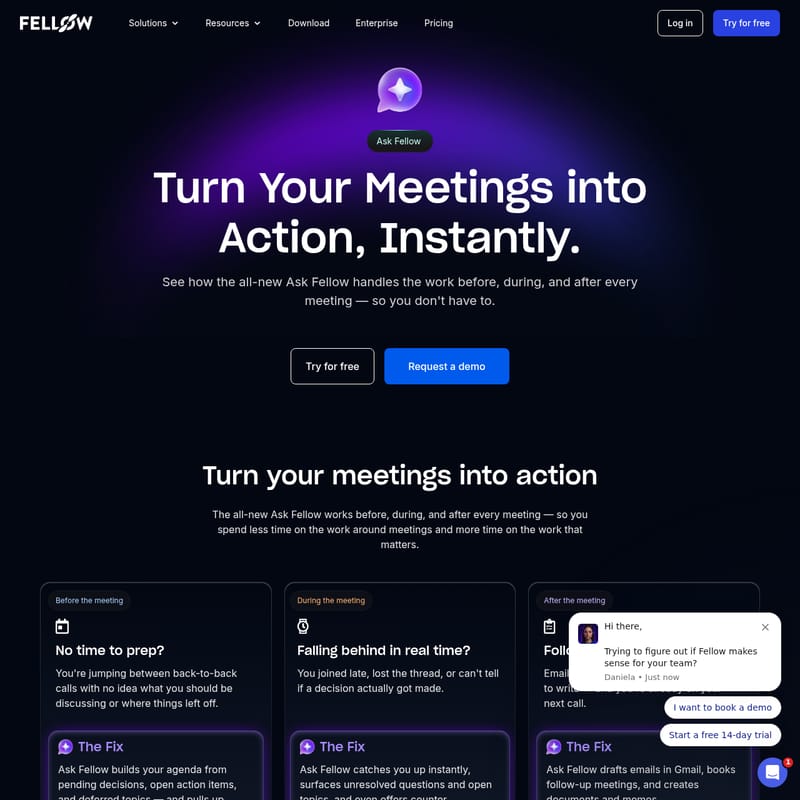
Ask Fellow: Turn Your Meetings into Action, Instantly
In the modern workplace, meetings are essential, but the administrative work surrounding them can be overwhelming. From preparing agendas to taking notes and managing follow-ups, the "work around meetings" often consumes more time than the actual discussions. Ask Fellow is designed to solve this problem by serving as your comprehensive AI meeting assistant.
With Ask Fellow, you can transform every conversation into meaningful action. By handling the preparation, real-time tracking, and post-meeting documentation, Ask Fellow ensures you spend less time on administrative tasks and more time on the work that truly matters.
What's Ask Fellow?
Ask Fellow is the all-new AI-driven capability within the Fellow platform that handles the heavy lifting before, during, and after every meeting. It is an intelligent solution designed to eliminate the friction of back-to-back calls and the manual effort of follow-through.
Whether you are jumping into a call without preparation or struggling to keep up with action items once a meeting ends, Ask Fellow provides the tools to keep your team organized. It acts as a bridge between discussion and execution, ensuring that decisions are documented and next steps are clearly defined.
Key Features of Ask Fellow
Ask Fellow introduces a suite of features designed to optimize the entire lifecycle of a meeting. Below are the core functionalities that make Ask Fellow an essential tool for high-performing teams:
1. Automated Agenda Building
One of the most powerful features of Ask Fellow is its ability to build your agenda automatically. It pulls pending decisions, open action items, and deferred topics from previous meetings, so you walk into every call fully prepared without spending hours on research.
2. Real-Time Catch Up
If you join a meeting late or lose the thread of a complex conversation, Ask Fellow catches you up instantly. It summarizes everything discussed so far, highlighting key points and decisions that have already been made.
3. Smart Follow-Up Drafts
Immediately after a meeting ends, Ask Fellow can draft follow-up emails in Gmail. This ensures that meeting outcomes are communicated to stakeholders while the information is still fresh.
4. Meeting-to-Document Transformation
Ask Fellow can turn the contents of your discussion into polished documents and memos. This feature is perfect for creating records that are ready to share with the broader team or organization.
5. Automated Scheduling
You can ask Ask Fellow to book follow-up meetings directly, ensuring that the momentum of a project is never lost due to scheduling delays.
Use Cases: How Ask Fellow Solves Common Meeting Challenges
Ask Fellow is built to address specific pain points that professionals face daily. Here is how Ask Fellow improves different stages of the meeting process:
Before the Meeting: The Fix for Zero Prep Time
When you are jumping between back-to-back calls, you often have no idea what you should be discussing or where things left off.
- The Problem: No time to prepare for the next call.
- The Ask Fellow Solution: Ask Fellow pulls up outstanding items by assignee and organizes the agenda based on unresolved topics, so you are ready the moment the call starts.
During the Meeting: The Fix for Falling Behind
It is easy to lose track of whether a decision was actually made or to miss the context of a conversation if you join late.
- The Problem: Falling behind in real time or missing the thread.
- The Ask Fellow Solution: Ask Fellow surfaces unresolved questions and open topics. It even offers counter-perspectives to sharpen your team's thinking and ensures that decisions are clearly captured.
After the Meeting: The Fix for Follow-through Piling Up
The period after a meeting is often a rush to the next call, leaving emails unsent and follow-ups unbooked.
- The Problem: Follow-through tasks piling up while you move to the next task.
- The Ask Fellow Solution: Ask Fellow handles the administrative burden by drafting emails, booking the next conversation, and creating necessary memos instantly.
How to Use Ask Fellow
Using Ask Fellow is integrated seamlessly into your existing workflow to maximize productivity:
- Prepare: Before your call, use Ask Fellow to aggregate pending decisions and deferred topics into a structured agenda.
- Engage: During the meeting, use the tool to see summaries of what you missed or to identify unresolved questions that need the team's attention.
- Execute: Once the meeting concludes, review the drafted follow-up emails in Gmail and the memos created by Ask Fellow.
- Schedule: Prompt the tool to book the next follow-up meeting to keep the project moving forward.
FAQ
Q: How does Ask Fellow help if I join a meeting late? A: Ask Fellow provides an instant summary of everything discussed before you arrived, including key points, decisions made, and what is currently happening in the meeting.
Q: Can Ask Fellow help with email follow-ups? A: Yes! Ask Fellow drafts follow-up emails based on the meeting discussion and places them directly in Gmail for your review and final send.
Q: Where does Ask Fellow get the information for agendas? A: It pulls from pending decisions, open action items, and deferred topics from your previous meetings and organizes them by assignee.
Q: Can it create formal documentation? A: Absolutely. Ask Fellow can turn meeting discussions into polished documents and memos that are ready to be shared with your entire team.
Turn your meetings into action today. With Ask Fellow, you can spend less time on the work around meetings and more time on the work that matters. Try it for free or request a demo to see how the all-new Ask Fellow handles the work before, during, and after every meeting.