Openstatus Incident Management favicon

Openstatus Incident Management

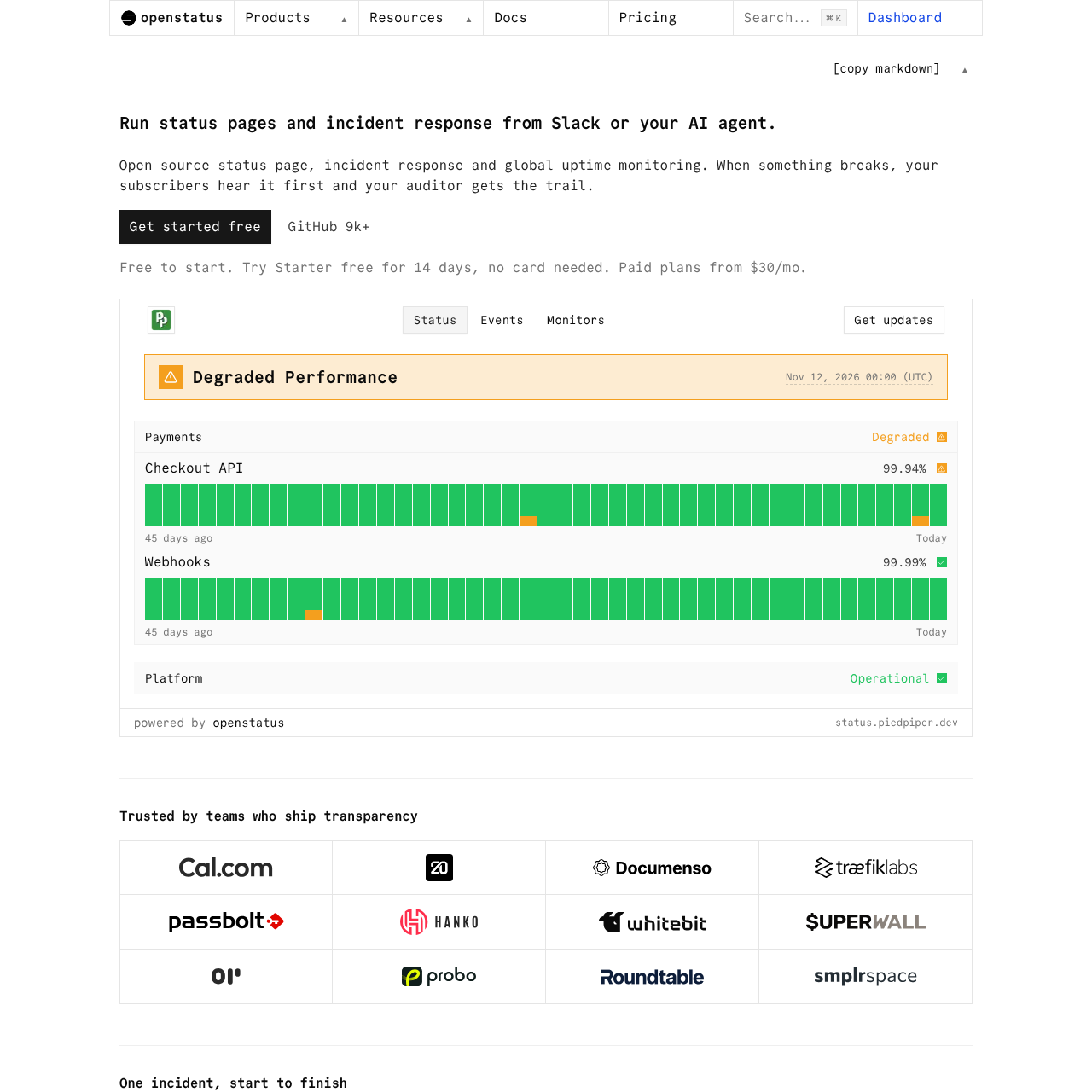
Openstatus Incident Management is an open-source incident response and status page platform that enables teams to declare incidents, coordinate in Slack, publish public updates, and generate postmortems using AI agents.

Code & ITDeclaring incidents with designated…Automatically creating dedicated Slack…Drafting and publishing public status…Synthesizing blameless postmortem…
Openstatus Incident Management product interface screenshot
Estimated monthly visits
91K
Data period:
Listed on AIToolly

What Is Openstatus Incident Management? Product Overview

What the product does and how it is positioned

Openstatus Incident Management provides an end-to-end incident response workflow integrated with Slack, AI agents, and public status pages.

Responders can declare incidents, launch dedicated response channels, draft status updates with agent assistance, and generate blameless postmortems directly from channel history.

What Can You Use Openstatus Incident Management For?

Source-supported ways to use the product

Slack-Driven Incident Response

Teams can run the entire incident lifecycle directly in Slack, from declaring incidents and opening incident channels to publishing status reports and mitigating issues.

Compliance and Audit Readiness

The company presents this as a customer use case for maintaining timestamped incident records and exportable audit logs to support SOC 2, ISO 27001, NIS2, and DORA standards.

How to Use Openstatus Incident Management

The documented workflow, where available

  1. 1

    Alert Detection

    Global uptime monitors detect service degradation and dispatch failure alerts with diagnostic details to Slack, PagerDuty, email, or webhooks.

  2. 2

    Incident Declaration

    A team member declares an incident with a title and severity using a Slack slash command, which creates a dedicated channel and pins the incident card.

  3. 3

    Status Report Drafting

    The openstatus AI agent drafts an external status message in the incident thread, which a responder reviews and approves to notify subscribers.

  4. 4

    Mitigation and Monitoring

    Responders issue a slash command to mark the incident mitigated, automatically moving the linked public status report to monitoring status.

  5. 5

    Postmortem Generation

    Once resolved, the agent compiles a draft postmortem containing a summary, impact duration, timeline, root cause, and action items for final approval.

AI-Assisted Incident Management and Postmortems

Openstatus integrates AI agent workflows directly into operational response channels. Rather than requiring responders to navigate a separate web interface during critical events, the platform enables engineers to interact with the assistant inside Slack threads or through AI environments like Claude, ChatGPT, and Cursor via Model Context Protocol (MCP).

During an incident, the agent translates informal technical updates into public status announcements that can be reviewed and approved before broadcasting to subscribers. Following resolution, the agent aggregates timestamps, status transitions, and discussion history to produce a structured postmortem draft containing timelines, root causes, and follow-up action items.

  • Drafts external status reports from chat inputs while retaining human approval controls
  • Parses incident timelines and channel conversations into structured postmortem drafts
  • Connects to third-party AI assistants through a dedicated Model Context Protocol (MCP) server

What to Test Before Choosing Openstatus Incident Management

Checks to run with your own material and workflow

  • Confirm that Slack slash commands and automated channel creation align with your internal incident management procedures.
  • Verify that the MCP server integration operates smoothly with your preferred AI environment, such as Claude, ChatGPT, or Cursor.
  • Check whether the exportable CSV and JSON audit logs satisfy your internal auditing and compliance reporting requirements.
  • Review self-hosting deployment requirements using Docker if running the service on internal infrastructure is required.

Openstatus Incident Management Sources and Last Checked

What was checked and when

Last checked
Category
Code & IT

Openstatus Incident Management Frequently Asked Questions

Answers based on the source-checked product record

What interfaces can be used to manage incidents in Openstatus?

Openstatus can be managed through Slack slash commands, an AI agent via Model Context Protocol (MCP), a web dashboard, a CLI, a typed API with a Node SDK, and Terraform.

How does Openstatus support compliance requirements like SOC 2?

Openstatus maintains timestamped incident updates and logs all mutations, actors, and event sources in an exportable audit log to satisfy external communication criteria like SOC 2 CC2.3.

Can Openstatus be self-hosted on private infrastructure?

Openstatus can be self-hosted using Docker. Users can run the full stack, host the status page separately, or operate private monitoring locations behind a firewall.

How does the AI agent contribute to incident resolution?

The AI agent drafts external status announcements from channel input during active incidents and compiles blameless postmortem summaries from chat timelines once resolved.

What notification channels are supported for alerting and subscriber updates?

Openstatus supports alerting and update distribution across Slack, PagerDuty, email, RSS feeds, and webhooks.

Explore other recently added tools in the same category.