ModelHub
ModelHub: The Ultimate macOS Menu Bar App for Local LLMs and Hugging Face Models
ModelHub is a lightweight macOS menu bar utility designed to centralize the management of local LLMs. It allows users to discover, download, and manage Hugging Face models with zero lock-in and full cache compatibility.
2026-05-26
--K
ModelHub Product Information
ModelHub: The Essential Menu Bar App for Local LLMs on macOS
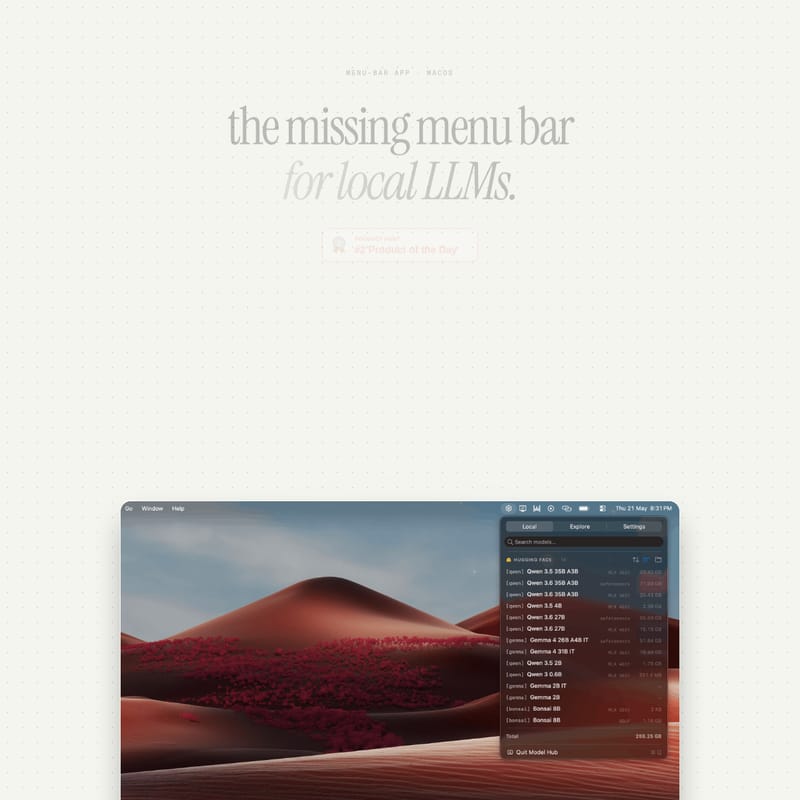
For developers and AI enthusiasts, running local LLMs has become a powerful way to leverage artificial intelligence while maintaining privacy and control. however, as the ecosystem grows, managing these models often leads to a fragmented and frustrating experience. ModelHub is designed to solve this problem as the "missing menu bar" app for local LLMs on macOS.
By centralizing the model layer, ModelHub allows you to discover, download, and manage models from Hugging Face effortlessly, ensuring they are ready to run with tools like Ollama, MLX, LM Studio, and llama.cpp. Whether you are a developer or a power user, ModelHub streamlines your workflow by bringing all your models into one accessible location.
What's ModelHub?
ModelHub is a specialized macOS menu bar application (v1.3.0) tailored for users who run local LLMs. The app addresses a common pain point: models are often scattered across various folders, browser tabs, and terminal commands. You might have models in LM Studio, some in the Hugging Face cache, others in Ollama, and even more in random directories on your Mac.
ModelHub acts as a unified interface for the model layer. It lives in your menu bar, providing a lightweight (~4 MB) and efficient way to interact with your AI assets. Designed specifically for Apple Silicon and requiring macOS 26+, ModelHub ensures that your local AI environment is organized and professional.
Features of ModelHub
Centralized Model Management
ModelHub brings your entire collection of local LLMs into a single place. Instead of switching between different applications or searching through hidden directories, you can browse and manage your models directly from the macOS menu bar. This centralized approach saves time and reduces the cognitive load of managing complex AI environments.
Seamless Hugging Face Integration
With ModelHub, you can discover and download models directly from Hugging Face. This integration ensures that you have access to the latest and most popular models in the AI community. Once downloaded, these models are immediately available for use with your favorite tools.
Zero Lock-In and Full Cache Compatibility
A critical feature of ModelHub is its "zero lock-in" philosophy. It is fully cache compatible, meaning every download replicates the official Hugging Face cache layout. When you fetch a model through ModelHub, it is byte-identical to one fetched using the huggingface-cli.
The app reads and writes to the standard directory:
~/.cache/huggingface/hub/
The structure includes:
- Blobs:
blobs/storage for actual data. - Snapshots:
snapshots/for specific model versions. - Refs:
refs/mainfor version tracking.
This means if you ever decide to uninstall ModelHub, you keep your models. They remain in the standard layout, ready to be used by other pipelines without any need for migration.
Wide Tool Compatibility
ModelHub is designed to "play well" with the tools you already use. It supports a variety of local LLM runners and frameworks, including:
- Ollama
- MLX-LM
- LM Studio
- llama.cpp
- Transformers
Lightweight and Native Performance
At only ~4 MB, ModelHub is a tiny but mighty utility. It is built natively for Apple Silicon, ensuring that it doesn't drain resources while it sits in your menu bar, ready to help you manage your local LLMs.
Use Case for ModelHub
ModelHub is the perfect tool for several scenarios in the local AI space:
- Unified Development: If you are a developer using Ollama for some tasks and MLX for others, ModelHub prevents you from having duplicate model files. It ensures that both tools can access the same centralized cache.
- Simplified Discovery: Instead of navigating the complex Hugging Face website in a browser, you can use the streamlined interface of ModelHub to find the right local LLMs for your project.
- Clean System Maintenance: Use ModelHub to quickly see which models are taking up space on your Mac and remove those you no longer need, all from the convenience of the menu bar.
- Pipeline Integration: Because it uses the standard Hugging Face layout, you can drop models managed by ModelHub into any existing AI pipeline without modification.
How to Use ModelHub
Setting up and using ModelHub on your macOS device is a straightforward three-step process:
- Open .dmg: Once you have downloaded the ModelHub disk image, open the .dmg file.
- Install: Drag the ModelHub icon into your Applications folder to complete the installation.
- Launch: Open the app from your Applications. You will see a small dot appear in your macOS menu bar. Click this dot to start browsing, downloading, and managing your local LLMs.
FAQ
Q: What are the system requirements for ModelHub? A: ModelHub requires macOS 26+ and an Apple Silicon processor (M1, M2, M3, etc.). The application is approximately 4 MB in size.
Q: Does ModelHub lock me into a proprietary format?
A: No. ModelHub offers zero lock-in. It uses the standard Hugging Face cache layout (~/.cache/huggingface/hub/). If you uninstall the app, your models stay exactly where they are and remain compatible with other tools.
Q: Can I use ModelHub with Ollama and llama.cpp? A: Yes! ModelHub is specifically designed to manage models that can be run with Ollama, MLX, LM Studio, llama.cpp, and the Transformers library.
Q: Is the data downloaded by ModelHub different from the official CLI? A: No. Every model fetched through ModelHub is byte-identical to the official Hugging Face repository content, ensuring maximum reliability and compatibility.
Q: Who created ModelHub? A: ModelHub was created by sabesh at conscious engines, designed specifically for people who run their own models locally.