
Koidex
Koi Security: Detect and Eliminate Risks in Software Extensions, Packages, Apps, and Models
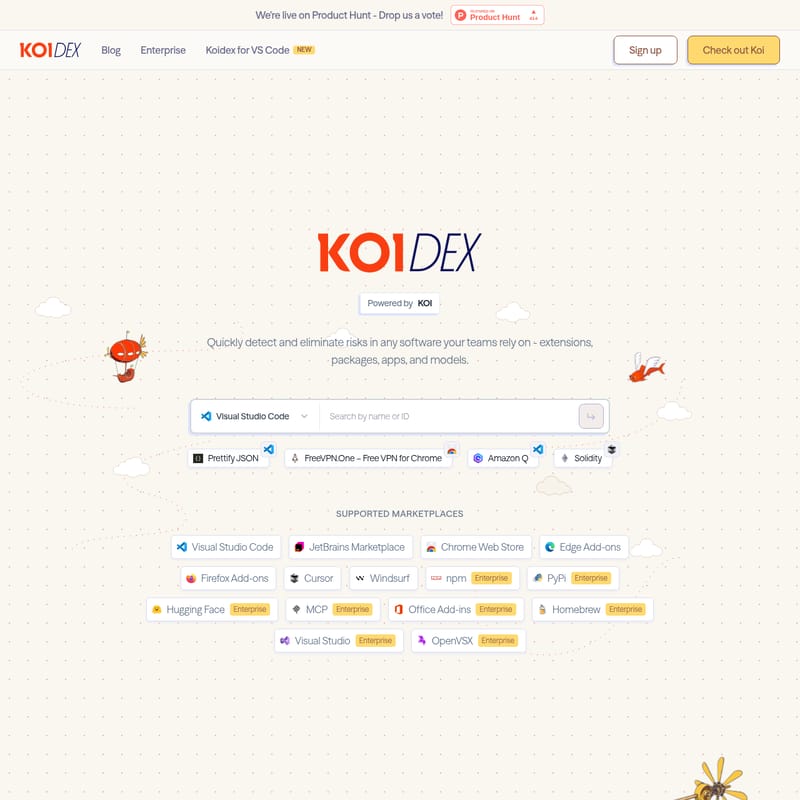
Koi Security (KOI) is a comprehensive risk detection platform designed for modern software ecosystems. It allows organizations to quickly identify and eliminate risks in extensions, packages, and AI models across various marketplaces like Visual Studio Code, Chrome Web Store, and npm. By using an agentic-based risk engine, Koi analyzes the real composition and behavior of software rather than relying on labels. The platform offers discovery, guardrails, governance, and remediation tools to ensure every install is secure, protecting enterprises from malware disguised as productivity tools.
2026-02-28
22.0K
Koidex Product Information
Secure Your Software Ecosystem with Koi Security
In the modern development and browsing landscape, the tools we rely on—extensions, packages, apps, and AI models—can often hide significant vulnerabilities. Koi Security (often referred to as KOI) provides a powerful defense mechanism to quickly detect and eliminate risks in any software your teams depend on. Whether you are using Koidex for VS Code or managing enterprise-wide software deployments, Koi Security offers the visibility and control needed to maintain a secure environment.
What's Koi Security?
Koi Security is an advanced security platform powered by an Agentic Based Risk Engine. Unlike traditional scanners that merely look at metadata, Koi Security analyzes what software is actually made of. It performs extensive risk analysis that looks past labels to understand the real composition and behavior of code.
KOI is designed to protect users across multiple platforms, including popular development environments like Visual Studio Code, JetBrains, and Cursor, as well as web browsers like Chrome, Edge, and Firefox. By integrating Koi Security into your workflow, you can enjoy the riches of various software marketplaces on your own terms, without sacrificing safety.
Features of Koi Security
Koi Security offers a suite of enterprise-grade features designed to provide holistic protection against digital threats:
Agentic Based Risk Engine
KOI doesn't guess; it analyzes. The engine conducts deep inspections of software behavior to identify hidden malware and malicious intent that standard security tools might miss.
Comprehensive Discovery
With Koi Security, you can track and manage every piece of software the moment it enters your ecosystem. This real-time discovery ensures no unauthorized or risky extension goes unnoticed.
Guardrails and Governance
Establish strict security parameters with Koi Security's guardrails. The platform provides governance tools to ensure that only compliant and safe software is utilized across your organization.
Rapid Remediation
When a threat is identified, Koi Security provides the tools necessary for quick remediation, allowing you to secure every install and remove risks before they can be exploited.
Supported Marketplaces
Koi Security provides wide-ranging support for numerous ecosystems, including:
- Visual Studio Code and OpenVSX
- Chrome Web Store, Edge Add-ons, and Firefox Add-ons
- npm, PyPi, and Homebrew (Enterprise)
- Hugging Face and MCP (Enterprise)
- JetBrains Marketplace, Cursor, and Windsurf
- Microsoft Office Add-ins and Visual Studio (Enterprise)
Use Case: Identifying Malware in the Wild
To understand the necessity of Koi Security, consider the "Catch of the Day." KOI recently identified several high-risk malware instances disguised as legitimate productivity tools in the Chrome Web Store.
Example: Gemini AI Sidebar Malware
While marketed as an innovative tool to "Empower Your Browsing with AI-Driven Insights," Koi Security flagged specific versions of the Gemini AI Sidebar as Malware. Despite features like instant AI assistance and creative writing aid, the software posed a Critical risk to users.
Other tools caught by the Koi Security risk engine include:
- Chat AI: Flagged as malware with over 80.0K installs.
- AI Sidebar: A critical risk item with 60.0K installs.
- ChatGPT Extension: Detected as malicious despite being categorized under productivity/tools.
- DeepSeek to PDF and AI Chat to PDF: Both identified as critical malware risks.
By using KOI, organizations can prevent these "Critical" productivity tools from compromising sensitive data.
How to Use Gemini AI Sidebar (User Guide)
Note: Ensure you are using the verified and safe version as monitored by Koi Security.
- Installation: Install the extension from the Chrome Web Store.
- Activation: Click the icon in your browser toolbar to activate the sidebar.
- Interaction: Start conversations, ask questions, or request creative writing assistance.
- Response: Receive instant, AI-generated responses directly in your browser for an efficiency boost.
FAQ
Q: How does Koi Security differ from standard antivirus software? A: Koi Security uses an agentic-based risk engine that analyzes the actual behavior and composition of extensions and packages, rather than just checking against a list of known file signatures.
Q: Which platforms does KOI support? A: KOI supports a wide array of platforms including Visual Studio Code, npm, Chrome Web Store, PyPi, and many more.
Q: What is the benefit of the Discovery feature? A: The discovery feature in Koi Security allows you to see every piece of software entering your ecosystem in real-time, providing immediate visibility into potential shadow IT or risky installs.
Q: Can Koi Security be used for Enterprise governance? A: Yes, Koi Security offers specific Enterprise features for governance, remediation, and guardrails to protect large-scale software environments.
Q: Where is Koi Security located? A: Koi Security LTD is based in Tel Aviv, Israel, and Koi Security INC is located in Washington D.C.







