
GStack
gstack: Eight Opinionated Specialist Skills for Claude Code by Garry Tan
gstack is a powerful extension for Claude Code that transforms a generic AI assistant into a team of specialized agents. Created by Garry Tan, it provides eight opinionated workflow skills including CEO-level planning, engineering review, automated shipping, and browser-based QA. gstack eliminates 'mushy' AI interactions by providing explicit cognitive modes like Founder taste, Engineering rigor, and Paranoid Reviewer. With features like integrated browser automation via /browse and Greptile PR triage, gstack streamlines the entire software development lifecycle from initial ideation to final production deployment.
2026-03-15
615200.0K
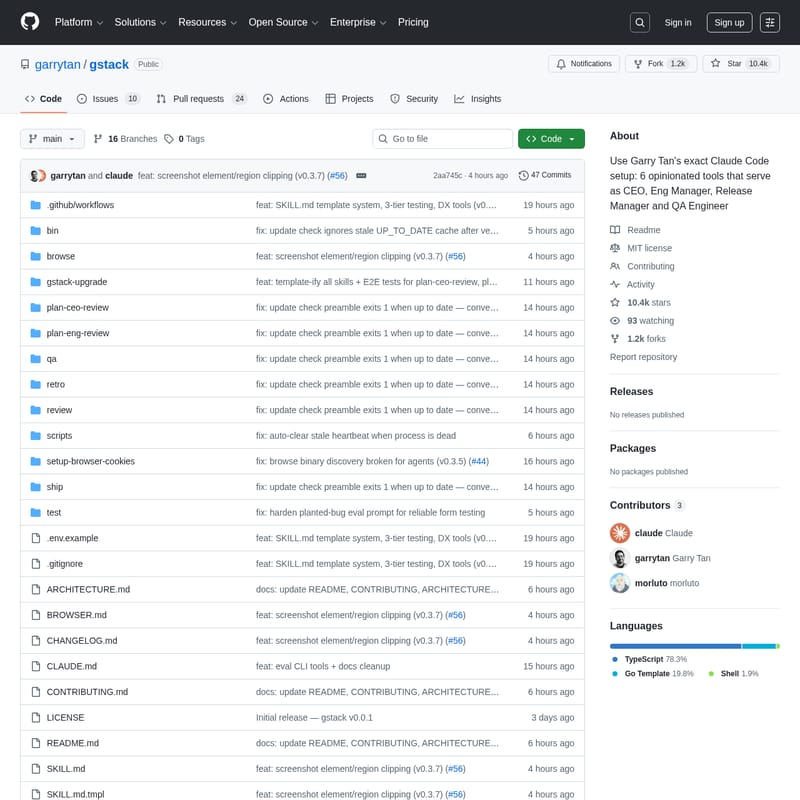
GStack Product Information
gstack: The Specialized Operating System for Claude Code
gstack is a comprehensive suite of eight opinionated workflow skills designed to transform Claude Code from a generic assistant into a specialized team of experts. Developed by Garry Tan, President & CEO of Y Combinator, gstack allows developers to summon specific cognitive modes—such as a Founder, Engineering Manager, or QA Lead—on demand to ensure high-rigor software development.
What's gstack?
gstack is an enhancement layer for Claude Code that introduces specialized slash commands for every stage of the development lifecycle. Instead of receiving literal, often mediocre implementations from a standard AI agent, gstack enforces specific "gears" or cognitive modes.
Without gstack, an agent might take requests too literally, provide inconsistent PR reviews, or struggle with manual QA tasks. With gstack, you gain access to a "team" that can pressure-test product ideas, lock in technical architecture, perform paranoid code audits, and execute automated browser testing. It is an operating system for builders who want to ship high-quality software with maximum momentum.
Features of gstack
gstack is packed with features designed to handle the "boring" parts of shipping while elevating the creative and technical parts of building.
Specialized Cognitive Skills
- /plan-ceo-review: Operates in "Founder Mode" to find the 10-star product version of a request rather than just implementing a ticket.
- /plan-eng-review: Acts as a Technical Lead to define architecture, data flows, state machines, and detailed technical diagrams.
- /review: A "Paranoid Staff Engineer" mode that hunts for race conditions, N+1 queries, and security vulnerabilities.
- /ship: A disciplined Release Engineer that syncs main, runs tests, and opens PRs automatically.
- /browse: Provides the agent with "eyes" via a persistent Chromium session to inspect UI, verify layouts, and check console errors.
- /qa: A QA Lead mode that analyzes git diffs to identify and test affected routes automatically.
- /setup-browser-cookies: Imports real browser sessions (Chrome, Arc, Brave, etc.) to test authenticated pages without manual logins.
- /retro: An Engineering Manager mode that provides data-driven retrospectives, team praise, and growth opportunities.
Advanced Integrations and Tools
- Greptile Integration: Automatically triages Greptile PR comments, fixing valid issues and responding to false positives.
- Conductor: Allows running up to ten Claude Code sessions in parallel, each in an isolated workspace with its own browser instance.
- Browser Automation: Built on Playwright, the /browse tool supports screenshots, element clipping, and session persistence.
Use Cases for gstack
gstack is ideal for high-velocity developers and teams who already use Claude Code heavily and want to move beyond generic assistance.
- Product Ideation: Use
/plan-ceo-reviewto rethink a simple feature (like "photo upload") into a comprehensive user experience (like an "AI-assisted listing creator"). - Technical Architecture: Use
/plan-eng-reviewto generate sequence diagrams and state models before writing a single line of code. - Automated QA: Use
/qaon a feature branch to automatically detect changed routes and verify them on localhost:3000 without manual clicking. - Production Verification: Use
/browseto log into a staging environment, navigate complex flows, and capture screenshots to verify a deployment. - Team Management: Use
/retroat the end of a sprint to analyze commit patterns and provide specific feedback to contributors.
How to Use gstack
Installation
To install gstack on your machine, open Claude Code and run the following command:
git clone https://github.com/garrytan/gstack.git ~/.claude/skills/gstack && cd ~/.claude/skills/gstack && ./setup
After installation, add a "gstack" section to your CLAUDE.md file listing the available skills and instructing Claude to use /browse for all web tasks.
Switching Modes
Simply type the desired slash command within your Claude Code session:
- Start with
/plan-ceo-reviewto lock in the product vision. - Move to
/plan-eng-reviewto define the technical spine. - Implement the code, then run
/reviewto audit the changes. - Use
/qato verify the functionality in a live browser. - Finally, use
/shipto land the plane and open your PR.
FAQ
Q: What are the requirements for gstack? A: You need Claude Code, Git, and Bun v1.0+. The /browse skill requires a native binary which compiles on macOS and Linux (x64 and arm64).
Q: Does gstack touch my system PATH?
A: No. Everything lives inside the .claude/ directory. It does not run background processes or alter your global environment.
Q: Can I use gstack with my team?
A: Yes. You can copy gstack into your project repository's .claude/skills/ folder so that teammates can use the same specialized skills.
Q: How does the browser tool handle authentication?
A: Use the /setup-browser-cookies command to import session cookies from your local browser (like Chrome or Edge) into the gstack headless session.
Q: What should I do if a skill isn't showing up?
A: Run cd ~/.claude/skills/gstack && ./setup to rebuild the symlinks and ensure Claude can discover the new commands.







