Shadow
Shadow: The Advanced AI Interface That Sees, Hears, and Runs Your Tasks
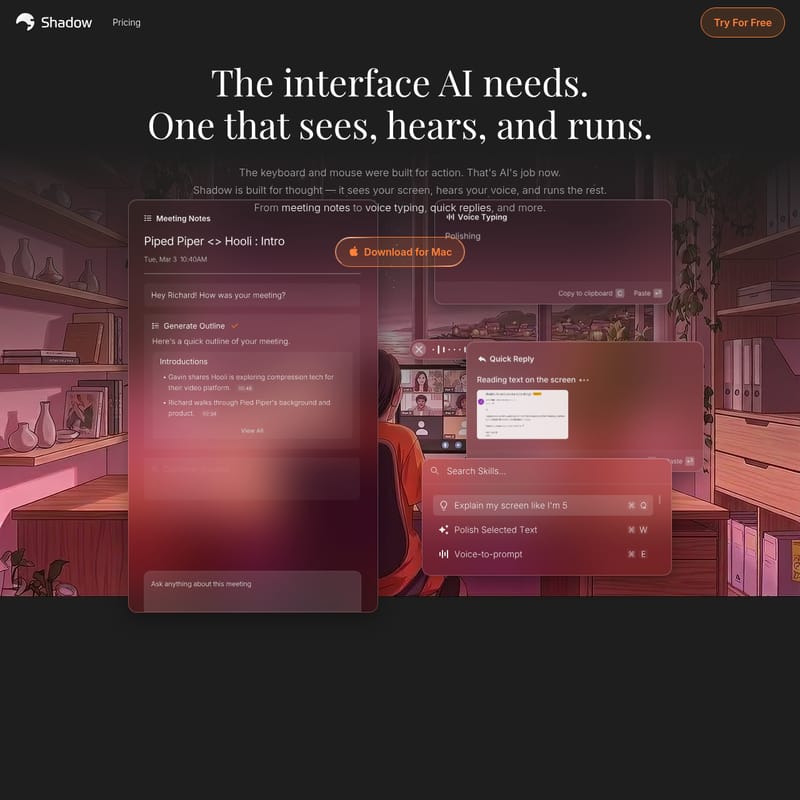
Shadow is an innovative AI interface designed for professionals. It operates by seeing your screen, hearing your voice, and running custom AI Skills to automate meetings, emails, and notes. With local-first privacy and no-bot meeting capture, Shadow provides a seamless, secure, and highly efficient workflow for Mac users.
2026-05-20
29.0K
Shadow Product Information
Shadow: The AI Interface That Sees, Hears, and Runs
In the modern professional landscape, the tools we use to interact with technology are evolving. While the keyboard and mouse were originally built for manual action, the era of artificial intelligence demands something more intuitive. Shadow is the interface AI needs—a sophisticated system designed for thought, context, and execution. Shadow doesn't just wait for instructions; it sees your screen, hears your voice, and runs the rest of your workflow automatically.
Built specifically for professionals who demand efficiency without compromise, Shadow has already earned the trust of thousands of users. It transforms the way you handle meeting notes, voice typing, and quick replies, turning your daily context into immediate, actionable output.
What is Shadow?
Shadow is a local-first AI interface that bridges the gap between your digital activities and AI-driven automation. It is defined as an interface that "sees, hears, and runs." Unlike traditional AI tools that require manual data entry, Shadow captures the context of your work in real-time. Whether you are in a high-stakes meeting or deep in a coding session, Shadow observes what is happening on your screen and listens to what is being said to provide relevant assistance.
By downloading Shadow for Mac, users gain access to a tool that captures meetings without ever joining as a bot, runs custom Shadow Skills based on personal prompts, and ensures that every piece of context—from a shared screen to a spoken sentence—is utilized to simplify your workload.
How Shadow Works
Understanding the workflow of Shadow is key to unlocking its full potential. The system operates on a simple yet powerful three-step process: Capture, Prompt, and Run.
- Capture: Shadow captures what you say, what you hear, and what you see on your screen.
- Prompt: It then applies your own custom prompts (or Skills) to that captured information.
- Run: Finally, Shadow executes the action, whether that is generating a follow-up email, a BANT breakdown, or formatted meeting notes.
This process is designed to be frictionless. Shadow operates entirely in the background, ensuring that your focus remains on your work while the AI handles the administrative heavy lifting.
Key Features of Shadow
Shadow is packed with features designed to make it the ultimate productivity companion. These features are categorized into two main pillars: Meetings and Actions.
Meetings Without the Bots
One of the standout features of Shadow is its approach to meetings. Traditional AI note-takers often require a bot to join the call, which can be intrusive. Shadow changes this dynamic.
- No Bots: Shadow joins nothing but hears and sees everything. It operates in the background without interruptions.
- Autopilot Mode: Shadow automatically detects when a meeting starts and ends. It records discussions and structures key takeaways without you ever having to press a start button.
- Smart Screenshot: During a call on Zoom, Huddle, or any other platform, Shadow finds the meeting window and captures screenshots automatically so that visual context is never lost.
- Speaker Identification: Shadow detects and labels speakers in real-time, providing clarity on who said what during the discussion.
- Meeting Skills: At the end of a call, you can run a specific Skill. Whether you need a customer feedback summary or action items, Shadow runs it the moment the call ends.
- Markdown and Webhooks: You can save your results as clean Markdown (.md) files or send them to external tools like Zapier, n8n, and Make via Webhooks.
Actions via Keyboard and Voice
Beyond meetings, Shadow serves as a shortcut to everything else in your digital life through the Actions feature.
- Keyboard Shortcuts: Press a shortcut on any screen, and Shadow will see what is there and hear what you say to run a Skill.
- Voice Input: Talking to Shadow is 4× faster than typing. You can give it clear instructions and context just by speaking.
- Quick Access: Open Shadow from anywhere to search through your favorite Skills or trigger a specific one with a dedicated shortcut.
- Context Awareness: When an Action Skill runs, Shadow captures the active window. It sees what you see, allowing it to turn screen content into emails, notes, or code instantly.
Custom Skills
Every Shadow Skill is fully customizable. You can edit existing Skills or build your own from scratch. A Skill is composed of three parts:
- Input: What Shadow captures (Voice, Screen, or Selected Text).
- Prompt: The instructions you provide to the AI.
- Output: Where the result goes (such as pasting at the cursor in your focused field).
Use Cases for Shadow
Shadow is versatile enough to handle a wide range of professional tasks. Here are some primary use cases:
- Professional Meetings: Use Shadow to generate meeting notes, BANT breakdowns, and follow-up emails without having to manage a bot.
- Content Creation: Utilize Voice Input to draft emails or documents 4× faster than typing, with Shadow pasting the result directly into your app.
- Developer Workflows: Capture code snippets from your screen and use a Skill to explain or refactor them.
- Customer Success: Automatically summarize customer feedback from calls and sync the data to your CRM via Webhooks.
- Task Management: Use Selected Text to turn information from a webpage into structured action items in your favorite productivity tool.
Privacy and Data Control
Privacy is a core pillar of the Shadow experience. Unlike many AI tools that process data in the cloud, Shadow is built with a local-first philosophy.
"Your data, your control. Shadow keeps your data on your Mac and out of model training — by default."
- Local Transcription: Transcription happens directly on your Mac. Audio never leaves your device, and your meetings are stored locally.
- User-Triggered AI: AI only runs when you say so. Skills hit LLM APIs only when you trigger them. If you turn it off, everything stays on your machine.
- No Training: Your meeting content and Skill outputs are never used to train AI models. Your conversations remain yours alone.
FAQ
What is Shadow?
Shadow is the interface AI needs—one that sees your screen, hears your voice, and runs the rest. It captures your meetings without ever joining as a bot and runs custom Skills on what you said, saw, or heard.
What's a Skill?
A Skill is a customizable AI prompt within Shadow. It defines what the AI captures (like your voice or screen), what the prompt is, and where the output should be delivered.
What's the difference between Meeting Skills and Action Skills?
Meeting Skills are designed to run during or after calls (like taking notes), while Action Skills are triggered by shortcuts to perform quick tasks like voice typing or screen-based drafting.
Is my data private?
Yes. Shadow uses local-first transcription, meaning your audio and meetings stay on your Mac. Furthermore, Shadow does not use your data to train AI models.
What platforms does Shadow run on?
Shadow is currently available for Mac users.
Does Shadow use bots for meetings?
No. Shadow operates entirely in the background and does not join meetings as a bot, ensuring a natural and interruption-free experience.