Second Brain for AI v2
Second Brain: A Unified Persistent Memory Layer for Claude, ChatGPT, and All AI Tools
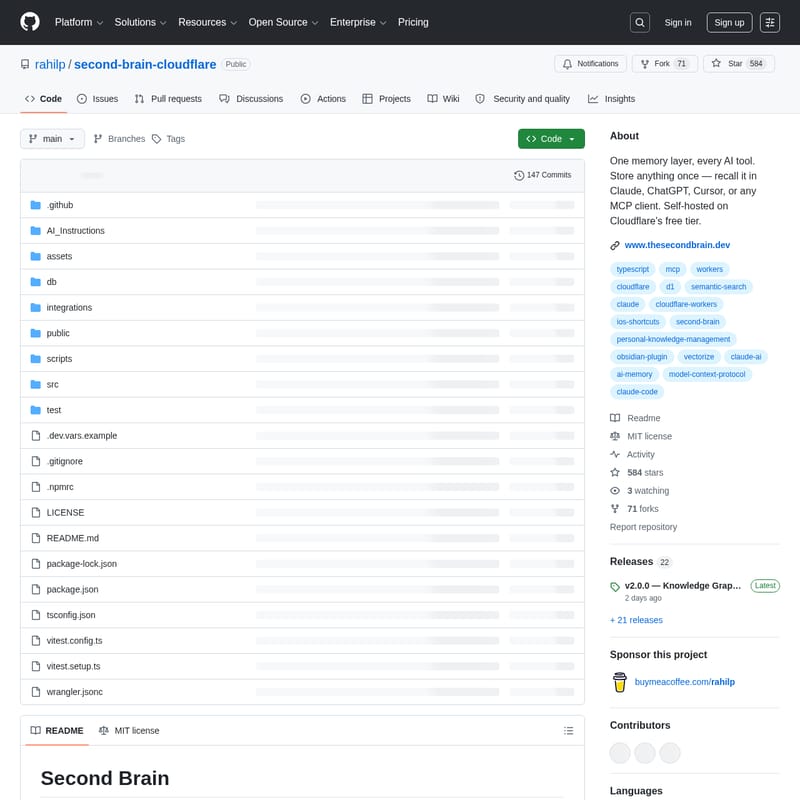
Second Brain is an open-source, self-hosted memory layer built on Cloudflare that provides a persistent context for all your AI tools. It ensures your projects, decisions, and preferences follow you across Claude, ChatGPT, Cursor, and Codex, eliminating the need to repeat yourself.
2026-07-14
615200.0K
Second Brain for AI v2 Product Information
Second Brain: The Unified Persistent Memory Layer for AI Tools
In the modern era of artificial intelligence, users often find themselves switching between various platforms. You might use Claude for creative writing, ChatGPT for general inquiries, and Cursor for coding. However, a significant problem arises: your context, decisions, and project history do not move with you. This fragmentation forces you to explain your preferences and background repeatedly to different models.
Second Brain solves this by providing a single, shared memory for every AI tool you use. Instead of being locked inside a specific platform, this memory belongs to you, running entirely within your own Cloudflare account. It utilizes the Model Context Protocol (MCP) to bridge the gap between different AI clients, ensuring that your context is always available, regardless of which tool you are currently using.
What's Second Brain?
Second Brain is a self-hosted, open-source memory layer designed for the personal scale. It is built using Cloudflare Workers, D1 SQLite, and Cloudflare Vectorize to offer a high-performance, private, and cost-effective solution for persistent AI memory.
By deploying Second Brain, you create a centralized repository of knowledge that your AI tools can query and update. Because it resides in your own Cloudflare environment, you maintain complete control over your data. It doesn't just store text; it understands meaning through semantic search, allowing it to surface relevant information even when the exact wording differs from your query.
Key Features of Second Brain v2
The launch of version 2 has introduced several advanced capabilities that make the Second Brain even more powerful for personal knowledge management.
1. Advanced Memory Graph
Memories in your Second Brain are no longer isolated snippets of information. With the Memory Graph, connections are created automatically as you save information or explicitly through the link tools. This allows for "multi-hop recall," where the system can follow connections to surface related context that a standard keyword search would miss. The dashboard also features a Graph tab for visual exploration of your data.
2. Seamless Notion Sync
Integrate your existing workflow by connecting your Notion workspace. By sharing specific pages with the Second Brain connection, your notes are automatically synced into your memory. This happens nightly or on-demand, ensuring that your AI tools are always up-to-date with your latest Notion entries.
3. Semantic Recall and Search
Unlike traditional databases, Second Brain retrieves memories based on meaning. If you ask, "What did I decide about the pricing model?", it can find the relevant note even if the original entry used entirely different terminology. This is powered by Cloudflare Vectorize and Workers AI.
4. Graceful Degradation
Version 2 ensures reliability with graceful degradation. If the Vectorize index is temporarily unavailable, the system automatically falls back to keyword search, providing a clear notice and a health endpoint for status reporting.
5. Multi-Platform Support
You can capture and recall information from almost anywhere:
- AI Clients: Integrated directly into Claude, ChatGPT, Cursor, and Codex.
- Command Line: Manage your memory via the
second-brain-cf-clion your terminal. - Obsidian: Use the Second Brain Sync plugin to keep your Obsidian vault in sync.
- Mobile: Utilize specialized iOS Shortcuts for quick brain dumps on iPhone and iPad.
- Browser: Capture text or pages via the Chrome extension and bookmarklet.
How Second Brain Works
Second Brain acts as a middleman between your data sources and your AI agents. It uses a variety of tools to manage the lifecycle of a memory:
- remember: Stores new ideas, preferences, and project context.
- append: Adds updates to existing memories to maintain a chronological flow.
- update: Replaces an existing memory if the information has changed.
- recall: Finds memories based on semantic meaning.
- list_recent: Allows you to browse recently saved entries.
- forget: Permanently deletes a memory from the database.
Use Case Scenarios
Software Development
When working in Cursor or Codex, you can use Second Brain to store architectural decisions. Later, when you are chatting with Claude about a new feature, the AI can recall those specific decisions without you having to re-upload your documentation.
Personal Knowledge Management
By syncing Notion and Obsidian, your Second Brain becomes a comprehensive repository of your life's work. You can query your AI about notes you took months ago, and it will have the context needed to provide insightful answers.
Cross-Platform Research
Use the Chrome extension to save research snippets while browsing. Later, access that research instantly through ChatGPT to draft a report, ensuring no piece of information is lost in transition.
How to Use Second Brain
Setting up your Second Brain is a straightforward three-step process that takes approximately two minutes.
Step 1: Choose an Authentication Token
Your AUTH_TOKEN serves as your password. You can use a memorable phrase or generate a secure random token using:
openssl rand -base64 32
Keep this token secure; you will need it for all client authorizations.
Step 2: Deploy to Cloudflare
Use the Deploy to Cloudflare button found in the repository. During setup, configure the following values:
- Dimensions: 384
- Metric: cosine
- AUTH_TOKEN: Your created token
Once deployed, Cloudflare will provide a Worker URL (e.g., https://your-worker-name.your-subdomain.workers.dev).
Step 3: Connect Your AI Clients
For Claude Code or Codex CLI, run the setup script provided in the documentation. For web-based apps like ChatGPT or the Claude desktop app:
- Add the provided custom instructions to your app's personalization settings.
- Add your Worker URL as a custom MCP connector at:
https://YOUR-WORKER-URL/mcp.
FAQ
Q: Where is my data stored? A: Your data stays entirely within your own Cloudflare account, utilizing D1 and Vectorize. It is not locked into any single AI platform.
Q: Does it cost money to run? A: Second Brain is designed to run within Cloudflare's free tier for personal use, making it an extremely cost-effective solution.
Q: Which AI tools are supported? A: It supports any tool that can use the Model Context Protocol (MCP), including Claude, ChatGPT, Cursor, and various CLI tools.
Q: How does semantic search differ from keyword search? A: Keyword search looks for exact word matches. Semantic search (Recall) looks for the intent and meaning behind your words, allowing the AI to find relevant information even if the vocabulary is different.