guilds.run favicon

guilds.run

guilds.run is an open-source multi-agent orchestration platform that runs on local machines, providing full run observability, persistent memory, sandboxed compute workspaces, and configurable connectors across heterogeneous language models.

Code & ITExecuting multi-agent automated…Mixing different frontier and…Automating web navigation and terminal…Tracking inter-agent communication,…
guilds.run product interface screenshot
Listed on AIToolly

What Is guilds.run? Product Overview

What the product does and how it is positioned

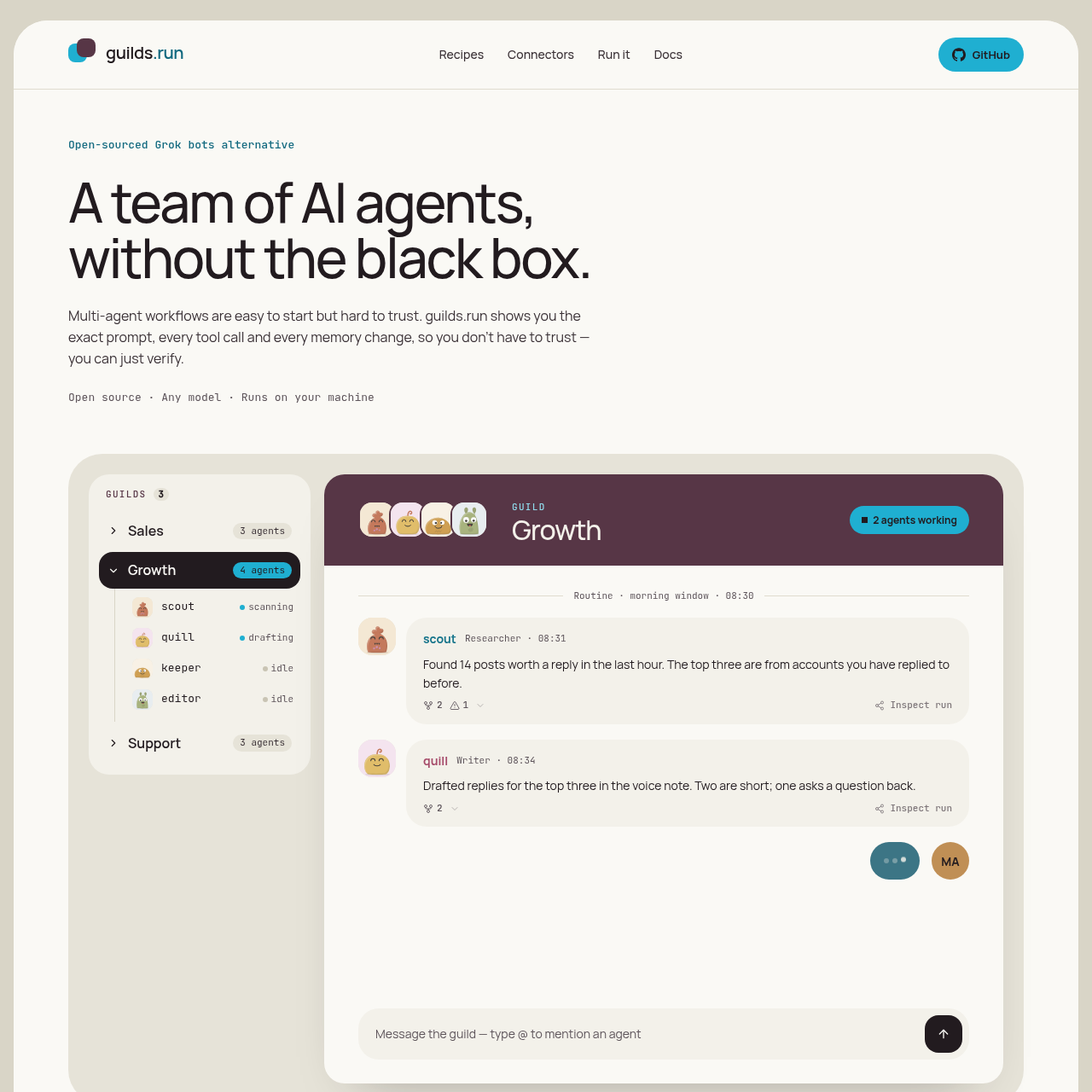
guilds.run is an open-source system designed for deploying and managing teams of collaborative AI agents on user-controlled infrastructure. The platform addresses opacity in multi-agent execution by exposing the exact prompts submitted to models, tool execution outputs, and every memory modification across runs.

Each agent operates within an isolated workspace equipped with a terminal, script storage, and an optional persistent browser. Organizations can coordinate agents across distinct departments, attach scoped third-party connectors, and utilize the built-in Studio coach to diagnose workflow issues and refine agent instructions.

What Can You Use guilds.run For?

Source-supported ways to use the product

Social Media Monitoring and Engagement

Teams of agents scan social timelines, score incoming posts against reply criteria, draft responses matching specific guidelines, and queue entries for operator review.

Inbound Support Triage

Configured agent recipes read shared support inboxes, tag and route issues, and prepare initial draft answers for human agent approval.

Open-Source Repository Maintenance

Automated agents inspect code repositories to organize issues, review incoming pull requests, and maintain development backlogs.

Outreach and Prospect Research

Agents research external prospect profiles, write introductory outreach communications, and log interaction threads into structured database tables.

How to Use guilds.run

The documented workflow, where available

  1. 1

    Launch the local environment

    Clone the open-source repository and deploy the local services using Docker Compose.

  2. 2

    Configure agent teams and recipes

    Define agents, standing task instructions, schedules, and shared database schemas directly or apply a preconfigured team recipe.

  3. 3

    Assign models and connector permissions

    Provide model credentials from chosen providers and assign third-party service connectors to the organization, guild, or individual agents.

  4. 4

    Monitor runs and tune instructions

    Inspect live runs, review tool calls and memory changes, and adopt prompt corrections suggested by the Studio coach.

Run Observability and Studio Diagnostics

Operating autonomous agent teams often presents debugging hurdles when multi-step outputs diverge from expectations. guilds.run addresses this by capturing comprehensive execution records for every run, exposing the verbatim prompts delivered to models, the arguments and return values of every tool call, and the resulting state changes in memory.

Building on this audit trail, the Studio feature functions as an automated diagnostic tool. It analyzes execution histories, shared notes, and memory tables to detect recurring failures, such as agents writing text exceeding length constraints. Studio drafts exact diffs for agent instructions, allowing operators to verify and publish adjustments before any live behavior changes.

  • Granular inspection views displaying prompt inputs, tool invocations, and memory state transitions
  • Interaction graphs tracking which routines or agents initiated each wake event
  • Non-destructive suggested configuration diffs that require explicit operator approval

Agent Compute Environments and Integrations

Agents in guilds.run are not limited to stateless API calls; each agent has access to an isolated computing environment. Workspaces include dedicated terminals, reusable script execution capabilities, and browser sessions that remain logged in between scheduled runs to facilitate continuous web-based workflows.

Integration management supports broad model provider flexibility alongside granular tool permissions. Agents within the same guild can run differing models, ranging from commercial frontier APIs to local endpoints. Connectors to services such as GitHub, Notion, Gmail, and on-chain tools can be scoped strictly to the agents requiring them.

  • Configurable compute instances ranging from lightweight allocations to custom hardware specs
  • State-preserving browser automation and local terminal execution for agent tools
  • Multi-model deployment allowing different frontier and open-weight models within a single guild
  • Access control scoping third-party connectors to an entire organization, a guild, or a single agent

What to Test Before Choosing guilds.run

Checks to run with your own material and workflow

  • Confirm that the target deployment machine meets the prerequisites for running Docker Compose and hosting containerized agent workspaces.
  • Verify that required external tools are currently available, noting that integrations for Slack, Discord, Linear, Google Calendar, and LinkedIn are listed as coming soon.
  • Check the compute resource allocations, such as CPU and memory limits, to ensure adequate capacity for browser automation and scripting workloads.
  • Review the availability of necessary API keys or local inference endpoints like Ollama, as external model provider credentials must be supplied directly by the user.

guilds.run Sources and Last Checked

What was checked and when

Last checked
Category
Code & IT

guilds.run Frequently Asked Questions

Answers based on the source-checked product record

Where does guilds.run execute agent workloads?

guilds.run is open-source software that runs locally on the user's machine or on self-hosted servers using Docker Compose.

Which artificial intelligence models are compatible with guilds.run?

The platform supports frontier models including Claude, GPT, Gemini, and Grok, as well as open-weight models such as Qwen, DeepSeek, Kimi, Llama, Mistral, and GLM via local endpoints or provider keys.

How does guilds.run maintain visibility into agent actions?

The system records every execution step, showing the exact prompt seen by the model, each tool call and its output, and all persistent memory changes made across runs.

What tools are included in each agent's individual computer environment?

Each agent workspace includes a terminal, reusable script storage, and an optional web browser that retains login state across executions.

How are third-party connectors managed and assigned to agents?

Connectors are managed with granular access controls, allowing administrators to attach an account to an entire organization, a specific guild, or an individual agent.

Explore other recently added tools in the same category.