Face AI Video Swap
AIToolly product video
See Face AI Video Swap in motion
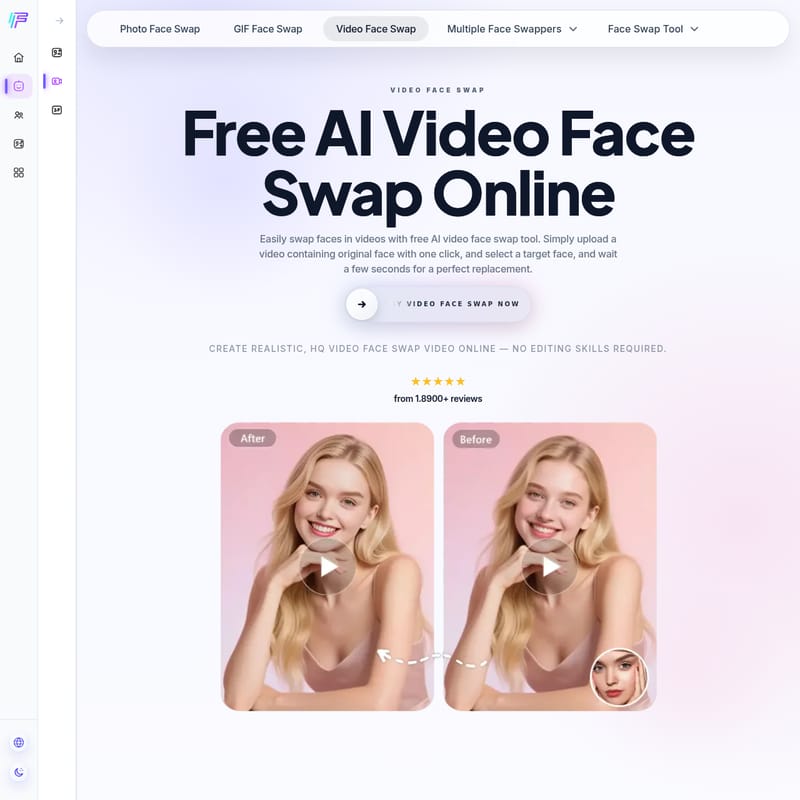
Free AI Video Face Swap Online - Create Realistic Face Swapping Videos with FaceAI
Experience the industry-leading AI video face swap tool by FaceAI. Swap faces in videos, GIFs, and photos effortlessly with high-fidelity, 4K resolution, and no watermarks for free.
2026-06-02
543.0K
Face AI Video Swap Product Information
Video Face Swap: The Ultimate Guide to Free AI Video Face Swapping
In the era of advanced artificial intelligence, creating high-quality, entertaining content has never been easier. Video face swap technology has transformed how we interact with digital media, allowing users to seamlessly replace faces in videos with just a few clicks. Whether you are looking to create a hilarious meme, a personalized gift, or professional-grade content, the AI video face swap tool by FaceAI provides a comprehensive, free, and user-friendly solution.
What's Video Face Swap?
A video face swap tool is a sophisticated video processing application that focuses on providing a realistic face-swapping experience for people within video clips. Unlike traditional video editing that requires hours of manual labor and professional skills, an AI video face swap uses artistic-level facial fusion technology to automate the process.
By utilizing FaceAI, users can upload a source video and a target face image, and the AI algorithm will handle the rest. It ensures that the new face matches the original character's movements, lighting, and expressions. This tool is not limited to just single faces; it also supports multi video face swap and batch video face swap functionalities, making it a versatile choice for various creative needs.
Key Features of FaceAI Video Face Swap
FaceAI stands out as the best face swapping tool for video due to its robust set of features designed for both casual users and professional content creators.
1. High-Fidelity Technology
One of the most impressive aspects of this video face swap tool is its ability to preserve original facial expressions. The AI ensures that the replaced face perfectly synchronizes with the original character's mouth movements, eye contact, and emotional changes, resulting in a realistic face swap.
2. Multi Video Face Swap
It's not just about swapping one face in a video. FaceAI can accurately identify all faces in a video and replace multiple faces as needed. This multiple face swap video feature expands the application scenarios for AI tools, addressing specific needs for group videos or family clips.
3. Batch Video Face Swap AI
For those who need to process several videos at once, the batch video face swap tool improves efficiency by 10x. You can upload multiple videos with one click and keep the target face consistent across all of them, saving you from the fatigue of repetitive manual editing.
4. Lightning-Fast Processing
Efficiency is at the core of FaceAI. Most short videos (under 15 seconds) are processed within 10 seconds. This lightning-fast speed leads the industry, ensuring you spend more time creating and less time waiting.
5. High-Definition Lossless Output
Quality is never compromised. FaceAI supports 4K resolution output, meeting the ultimate image quality requirements of professional content creators. Best of all, the output is clear and completely watermark-free.
6. Privacy and Security
Your data safety is a priority. All uploaded materials are used only for processing and are automatically and permanently deleted from the server immediately after the task is completed. No login is required, and usage traces are cleared within 24 hours.
How to Use AI Video Face Swap?
Using a deepfake video generator is super easy. You can achieve a professional-looking video face swap in just three simple steps:
- Upload a Video: Open the video face changer and upload a video or GIF containing the original faces. FaceAI supports formats like MP4, MOV, and WEBM.
- Select a Target Face: Choose a target face image from your computer or mobile phone and upload it to the video face swap tool.
- Start Face Swapping: Click the button to start the transformation. Wait a few seconds for the AI to generate the result, then download your realistic face-swapped video and share it with the world.
Pro Tip: Bookmark this tool by pressing Ctrl + D (or Command + D on Mac) to keep FaceAI one tap away for your next edit.
Use Case Scenarios for Video Face Swap
The applications for AI video face swap are vast and varied. Here are some common ways users leverage this technology:
- Social Media Content: Create engaging and funny clips for platforms like TikTok, Instagram, or YouTube using the face swap meme maker.
- Personalized Greetings: Use the multiple face swap video feature to put your friends' faces into famous movie scenes for birthdays or celebrations.
- Professional Content Creation: Creators can use high-definition, watermark-free 4K output to produce high-quality parodies or experimental films.
- Artistic Exploration: Utilize AI face morph and animal face swap features to push the boundaries of digital art.
- Efficiency for Professionals: Use batch video face swap to handle large-scale projects where consistency across multiple clips is required.
Why Choose Our AI Video Face Swap Tool?
Choosing FaceAI means opting for quality, speed, and ease of use. Unlike other paid products that may limit you to 5-second clips or charge heavy subscription fees, FaceAI offers free video face swapping for videos up to 15 seconds long. It is the best alternative to services like BeArt AI and Remaker AI, especially if you are looking for a cost-effective yet high-quality solution.
- Natural and realistic: Preserves transitions in lighting, shadows, and skin texture.
- User-friendly: No complicated steps; works on both mobile and PC.
- Watermark-free: We resolutely refuse to add watermarks, ensuring the best user experience.
FAQ: Questions & Answers
Q. What is an AI video face swap tool?
It is a video processing tool that provides a realistic face-swapping experience by replacing faces in videos. It can handle single faces, multiple faces, or batch processing of multiple videos.
Q. What's currently the best face swap for video?
FaceAI is considered the best online tool because it is completely free, offers lightning-fast processing, and produces incredibly realistic results without watermarks.
Q. Is the AI video face swap tool free?
Yes, FaceAI offers free video face swapping, making it a budget-friendly alternative to other paid tools on the market.
Q. Can I use video face swapping on my phone?
Absolutely. Our tool is fully compatible with both mobile phones and desktop computers, allowing you to edit on the go.
Q. Is my private data safe?
Yes, it is 100% safe. We do not require a login, and all uploaded materials are permanently deleted immediately after processing.
Q. Which video formats are supported?
We support popular formats including MP4, MOV, and WEBM, which cover most daily usage needs.
Q. What is the maximum video length supported?
Currently, we support videos up to 15 seconds in length. While video processing is resource-intensive, 15 seconds is more than double what many paid competitors offer.
Q. Does the video have a watermark?
No. To ensure the highest quality experience, FaceAI does not add watermarks to your generated videos.
Q. Does FaceAI support multi-person face swapping?
Yes! You can use our Multiple Face Swap Video feature to replace several faces within a single video clip for free.