Pegasus 1.6 by TwelveLabs favicon

Pegasus 1.6 by TwelveLabs

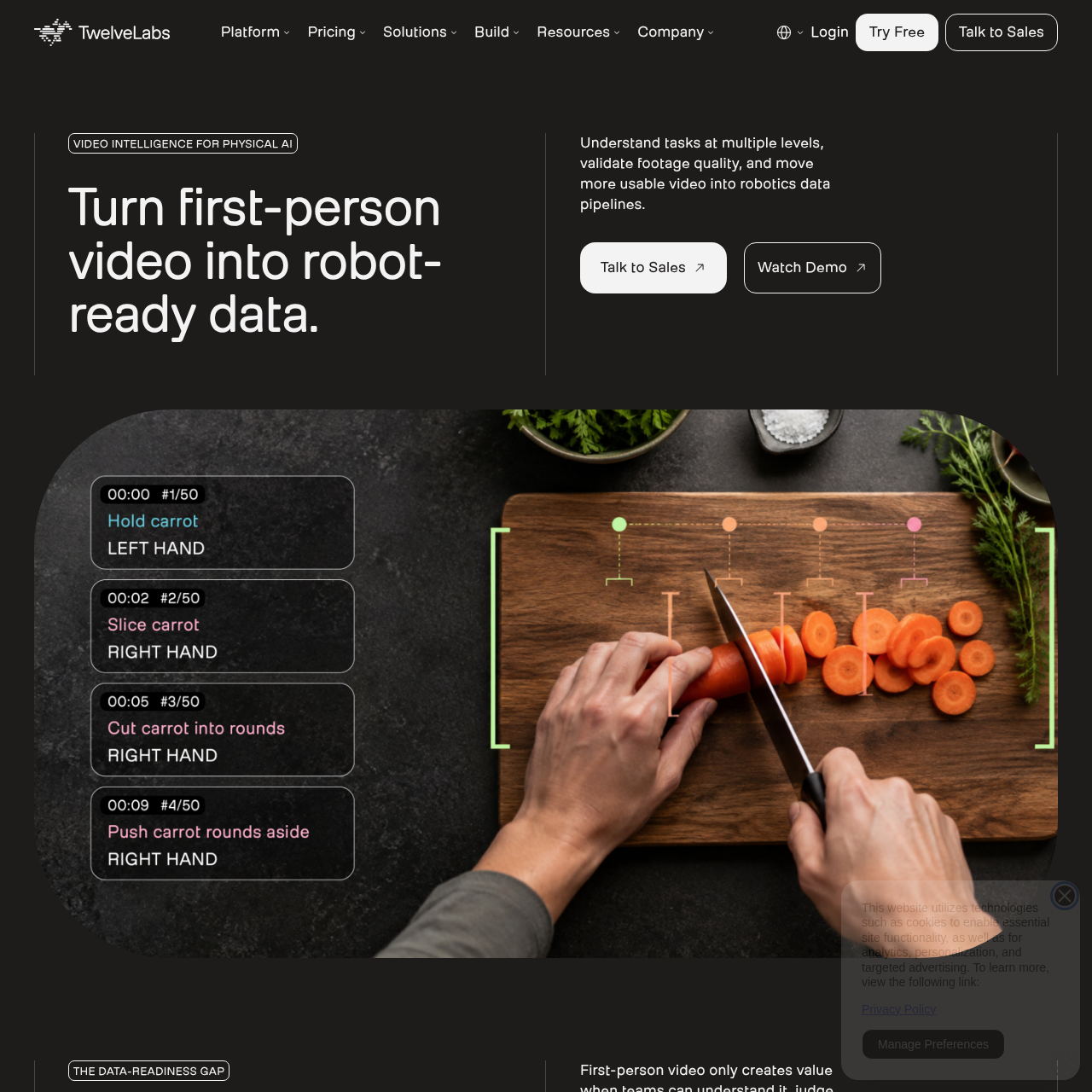
Pegasus 1.6 by TwelveLabs provides video intelligence for physical AI, turning first-person and robotics footage into structured, training-ready data through action segmentation, dense captioning, quality scoring, and compliance flagging.

VideoSegmenting and labeling discrete…Generating dense natural-language…Scoring video clips based on stability,…Searching footage libraries with…
Pegasus 1.6 by TwelveLabs product interface screenshot
Estimated monthly visits
177K
Data period:
Listed on AIToolly

What Is Pegasus 1.6 by TwelveLabs? Product Overview

What the product does and how it is positioned

Pegasus 1.6 by TwelveLabs is a video intelligence solution engineered to convert first-person and robotic video into structured, training-ready data for physical AI pipelines.

The platform enables teams to segment actions, generate dense descriptions of scene context, score visual quality, search libraries using natural language, and flag sensitive personal data before review or downstream processing.

What Can You Use Pegasus 1.6 by TwelveLabs For?

Source-supported ways to use the product

Robotics Training Data Curation

Robotics laboratories can transform raw first-person and robot footage into structured training datasets with timestamped actions and interaction captions.

Data Provider Quality and Compliance Validation

Commercial data providers can standardize delivery schemas, score clip quality, and verify consent requirements prior to buyer delivery.

Edge Case and Duplicate Discovery

Physical AI teams can query extensive video archives using natural language to uncover long-tail anomalies, rare events, and duplicate scenes.

How to Use Pegasus 1.6 by TwelveLabs

The documented workflow, where available

  1. 1

    Understand

    Identify valuable moments and filter raw footage against specific task requirements before sending it downstream.

  2. 2

    Validate

    Check footage against behavioral, visual, and privacy criteria, assessing stability, framing, occlusion, and PII presence.

  3. 3

    Activate

    Return structured, timestamped JSON outputs that teams can review, filter, and ingest directly into machine learning workflows.

Action Segmentation and Dense Captioning

The platform converts raw egocentric and robot video into structured data aligned with custom task structures. It identifies discrete, timestamped steps that can be mapped to user-provided verb lists and action hierarchies.

For language-conditioned robotic policies, the system generates natural-language descriptions that detail hand-object interactions, spatial relationships, and contextual scene dynamics without assembling separate transcription or framing tools.

  • Detection of discrete, timestamped actions from egocentric video
  • Custom taxonomy support for user-defined verbs and action hierarchies
  • Rich natural-language descriptions covering hand-object interactions and spatial context

Quality Validation and Compliance Screening

To keep low-quality recordings out of model pipelines, the solution evaluates footage stability, framing, visual occlusion, and action clarity using configurable quality prompts.

The screening process also incorporates automated compliance checks that locate minors and personally identifiable information, including faces, license plates, badges, and documents, prior to delivery.

  • Automated scoring for camera stability, framing, and occlusion
  • Pre-review compliance screening for faces, documents, badges, and license plates
  • Detection of minors to meet downstream privacy standards

What to Test Before Choosing Pegasus 1.6 by TwelveLabs

Checks to run with your own material and workflow

  • Verify that your custom action taxonomies and verb hierarchies can be mapped into the action segmentation workflow.
  • Check whether the quality scoring criteria for stability, framing, and occlusion meet your pipeline's acceptance thresholds.
  • Confirm that the compliance detection capabilities adequately identify relevant PII and minors in your recording environments.
  • Review the structured JSON schema and SDK integration mechanisms to ensure compatibility with your downstream ML data pipeline.

Pegasus 1.6 by TwelveLabs Sources and Last Checked

What was checked and when

Last checked
Category
Video

Pegasus 1.6 by TwelveLabs Frequently Asked Questions

Answers based on the source-checked product record

What types of video footage does TwelveLabs process for physical AI?

The platform processes first-person egocentric video and robot recordings to prepare training data for physical AI workflows.

Can teams use their own action taxonomies with the system?

Yes, teams can bring their own verb lists, action hierarchies, and granularity requirements to map detected video actions.

Which visual quality parameters can the platform evaluate?

The system scores footage based on clip stability, framing, visual occlusion, and action clarity before manual review.

What privacy and compliance elements can the platform detect?

The platform flags personally identifiable information such as faces, license plates, documents, and badges, as well as minors.

How are analysis results delivered to downstream workflows?

Outputs are delivered as structured, timestamped JSON records accessible through an official API and an SDK with async task handling.

Explore other recently added tools in the same category.