Dedica favicon

Dedica

Dedica evaluates websites against 125 automated checks to detect where AI agents encounter barriers, providing prioritized scores and remediation instructions.

Code & ITScans public web domains to identify…Detects access barriersGenerates remediation files formattedSupports rescanning domains to verify…
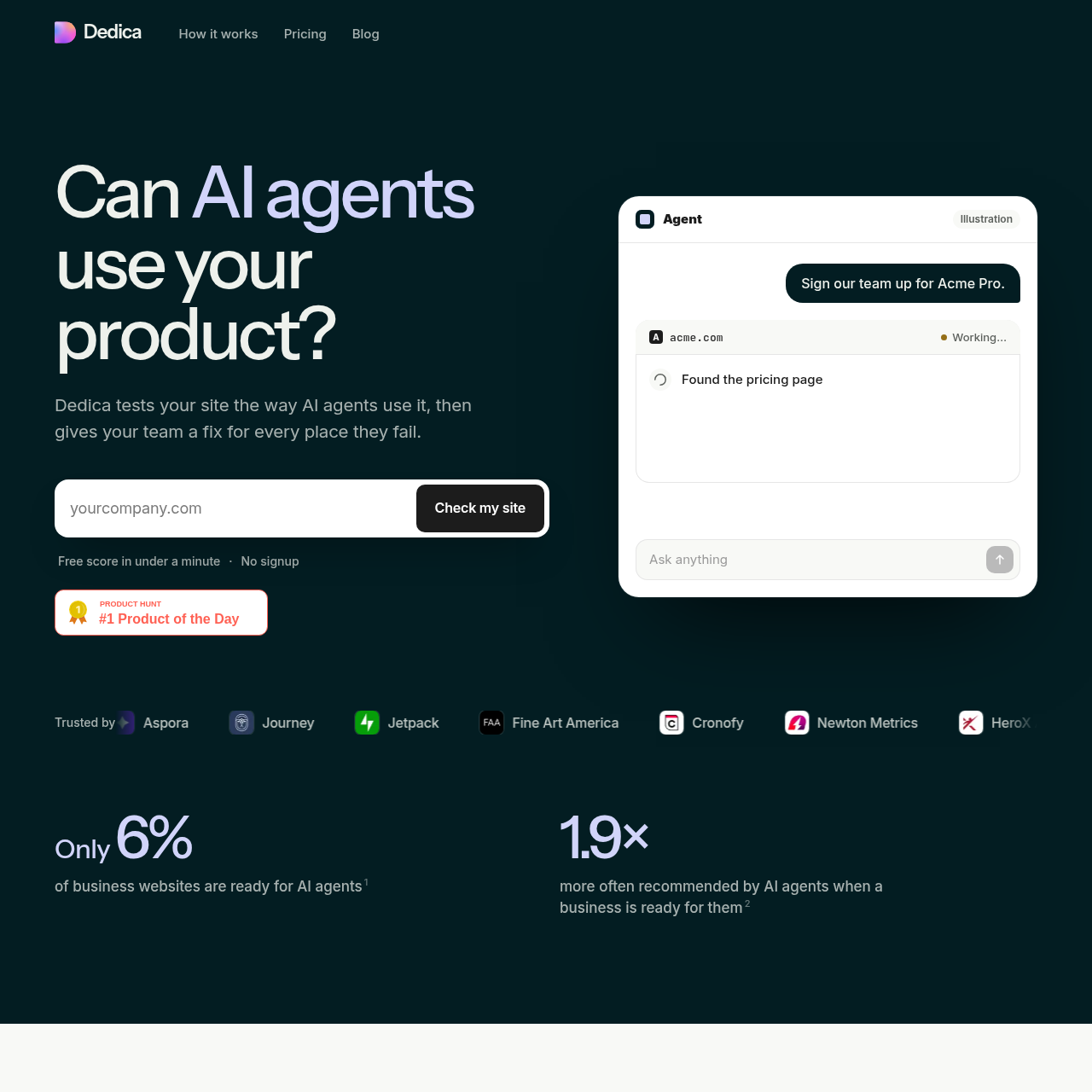
Dedica product interface screenshot
Listed on AIToolly

What Is Dedica? Product Overview

What the product does and how it is positioned

Dedica is an evaluation service that analyzes websites from the perspective of AI agents, identifying technical obstacles that prevent automated software from discovering, accessing, or completing actions on a domain.

The service assesses websites across discovery, access, usability, and payments, outputting prioritized findings along with dedicated instruction files designed for developers or coding assistants to resolve identified failures.

What Can You Use Dedica For?

Source-supported ways to use the product

Diagnosing AI Agent Accessibility Blockers

Teams enter their website domain to reveal where bot security checks, script-loading requirements, or missing API specifications prevent software agents from reading content.

Developer Remediation Handoff

Engineering teams pass generated Markdown instruction files directly to developers or coding tools to guide implementation and test each adjustment.

Post-Deployment Fix Verification

Organizations rescan their domains following site updates to ensure modified endpoints return appropriate responses and pass previous audit checks.

How to Use Dedica

The documented workflow, where available

  1. 1

    Scan your site

    Enter a domain to initiate an automated scan that evaluates agent compatibility and returns a scored breakdown across audit categories.

  2. 2

    Hand over the fix kit

    Provide the generated Markdown remediation files to a developer or import them into coding assistants such as Claude Code, Codex, Cursor, or Copilot.

  3. 3

    Scan again

    Rescan the domain once technical adjustments are deployed to confirm that previously failing checks now pass.

Agent Compatibility Auditing and Remediation

Dedica organizes site evaluations across four primary operational areas: discovery, access, usability, and payments. The assessment runs 125 checks to simulate how AI agents navigate websites, pinpointing structural and security configurations that prevent software agents from completing basic tasks.

When scans complete, the system highlights high-impact issues such as bot detection pages returning 403 status codes, pricing data that requires client-side JavaScript execution, and the absence of standardized OpenAPI specifications or MCP server manifests. Each issue displays an estimated score impact.

To assist with remediation, the platform provides individual instruction files structured for developers or coding agents. Each file states the finding, specifies the required configuration or code changes, and outlines verification procedures to validate that the endpoint responds correctly.

  • Coverage across discovery, access, usability, and payment checkpoints.
  • Identification of bot challenges, JavaScript dependencies, and missing machine-readable specifications.
  • Issue-specific Markdown guidance compatible with coding tools like Cursor, Claude Code, Codex, and GitHub Copilot.
  • Domain rescan functionality to confirm resolution of flagged items.

What to Test Before Choosing Dedica

Checks to run with your own material and workflow

  • Check whether public sign-up and pricing endpoints serve challenge pages to automated requests or require JavaScript execution.
  • Verify whether the domain publishes standard machine-readable assets like OpenAPI specifications or MCP server manifests.
  • Confirm that generated Markdown remediation files integrate into the development workflow or AI coding assistant in use.
  • Review rescan results after deploying changes to verify that resolved issues pass the corresponding audit checks.

Dedica Sources and Last Checked

What was checked and when

Official source
https://getdedica.com/
Last checked
Category
Code & IT

Dedica Frequently Asked Questions

Answers based on the source-checked product record

What categories does Dedica assess during a site scan?

Dedica assesses website performance across four categories: discovery, access, usability, and payments, evaluating 125 specific checks.

What common issues does the audit highlight?

The audit identifies obstacles including bot verification challenges on public routes, JavaScript-dependent content, missing OpenAPI specifications, and absent MCP servers.

How are recommended fixes delivered to teams?

Remediation guidance is provided as individual Markdown files per issue, each detailing what to change and outlining how to verify the resolution.

Can the fix files be used with automated coding tools?

Yes, the instruction files are designed to be handed to developers or loaded into coding agents such as Claude Code, Codex, Cursor, and GitHub Copilot.

How can teams confirm that site updates solved the detected problems?

Teams follow the verification steps in each instruction file and perform a rescan of their domain in Dedica to verify that the check passes.

Explore other recently added tools in the same category.