Anyvids
AIToolly product video
See Anyvids in motion
Anyvids: The Ultimate All-in-One AI Video and Image Platform for Creators
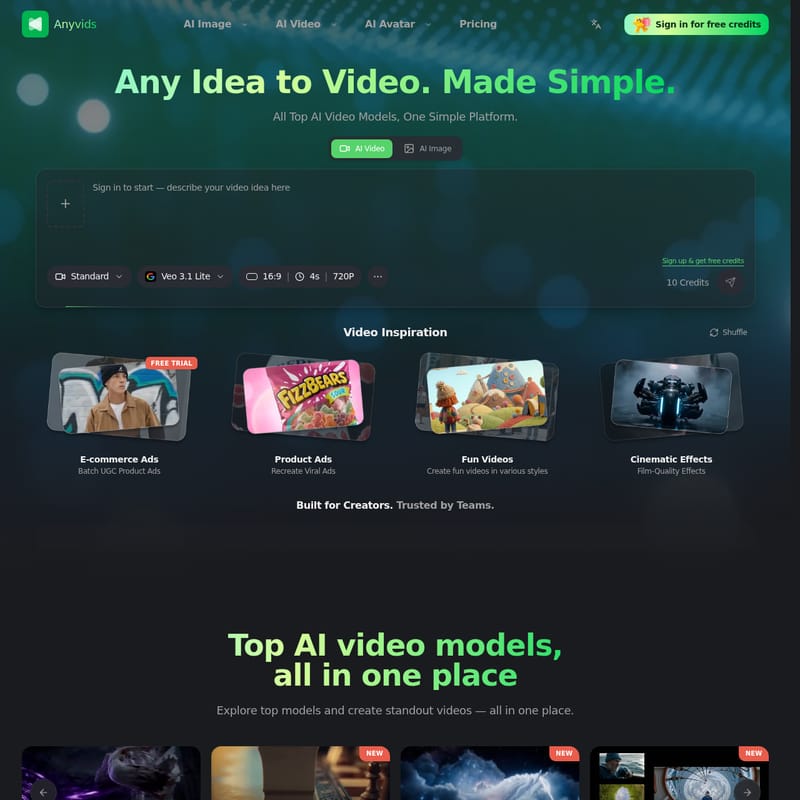
Anyvids is a comprehensive AI creative ecosystem that simplifies video and image generation. By aggregating top AI models like Kling, Veo, and Wan, Anyvids provides a powerful toolkit for text-to-video, image-to-video, and professional-grade AI editing, tailored for creators and enterprise teams.
2026-07-11
1.0K
Anyvids Product Information
Anyvids: The All-in-One AI Video and Image Generation Platform
In the rapidly evolving landscape of digital content, Anyvids emerges as a premier, all-in-one AI video and image platform. Designed to simplify the complex process of content creation, Anyvids brings together the world’s most advanced AI models into a single, intuitive interface. Whether you are a solo creator, a designer, or part of an enterprise team, Anyvids provides the essential tools to transform any idea into a high-quality video or image with ease.
What's Anyvids?
Anyvids is a comprehensive creative ecosystem that bridges the gap between imagination and professional-grade visual content. It is defined as a platform where any idea can be turned into a video, making high-end AI production accessible to everyone. By integrating all top AI video models into one simple platform, Anyvids eliminates the need for multiple subscriptions and complex workflows. It is a complete toolkit built for creators and trusted by teams globally to deliver standout videos and imagery.
At its core, Anyvids is built to help users generate, edit, and refine videos and images in one unified place. From cinematic projects to social media content, Anyvids provides a powerful infrastructure that supports a wide range of creative needs, ensuring that every user can conquer their creative challenges within one ecosystem.
Core Features of Anyvids
Anyvids is packed with a diverse array of creative tools and models that cater to every aspect of AI-driven production. The platform is divided into several high-impact feature sets:
AI Video Generation Tools
Anyvids excels in video production, offering a suite of tools that automate and enhance the filmmaking process:
- AI Video Generator: The flagship tool for creating high-quality video content.
- AI Movie Maker: Specialized for longer, more cinematic projects.
- AI Animation Generator: Perfect for creating stylized and animated motion graphics.
- AI Ad Generator: Tailored for marketing teams looking to create high-conversion social content and brand campaigns.
- Text to Video: Convert detailed text prompts directly into moving images.
- Image to Video: Transform static photos or designs into dynamic video clips.
- Reference to Video & Frames to Video: Maintain consistency and control over your output by using reference materials.
Advanced AI Video Editing
Beyond simple generation, Anyvids offers professional editing capabilities:
- AI Video Editor: Refine your creations within the platform.
- Motion Control: Gain precise control over how elements move within your video.
- Video Character Swap: Effortlessly change characters within a scene.
- Video Upscaler: Enhance your video quality to higher resolutions.
- AI Avatar: Create realistic AI-driven characters for presentations or social media.
AI Image and Character Tools
For designers and visual artists, Anyvids provides a robust set of image tools:
- AI Image Generator: Produce stunning visuals from scratch.
- AI Character Generator: Design unique characters with specific traits.
- Text to Image & Image to Image: Flexible generation workflows for diverse artistic styles.
- AI Image Editor: Edit and fine-tune images directly on the Anyvids platform.
Top-Tier AI Models Supported
One of the greatest strengths of Anyvids is its integration of the industry's leading AI models. Users can explore and utilize models such as:
- Kling 3.0
- Veo 3.1
- Wan 2.7
- Flux 2
- Grok Imagine Image
- Seedance 2.0, 2.0 Mini, and 2.5
- Seedream 5.0 Lite
- Happy Horse 1.0
- Gpt image 2
- Nano banana 2
- Gemini Omni
How to Use Anyvids
Getting started with Anyvids is simple and efficient. The platform features an intuitive four-step workflow that allows you to create professional videos in minutes.
Step 01: Describe Your Video
Begin by writing a detailed text prompt or uploading an image to the Anyvids interface. The more specific your description, the better the final AI output will be. On average, users spend about 30 seconds on this stage.
Step 02: Choose Output Settings
You can start with the "Auto" setting or manually select a specific AI model from the Anyvids library. Fine-tune your output settings to match your creative vision. Anyvids supports over 20 different formats to ensure compatibility with your project requirements.
Step 03: AI Generates
Once you have configured your settings, the Anyvids AI processes your request. The generation time is remarkably fast, averaging around 3 minutes to create a unique, high-quality video.
Step 04: Download & Share
After the AI finishes processing, you can download your HD video. Anyvids supports a maximum quality of 1,080p, making it easy to share your creations anywhere, from social platforms to professional presentations.
Use Cases for Anyvids
Anyvids is a versatile platform that serves a wide range of industries and creative purposes:
- Social Content: Creators use Anyvids to generate viral-ready videos for platforms like Instagram, TikTok, and YouTube.
- Brand Campaigns: Marketing teams leverage the AI Ad Generator to produce high-quality promotional materials quickly.
- Cinematic Projects: Filmmakers utilize the AI Movie Maker and motion control features to build cinematic scenes and storyboards.
- Image Inspiration: Designers use the Text to Image tools for rapid prototyping and creative inspiration.
- Enterprise Solutions: Large teams benefit from the tailored AI ecosystem that Anyvids provides, allowing for collaborative and consistent content production.
- Video Inspiration: Use the platform to explore what’s possible with the latest AI models and push the boundaries of visual storytelling.
Frequently Asked Questions (FAQ)
What is Anyvids? Anyvids is an all-in-one AI creative platform that integrates top video and image models like Kling, Veo, and Wan into one place, allowing users to generate and edit high-quality content easily.
Can I use Anyvids for free? Yes, you can sign in to Anyvids to receive free credits and start exploring the platform's features.
What is the maximum resolution for Anyvids videos? Anyvids allows you to download videos in HD quality, with a maximum resolution of 1,080p.
How many formats does Anyvids support? The Anyvids platform supports over 20 different output formats, providing great flexibility for various creative projects.
How long does it take to generate a video? While you can describe your video in seconds, the AI generation process on Anyvids typically takes about 3 minutes.
Who is Anyvids built for? Anyvids is built for a wide audience, including solo content creators, professional designers, and enterprise teams looking for tailored AI video and image solutions.