AI Image to Video pro
AIToolly product video
See AI Image to Video pro in motion
AI Image to Video Generator: Create Stunning Animations from Photos with aiimagetovideo pro
Transform static images into dynamic HD videos using aiimagetovideo pro, the best free AI image to video generator for marketing, social media, and creative storytelling.
2026-05-30
814.0K
AI Image to Video pro Product Information
AI Image to Video: The Best Free AI Video Generator to Transform Photos into Motion
In the modern digital landscape, static visuals are often not enough to capture attention. The rise of AI image to video technology has revolutionized how creators, marketers, and hobbyists interact with their media. Using aiimagetovideo pro, a professional-grade AI video generator, anyone can now convert image to video online free without needing complex editing skills. This comprehensive guide explores the features, use cases, and workflows of the best free AI image to video generator available today.
What is AI Image to Video Pro?
aiimagetovideo pro is an advanced AI video tools platform designed to transform static images into cinematic motion using cutting-edge artificial intelligence. Whether you are looking to explore Google Veo, Veo 3, or Imagen 3 aesthetics, this tool provides a seamless way to make video from images for social media and professional projects.
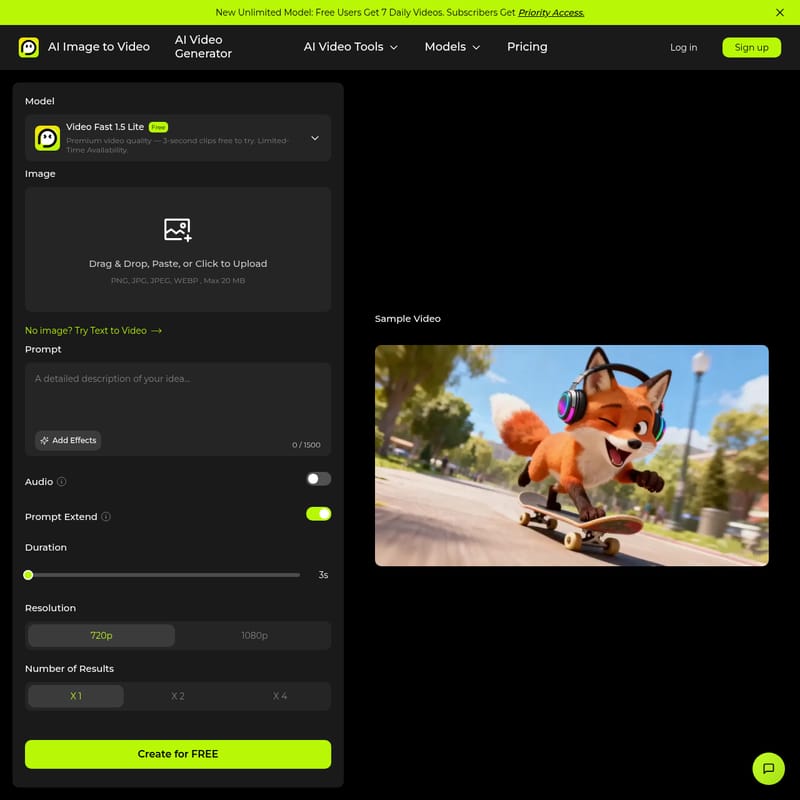
Under the new Unlimited Model, free users can generate up to 7 daily videos, while subscribers receive priority access to the processing queue. The platform supports a variety of formats including PNG, JPG, JPEG, and WEBP (up to 20 MB), ensuring that your high-quality source files are ready for an AI picture to video transformation.
Key Features of the AI Image to Video Generator
Our AI video generator from image is packed with features that rival premium platforms like Luma AI, Kling AI, and Runway. Here are the core highlights:
High-Quality Output without Watermarks
One of the most significant advantages of aiimagetovideo pro is the ability to generate HD AI image to video results without intrusive watermarks. This makes it an ideal image to video AI generator free for creators who need clean, professional assets for their portfolios or commercial ads.
Multi-Input Prompts: Image and Text Synergy
To provide maximum creative control, our platform utilizes a text to video AI generator framework alongside image inputs. By combining a source image with a descriptive text prompt, you can guide the artificial intelligence to perform specific actions—such as a rabbit paragliding over a city or a solar-powered sailboat drifting past a floating city.
Access to Advanced AI Models
The platform integrates a wide variety of state-of-the-art models, including:
- Video Fast 1.5 Lite: Optimized for speed and premium quality.
- Huyuan & Kling AI: Known for realistic motion and cinematic lighting.
- Sora 2 & Veo 3.1: Leading models for high-fidelity video generation.
- Wan 2.1 & Minimax: Specialized models for diverse artistic styles.
Versatile Visual Options
Whether you are performing a style transfer or creating a 3-second clip for a quick social media hook, our free image to video maker adapts to your needs. It rivals the capabilities of platforms like Dezgo and Higgsfield, offering everything from photorealistic portraits to hyper-artistic anime styles.
How to Use the AI Video Generator from Image
Creating a video from a still photo has never been easier. Follow these simple steps to convert image to video AI successfully:
- Upload Your Image: Drag and drop your JPG, PNG, or WEBP file into the free image to video converter. Ensure the file is under 20 MB for optimal processing.
- Type in Your Prompt: Enter a descriptive text prompt (up to 1500 characters) to guide the motion. You can also add effects, audio, and use the "Prompt Extend" feature to enhance your description.
- Customize Settings: Select your desired duration (e.g., 3 seconds) and resolution (720p or 1080p). You can also choose the number of results you wish to generate (X1, X2, or X4).
- Generate and Export: Click "Create for FREE" and wait for the AI to render. Once the motion is finalized, you can preview and export your watermark-free video.
Practical Use Cases for AI Image to Video
1. Social Media Marketing and Viral Clips
Influencers like Ava Reyes use the AI video generator from image to turn static photos into lively short videos, doubling their engagement on platforms like TikTok and Instagram. It is a must-have for creating viral hits quickly.
2. Real Estate and Property Tours
Realtors can transform flat real estate photos into elegant, cinematic property tours. This helps clients visualize spaces more effectively than static galleries alone.
3. Professional Creative Design
Designers can use aiimagetovideo pro to save hours on manual animation. By adding image details and prompts, they can create professional-grade content that feels like it was produced by a high-end studio.
4. Dynamic Ads and E-commerce
Shopify store owners use photo to video animation tools to create promotional videos directly from product images. This professional look builds trust and helps boost sales by showcasing products in motion.
Understanding the 2026 AI Video Landscape
As we look toward 2026, the market for AI video tools has expanded. Platforms like Dezgo AI have moved beyond simple wrappers to become multi-model marketplaces, offering access to Grok Imagine and Flux 2 Pro. Meanwhile, Gemini Omni introduces a conversational editing workflow, allowing users to refine videos through natural dialogue.
However, aiimagetovideo pro remains a top choice for those seeking a balance of ease of use and high-quality results. While some platforms like Higgsfield use "Unlimited" marketing that includes speed throttling (the battery system), our platform focuses on providing transparent access to premium models like Veo 3 and Kling 3.0.
FAQ about AI Image to Video Generator
Q: Is there a free image to video AI option? A: Yes, aiimagetovideo pro offers a free plan. Free users get 7 daily videos to test the capabilities of our free AI image to video generator.
Q: What is the best image to video AI tool? A: The "best" tool depends on your needs, but aiimagetovideo pro is highly recommended for its ease of use, HD output, and lack of watermarks. It strives to match the quality of Google Veo and Kling AI.
Q: Do I need an account to use the AI generator? A: Currently, registration is required to save your projects and access your free daily credits. Registration is fast and free.
Q: Can I create professional results with a free tool? A: Absolutely. By using high-quality source images and descriptive prompts, you can convert image to video with professional-grade smooth rendering and cinematic effects.
Q: Does it support different models like Veo 3 or Sora? A: We integrate and evaluate leading technologies such as Veo 3, Sora 2, and Wan AI to ensure our users have access to the most cutting-edge video generation engines available.
"This is the best image to video AI generator free tool I've found. I uploaded an image, added a prompt, and created a stunning video effortlessly." — Maya Rodriguez, Beginner User