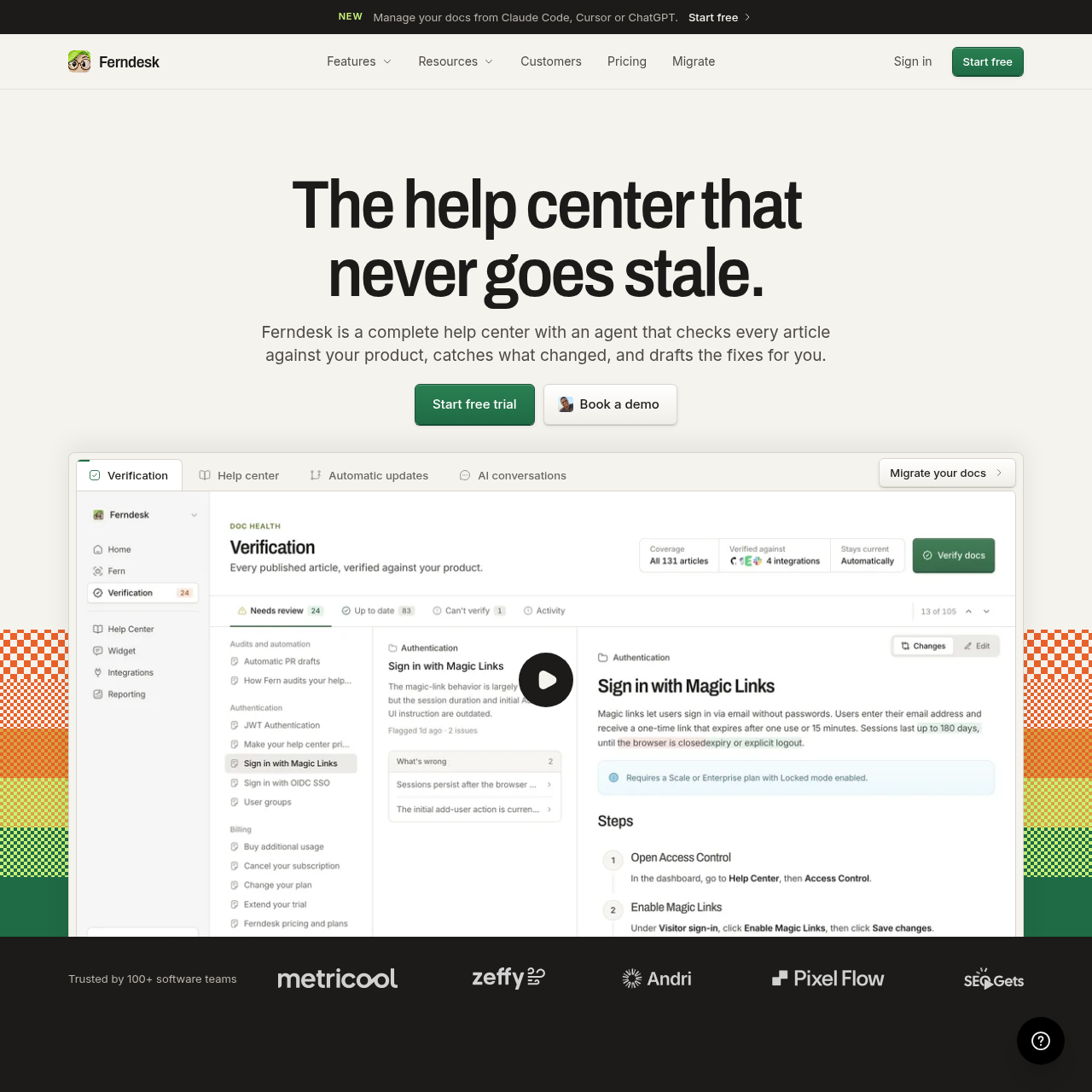
Ferndesk provides a software help center platform that verifies documentation accuracy against codebases and live tools, preparing draft updates for manual review.
Customer SupportDetects discrepancies between…Requires manual approval before…Indexes public help contentEscalates unresolved widget…
Estimated monthly visits
54K
Data period:
Listed on AIToolly
What Is Ferndesk? Product Overview
What the product does and how it is positioned
Ferndesk is a knowledge base and help center solution engineered to keep product documentation aligned with ongoing software releases. By connecting directly to source code repositories, live applications, and support channels, the platform monitors product modifications, pinpoints outdated claims in existing articles, and prepares suggested revisions for human confirmation.
In addition to automated doc verification and pull-request-driven drafting, Ferndesk includes self-service delivery tools. These comprise a public web portal, an embeddable in-app widget with AI conversational responses, interactive OpenAPI reference pages, private documentation secured via OIDC or JWT, and multilingual localization management.
What Can You Use Ferndesk For?
Source-supported ways to use the product
Synchronizing Docs with Code Releases
Development teams can automatically generate documentation drafts whenever pull requests merge, supporting product adjustments are documented before features deploy.
In-App Customer Self-Service
Support teams deploy the single-script widget inside applications to deliver search, verified AI answers, and ticket escalation directly to active users.
Migrating Stale Knowledge Bases
Organizations moving from legacy help desks can import existing articles and images while preserving URL structures and search engine indexing.
How to Use Ferndesk
The documented workflow, where available
1
Connect Data Sources
Link code repositories, live product environments, and customer support inboxes to the Ferndesk platform.
2
Scan and Identify Changes
The system compares existing help articles against product behavior and merged pull requests to detect outdated claims.
3
Draft Documentation Updates
The platform prepares proposed text modifications, new articles, or screenshot updates alongside explanations for the changes.
4
Review and Publish
Team members evaluate the proposed revisions and approve them before any updates go live to customer-facing channels.
Product-Aware Verification and Drafting
Ferndesk bridges technical development changes with user-facing support content by monitoring repositories such as GitHub alongside customer support streams and live software environments. Instead of relying on manual authoring to reflect software revisions, the platform inspects documentation text against underlying code logic and interface changes.
When a disparity is detected or when a pull request merges, the platform drafts corresponding edits or new articles before features reach users. Proposed changes explicitly outline what was modified and why, requiring an administrator or team member to review and approve the text before publication.
Connects to GitHub, Linear, Slack, Discord, and support platforms like Intercom and Zendesk.
Generates reviewable drafts for merged pull requests prior to software release.
Enforces human-in-the-loop review, helping reduce unapproved edits from going live.
Help Center Delivery and API Reference
Beyond documentation maintenance, Ferndesk serves as a multi-format hosting platform for customer self-service. It supports public help portals configured on custom domains or subpaths, structured to allow crawling by standard web search engines and conversational AI systems.
The platform also integrates API references powered by OpenAPI schemas, offering an interactive playground adjacent to regular help guides. Content can be distributed securely to restricted audiences using token-based access mechanisms or translated into multiple languages via localized routing.
Public hosting available on custom root domains or subfolder structures.
Interactive OpenAPI documentation playground integrated into the knowledge base.
Secured access controls using Magic Links, OIDC, or JWT tokens for private hubs.
Conversational in-app widget that escalates to external help desks when issues cannot be resolved.
What to Test Before Choosing Ferndesk
Checks to run with your own material and workflow
Confirm that repository integrations such as GitHub access permissions match your engineering security requirements.
Verify that existing help center URL patterns can be mapped during import to help reduce search traffic disruptions.
Check whether your external ticketing system is supported for conversational escalation from the in-app widget.
Review the supported authentication providers to ensure compatibility with your internal or partner SSO standards.
Answers based on the source-checked product record
Does Ferndesk update articles hosted in external help desk tools?+
No, Ferndesk only verifies and updates documentation hosted within its own system. Existing help centers must be imported into Ferndesk, though external ticketing systems remain untouched.
Can Ferndesk publish documentation changes automatically?+
No, the system requires a team member to review and approve drafted updates before any content is published live.
What happens to search engine rankings and URLs during migration?+
Ferndesk imports articles, images, and paths intact, creating redirects to preserve established URLs and search indexing.
Which ticketing tools can the Ferndesk widget escalate to?+
When the self-service widget cannot answer a customer inquiry, it can hand the conversation off to Intercom, Zendesk, or Help Scout.
How are private help center documents protected?+
Private documentation can be restricted and accessed using Magic link authentication, OIDC, or JWT tokens.
More Customer Support AI tools
Explore other recently added tools in the same category.