Clipwise  favicon

Clipwise

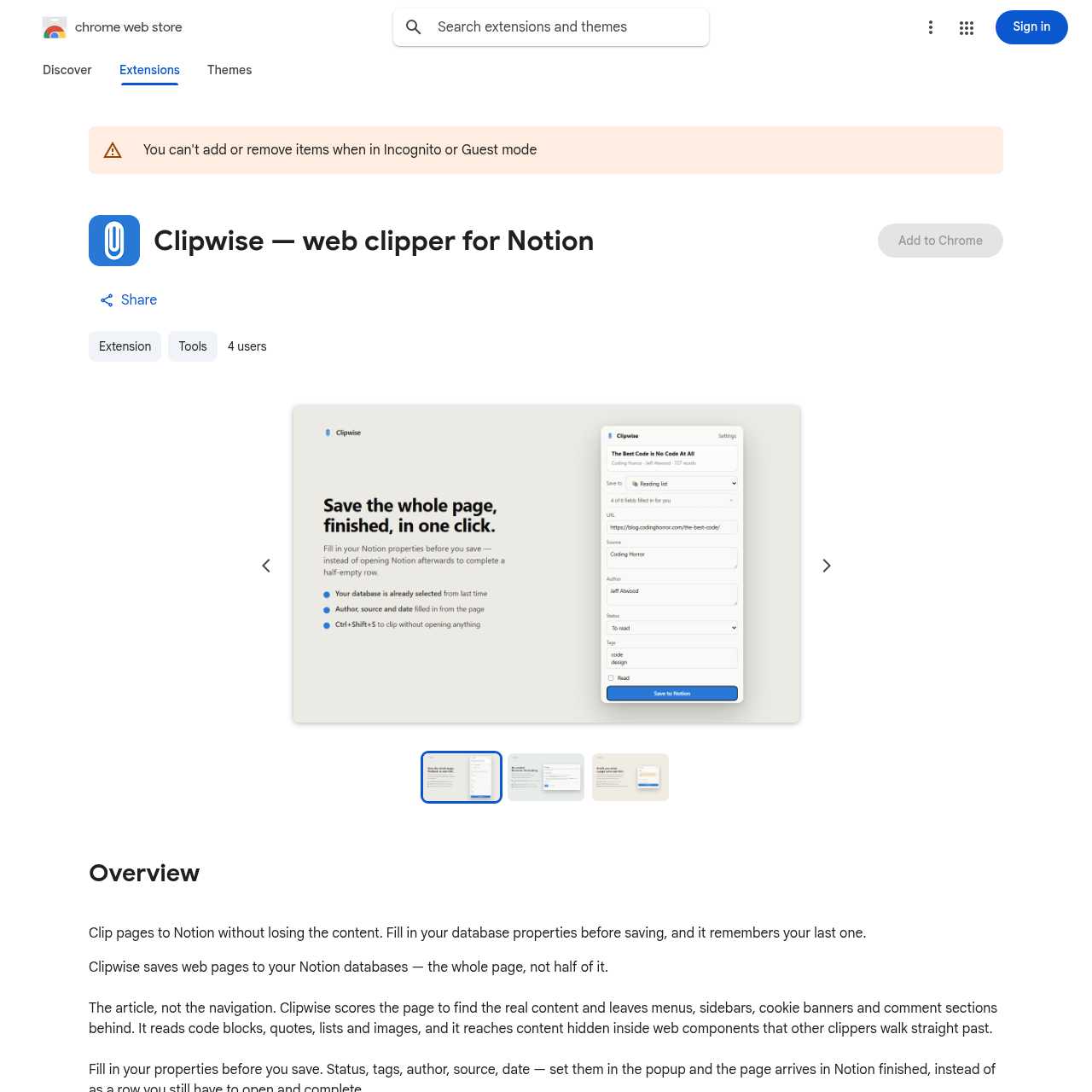
Clipwise is a Chrome extension that extracts web page content and sends it directly to Notion databases, allowing users to configure database properties prior to saving.

ProductivityExtracts main article text, quotes,…Populates Notion database properties…Saves content directly to the prior…Flags pages with little to no…
Clipwise  product interface screenshot
Estimated monthly visits
84.9B
Data period:
Listed on AIToolly

What Is Clipwise ? Product Overview

What the product does and how it is positioned

Clipwise is a Google Chrome extension designed to save web articles and resources into Notion databases. It extracts core page content, including code blocks, quotes, lists, images, and web component content, while excluding sidebars, menus, banners, and comments.

The extension allows users to populate Notion database properties such as author, source, date, tags, and status within the clipping popup, remembers previously applied properties, and supports quick clipping through a keyboard shortcut without routing data through intermediary servers.

What Can You Use Clipwise For?

Source-supported ways to use the product

Article Archiving with Custom Metadata

Researchers and readers can clip complete online articles into Notion while populating properties such as tags, author, and status in the popup before saving.

Rapid Background Clipping

Users who consistently save content to the same Notion database can bypass the extension popup entirely by triggering the Ctrl+Shift+S shortcut.

How to Use Clipwise

The documented workflow, where available

  1. 1

    Create Notion Integration

    Create a new integration in your Notion account settings and copy the generated integration secret.

  2. 2

    Configure Extension Settings

    Paste the integration secret into the Clipwise settings panel to connect the extension to Notion.

  3. 3

    Share Target Databases

    Open Notion and share the specific databases you want to clip into with your newly created integration.

Content Extraction and Local Architecture

Clipwise identifies and parses main page elements by scoring the DOM structure. It captures rich formatting elements including block quotes, code blocks, lists, and images, and parses text inside web components. Non-essential elements like navigation headers, sidebars, cookie banners, and comments are omitted.

The tool functions entirely client-side without external proxy servers or user accounts. Credentials and data travel directly between the local browser environment and Notion API endpoints.

  • Scoring engine separates article body text from peripheral navigation, footers, and sidebars.
  • Extracts content encapsulated inside custom web components.
  • Stores the Notion integration secret locally and communicates exclusively with Notion.

What to Test Before Choosing Clipwise

Checks to run with your own material and workflow

  • Confirm that target Notion databases are properly shared with the created integration before clipping.
  • Verify that code blocks, images, and lists are accurately captured from complex web component layouts.
  • Check that the thin page alert activates when attempting to clip pages with negligible readable text.

Clipwise Sources and Last Checked

What was checked and when

Last checked
Category
Productivity

Clipwise Frequently Asked Questions

Answers based on the source-checked product record

How does Clipwise extract content from web pages?

Clipwise scores the page to isolate core content, extracting elements such as text, images, code blocks, quotes, and lists, while filtering out navigation menus, cookie banners, sidebars, and comments.

Does Clipwise require an account or external server?

No, Clipwise does not require a user account or an external backend service. It connects directly to Notion using an integration secret stored locally on your device.

Can database properties be modified before saving to Notion?

Yes, users can assign Notion database properties such as author, source, date, tags, and status inside the extension popup prior to saving the entry.

How does the keyboard shortcut functionality work?

The shortcut Ctrl+Shift+S saves the current web page directly into the last selected Notion database without opening the extension popup.

What happens if a web page has almost no readable text?

Clipwise alerts the user that the page yields minimal text instead of saving an empty record into the Notion database.

Explore other recently added tools in the same category.