Wondershare Repairit
AIToolly product video
See Wondershare Repairit in motion
Wondershare Repairit: The Ultimate AI-Powered Solution for Corrupted Video, Photo, and File Repair
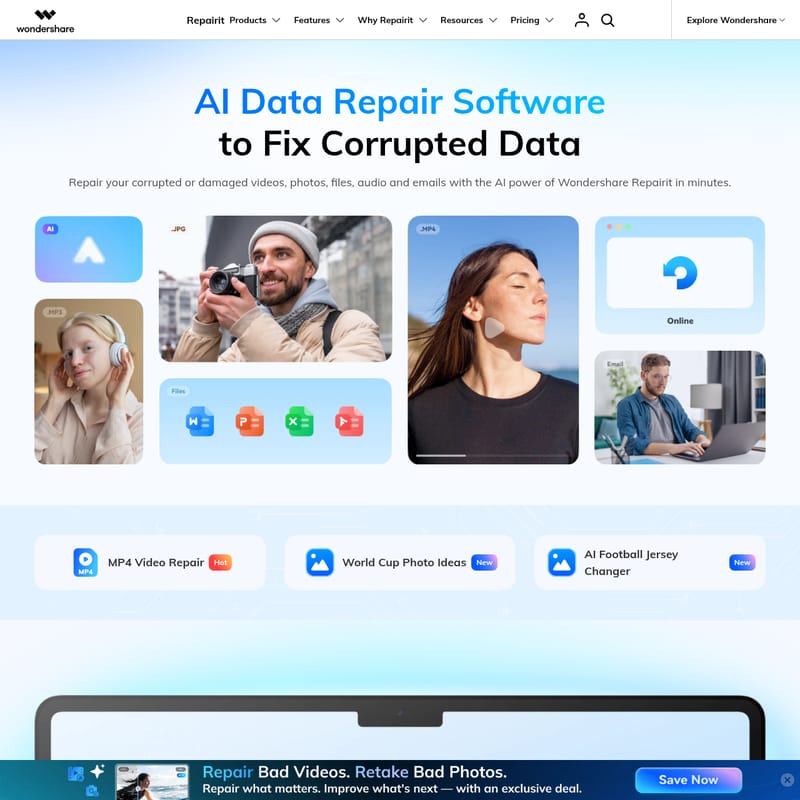
Wondershare Repairit is a professional, AI-driven data repair tool designed to fix corrupted or damaged videos, photos, files, and emails. Supporting a wide array of formats like MP4, MOV, JPG, and PDF, Repairit offers advanced features such as AI Video Enhancement, Old Photo Restoration, and Batch Repair. With over 22 years of expertise and patented technology, it serves as a comprehensive solution for photographers, office staff, and casual users to recover precious memories and critical data from various corruption scenarios including software crashes, physical damage, and transfer errors.
2026-06-17
8400.0K
Wondershare Repairit Product Information
Wondershare Repairit: The Ultimate AI-Powered Solution for Corrupted Data Repair
In the digital age, data is more than just bits and bytes; it represents our most cherished memories and critical professional assets. However, file corruption is an unfortunate reality. Whether it is a video that won't play or a document that refuses to open, the need for a reliable Repairit solution is paramount. Wondershare Repairit emerges as a game-changing, AI-powered tool designed to safeguard your digital life by repairing corrupted videos, photos, files, and audio with unmatched precision.
What is Wondershare Repairit?
Wondershare Repairit is a comprehensive, cross-platform AI repair and enhancement tool. It is specifically engineered to fix damaged or corrupted data across various formats and devices. Leveraging over 22 years of data expertise, Repairit provides a streamlined, one-stop solution for users to restore their files in minutes. From the Repairit Toolkit for desktop to the convenience of Repairit Online, this software addresses a wide range of corruption levels, from minor glitches to severe data damage.
As a TechSavior, Repairit utilizes patented AI-driven repair solutions to ensure a high success rate. It is not just about fixing what is broken; it is about enhancing quality through advanced AI features like the AI Video Enhancer and AI Photo Enhancer, making it a versatile studio for creative professionals and everyday users alike.
Key Features of Wondershare Repairit
Professional AI Video Repair
Repairit excels in restoring corrupted video files. Whether you are dealing with MP4 video repair, MOV file repair, or fixing specialized files like Sony RSV or Canon MDT, the tool handles it all.
- AI Video Enhancer: Upscale footage and reduce noise to transform low-quality videos into high-definition masterpieces.
- Advanced Video Repair: For severely damaged files, this option uses a sample file to reconstruct the corrupted data structure.
- Support for All Devices: Repair videos captured from GoPro, DJI drones, Sony, Canon, and more.
- Gyroscope Data Repair: A specialized feature to fix stability and metadata issues in action camera footage.
Advanced Photo Repair and Enhancement
Photos capture moments that cannot be replaced. Repairit offers a suite of tools to ensure your images remain flawless.
- AI Photo Enhancer: Sharpen details, enhance colors, and reduce noise to create high-resolution images.
- Old Photo Restoration: Effortlessly restore old, scratched, or faded photographs to their original glory.
- AI Photo Colorizer: Instantly add vibrant, natural colors to black-and-white photos.
- Photo Generative Fill & Eraser: Use AI to extend backgrounds or remove unwanted objects and watermarks in a single click.
- Specific Fixes: Includes innovative tools like the AI Eyes Opener, Photo Angle Changer, and Photo Lighting Enhancer.
Comprehensive File and Document Repair
Boost your productivity by fixing essential work documents that have become inaccessible.
- Office Document Repair: Fix corrupted Word, Excel, and PowerPoint files efficiently.
- PDF File Repair: Restore damaged PDF documents without losing formatting or content.
- Compressed File Repair: Repair corrupted ZIP and RAR files to retrieve your archived data.
Audio and Email Solutions
- Audio Repair: Fix corrupted audio files across multiple formats.
- Repairit for Email: A dedicated solution for repairing Outlook PST and OST files, ensuring you never lose important communications.
Use Cases: When to Use Repairit
Wondershare Repairit is designed to handle virtually every data corruption scenario. Here are common situations where Repairit is the ideal solution:
- Physical Damage: When hardware like SSDs or SD cards suffer trauma, leading to unreadable sectors.
- Software Crashes: System bugs or application crashes that result in corrupted, unsaved work.
- Abnormal Power Outages: Sudden power failures that interrupt file writing, creating incomplete DAT or RSV files.
- Transfer Errors: Files damaged during the move from one device to another due to interrupted connections.
- Storage Issues: Full storage or quality issues with storage cards that prevent files from opening correctly.
This tool is trusted by a wide range of users, including Photographers and Videographers who need to save client footage, Office and IT Staff managing critical documents, and Family and Friends looking to preserve digital memories.
How to Use Wondershare Repairit
Repairing your corrupted data with Wondershare Repairit is a simple, three-step process designed for users with no technical background.
- Add Corrupted Files: Open the Repairit interface and use the browse option or the drag-and-drop facility to add your corrupted videos, photos, or documents. You can add files in batches to save time.
- Repair the Files: Click the "Repair" button. For videos that are severely damaged, you can utilize the Advanced Repair feature, which uses a sample file of the same format to guide the AI in the reconstruction process.
- Preview and Save: Once the repair is complete, you can preview the fixed files to ensure they meet your standards. If satisfied, save them to your desired location.
Why Choose Repairit? Your Data Repair Expert
With over 2 million users globally, Repairit stands out as a leader in the industry. Here is why it is the preferred choice:
- Patented Data Repair Tech: Advanced AI technology ensures the highest repair quality and precision.
- High Success Rate: Outperforms competitors in restoring data from even the most severe corruption scenarios.
- Ease of Use: An intuitive interface with no learning curve, allowing anyone to fix files in just a few clicks.
- 22 Years of Expertise: Built on decades of experience in data management and recovery.
- Cross-Platform Availability: Whether you need a desktop toolkit, an online quick fix, or a mobile app like Relumi, Repairit is available wherever you need it.
Frequently Asked Questions (FAQ)
Q: Can Repairit fix videos that won't play on my phone? A: Yes, Repairit can fix blurry or unplayable videos from both Android and iPhone devices. Simply transfer the file to your computer or use the Repairit Online tool.
Q: What formats does Repairit support for video repair? A: Repairit supports a wide range of formats, including MP4, MOV, MDT, and specialized formats like Sony RSV and GoPro files.
Q: Can I repair multiple files at once? A: Absolutely. Repairit features a batch repair function that allows you to upload and fix multiple corrupted files simultaneously, significantly boosting productivity.
Q: Is there a way to fix corrupted Excel or Word files? A: Yes, Repairit includes dedicated modules for Excel, Word, PowerPoint, and PDF repair, restoring your documents to their original state efficiently.
Q: Can I preview the repaired file before paying or saving? A: Yes, Repairit provides a special preview feature that allows you to check the quality of the repaired file to ensure it meets your requirements before finalizing the process.