Data2Slide AI Presentation Maker
AIToolly product video
See Data2Slide AI Presentation Maker in motion
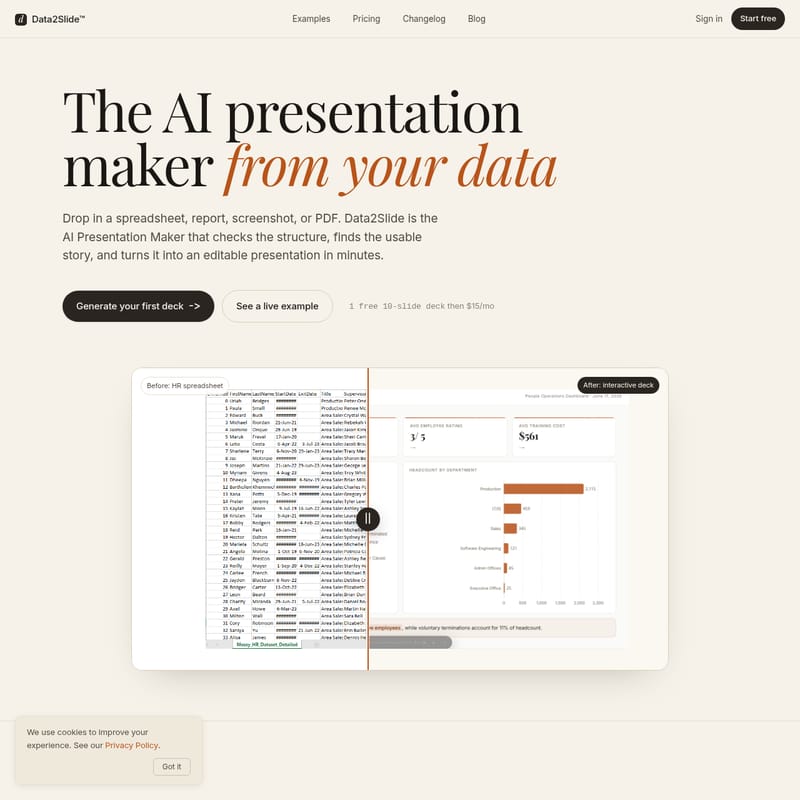
Data2Slide™: The AI Presentation Maker for converting spreadsheets, reports, and PDFs into professional, interactive decks.
Data2Slide™ is a powerful AI Presentation Maker that turns raw data into boardroom-ready slides in minutes. Supporting CSV, XLSX, PDF, and PNG formats, it provides automated input checking, browser-side data privacy, and interactive HTML exports. Designed for sales managers, HR professionals, and founders, this AI Presentation Maker simplifies data storytelling without requiring complex design skills or business intelligence tools.
2026-06-20
--K
Data2Slide AI Presentation Maker Product Information
Data2Slide™: The Ultimate AI Presentation Maker for Your Data
In the modern business environment, data is everywhere, but the time to present it effectively is often scarce. Data2Slide™ is the premier AI Presentation Maker designed to bridge the gap between raw data and professional communication. Whether you are dealing with a complex spreadsheet, a quarterly report, a dashboard screenshot, or a PDF, this AI Presentation Maker analyzes your information, finds the usable story, and converts it into an editable, interactive presentation in just minutes.
What's Data2Slide™?
Data2Slide™ is an automated AI Presentation Maker that transforms data exports into boardroom-ready slides. It is specifically built for professionals who have data and limited time. Unlike general-purpose design tools, this AI Presentation Maker focuses on the structural integrity of your data. It checks for metrics, timelines, and categories to ensure that the output is not just visually appealing but also factually accurate and decision-oriented.
From a simple CSV export to a complex financial PDF, Data2Slide™ acts as your personal data analyst and slide designer combined into one platform. It is the ideal AI Presentation Maker for those who prioritize clear decisions and clean charts over slide decoration. By focusing on the numbers that matter, it allows users to generate high-impact decks without needing expertise in Python, Tableau, or graphic design.
Features of the Data2Slide AI Presentation Maker
Automated Data Readiness Checks
One of the most unique aspects of the Data2Slide AI Presentation Maker is its "Input Check" phase. Before any slides are generated, the AI Presentation Maker scans your source file—such as a sales_q3.csv—to ensure it is ready for visualization. It checks for:
- Metrics and Dimensions: Identifying KPIs and data categories.
- Timeline Readiness: Ensuring dates are present for trend analysis.
- Data Quality: Detecting missing values and ignoring irrelevant ID columns.
- Source Suitability: If a file is too sparse or contains too much free text, the AI Presentation Maker provides a warning so you can fix the input before wasting time on a poor deck.
Privacy-First Browser Parsing
Security is a top priority for Data2Slide™. Unlike other tools that upload your sensitive documents to a cloud server, this AI Presentation Maker parses your files directly in your browser. Your raw data never touches our servers, ensuring that your internal reports and financial summaries remain private and secure.
Interactive and Self-Contained Outputs
The output of this AI Presentation Maker is far more than a static file. You receive a live dashboard URL that can be shared instantly. Alternatively, you can download the presentation as a self-contained HTML file. This file includes all charts, animations, and inlined data, allowing it to work perfectly even when you are offline.
Versatile Format Support
The Data2Slide AI Presentation Maker is highly flexible, supporting a wide range of input formats:
- Spreadsheets: CSV and XLSX exports from any CRM or ERP.
- Documents: PDF reports and text briefs.
- Visuals: PNG screenshots of dashboards.
- Technical Notes: Markdown (MD) files.
Use Cases for the AI Presentation Maker
01. Sales Reviews and Deal Status
Sales managers often spend hours translating CRM exports into slide decks for leadership. With the Data2Slide AI Presentation Maker, a Monday morning deal-status check becomes effortless. Simply drop in your pipeline export to visualize stages, Week-over-Week (WoW) deltas, and top retailers. It turns a boring spreadsheet into a deck that executives actually want to open.
02. HR and Recruiting Analytics
HR professionals can use the AI Presentation Maker to summarize quarterly headcount and recruitment funnels. By uploading a Lever export, you can instantly generate a board-ready report covering recruiting throughput, source mix, and attrition by team. What used to take hours now takes ninety seconds.
03. Finance and Partner Reports
For finance teams, the AI Presentation Maker handles P&L summaries and hierarchical tables with ease. It automatically calculates subtotals and Year-over-Year (YoY) deltas. Instead of sending a bulky 4 MB PowerPoint, you can provide partners with a streamlined URL or a lightweight HTML file.
04. Founder and Investor Relations
Founders can drop a Stripe export into the AI Presentation Maker to generate investor traction decks. The tool automatically creates cohort charts, MRR ladders, and the concise one-line takeaways that VCs look for during updates.
How to Use the Data2Slide AI Presentation Maker
Creating a professional presentation with this AI Presentation Maker follows a simple, three-step workflow:
- Upload the Source: Drag and drop your CSV, Excel, PDF, or screenshot into the composer. The AI Presentation Maker will immediately begin checking the file for metrics and dimensions.
- Describe the Audience: Provide a single line of context to guide the AI Presentation Maker. For example: "I'm a sales manager — quarterly revenue by region." This ensures the AI understands the perspective you want to highlight.
- Share and Present: Once the AI Presentation Maker builds the deck, you can copy the live link, download the HTML, or enter presentation mode directly. Use the built-in timeline animations and interactive charts to engage your audience.
FAQ
What file formats can I upload? You can upload CSV, XLSX, PDF, PNG, and MD files. The AI Presentation Maker is designed to handle anything with numbers or structured text.
Do I need to clean my data first? While the AI Presentation Maker can ignore ID columns and find metrics, the best results come from structured exports. If the data is too sparse or messy, the tool will give you a warning before generation.
Where can I present or share the output? You can share a live URL, present directly from your browser, or download a self-contained HTML file that works offline.
How is this different from Gamma or Beautiful.ai? Data2Slide is an AI Presentation Maker that focuses specifically on data-heavy decks. It prioritizes clean charts and decision-making over general design and slide decoration.
Does my data leave my browser? No. To ensure maximum privacy, the AI Presentation Maker parses your raw data locally in your browser.
Can I try Data2Slide for free? Yes, you can generate your first 10-slide deck for free. Subsequent access is available for $15/mo.
Can I export to PowerPoint or Google Slides? The current version of this AI Presentation Maker focuses on interactive HTML and live URL outputs to preserve advanced animations and chart interactivity.