WorkBuddy
WorkBuddy: Tencent's AI Workbench for End-to-End Task Automation and Professional Productivity
WorkBuddy is a full-scenario AI workbench from Tencent designed to help professionals analyze, plan, and execute tasks autonomously. By utilizing a team of expert agents, WorkBuddy delivers end-to-end results—from deep research reports to web development—seamlessly integrated with tools like Slack and Jira. It transforms natural language instructions into complete deliverables, offering significant efficiency gains for HR, operations, and technical teams alike.
2026-07-07
852.0K
WorkBuddy Product Information
WorkBuddy: The Ultimate Full-Scenario AI Workbench for Modern Professionals
In the rapidly evolving landscape of artificial intelligence, professionals are moving beyond simple chat interfaces toward comprehensive execution platforms. WorkBuddy, a premier full-scenario AI workbench from Tencent, stands at the forefront of this shift. Designed to be more than just a digital assistant, WorkBuddy acts as an AI colleague that understands, breaks down, and executes complex tasks end-to-end, allowing users to focus on high-level creativity and judgment.
What's WorkBuddy?
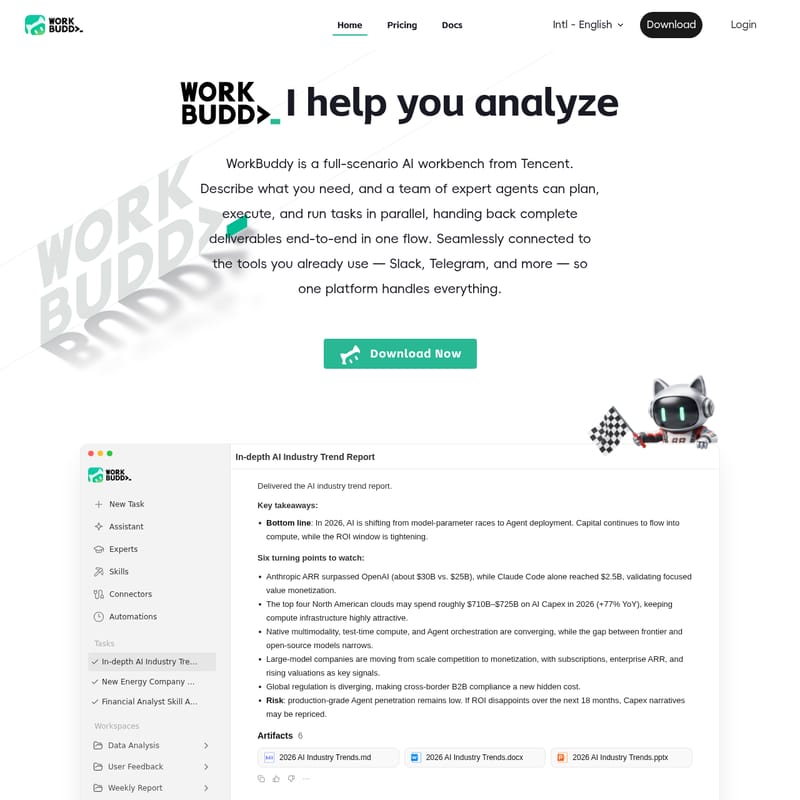
WorkBuddy is an advanced AI workbench developed by Tencent that enables users to describe what they need in natural language and receive complete deliverables in a single flow. Unlike traditional AI tools that merely provide suggestions, WorkBuddy employs a team of expert agents that can plan, execute, and run tasks in parallel. Whether you need an in-depth industry report, a new website, or a complex financial analysis, WorkBuddy handles the process from start to finish.
At its core, WorkBuddy is designed to connect seamlessly with the tools you already use, such as Slack and Telegram. It unifies your office ecosystem, making it a central hub for professional productivity. By shifting the focus from manual tool-switching to autonomous agent orchestration, WorkBuddy helps teams move from "model-parameter races" to actual value-driven agent deployment.
Key Features of WorkBuddy
WorkBuddy is packed with powerful features that cater to a wide range of professional needs:
- Autonomous Planning and Execution: Simply describe your task, and WorkBuddy autonomously plans the necessary steps, calls the required tools, and generates files for your review.
- Multi-Agent Parallelism: A team of expert agents works in parallel to ensure tasks are completed quickly and accurately.
- Deep Research Capabilities: Tell WorkBuddy your research topic, and it will break down search paths, cross-check sources, and generate structured reports, competitor matrices, and strategic recommendations in as little as 15 minutes.
- Artifact Generation: WorkBuddy can deliver results in multiple formats, including Markdown (.md), Word (.docx), and PowerPoint (.pptx).
- Personalized Memory: The platform features a personalized memory capability, allowing it to learn and adapt to your specific workflow and preferences over time.
- Extensive Connectors: WorkBuddy integrates with a vast office ecosystem, including Jira, Google Drive, GitHub, Linear, Microsoft Office, Notion, and Slack.
- Skill Auto-Creation: Users can leverage WorkBuddy for specialized tasks like financial analyst skill auto-creation or user feedback analysis.
How to Use WorkBuddy
Using WorkBuddy is straightforward, even for those without a technical background. Here is a typical workflow:
- Define Your Task: Enter a natural language instruction into the WorkBuddy interface, such as "Analyze current AI industry trends and generate Markdown, Word, and PPT reports."
- Autonomous Research: WorkBuddy begins the deep research phase, searching through dozens of in-depth industry reports and gathering the latest updates.
- Synthesis and Creation: Once the information is sufficient, WorkBuddy synthesizes the research and writes the reports in your requested formats.
- Review Deliverables: WorkBuddy delivers the final artifacts (e.g., .md, .pptx, and .docx files). You can then review the key takeaways, such as market turning points, ROI windows, and regulatory risks.
- Refinement: If needed, you can use WorkBuddy to further iterate on the documents or design elements.
Use Cases
WorkBuddy is a versatile tool applicable across numerous departments and industries:
Research and Strategy
Strategic planners use WorkBuddy to generate in-depth AI industry trend reports. The AI can analyze complex data like Capex narratives for cloud providers or ARR growth for major AI firms, providing structured summaries in minutes.
Document and Design
For HR and operations managers, WorkBuddy simplifies PPT creation, document data analysis, and image design. Instead of switching between multiple tools, users can hand these tasks directly to a WorkBuddy agent to generate weekly reports or data summaries.
Software Development
Even non-coders can use WorkBuddy to build web applications. By utilizing the built-in expert agents, users can move from an idea to a functioning web app in a week. For professional developers, WorkBuddy and its counterpart, CodeBuddy, offer remote mobile connectivity and smooth integration with IDEs.
Project Management
Project managers at companies like Mercedes-Benz and Jieshun Technology use WorkBuddy to manage cross-departmental workflows. The platform handles repetitive, cross-tool tasks, significantly reducing the administrative burden on team leads.
Pricing Plans
WorkBuddy offers flexible pricing to suit individual professionals and large enterprises:
- Pro Plan ($9.95/mo billed yearly): Includes 1,000 credits per month, a wide range of skills and connectors, and personalized memory capability. (Monthly price is $19.90 without the 50% discount).
- Team Plan ($40/seat/mo): Includes everything in Pro, plus a shared team credit pool, an admin console, unified billing management, and support for IDE/CLI/Plugin multi-form-factors.
User Testimonials
"What impresses me most about WorkBuddy is that it does not just give suggestions like a typical AI chat tool. It actually completes office tasks. From organizing files and analyzing spreadsheets to generating reports, everything can start with a single sentence." — Mingyuan Zhang, Senior Engineer at Tencent
"After using WorkBuddy, office workflows feel much simpler. Data summaries, chart analysis, and weekly reports used to require switching across tools. Now I can hand them directly to an AI Agent, and the efficiency gain is obvious." — Sihan Li, Delivery Manager at Tencent
"We use WorkBuddy ourselves and have promoted it across 15 departments. The new mini-program experience makes it quick to try without downloading, and colleagues say it feels like having an AI work partner." — Wanqing Zhao, Product Manager at Jieshun Technology
FAQ
Q: What makes WorkBuddy different from a standard AI chatbot? A: Unlike standard chatbots, WorkBuddy is a full-scenario workbench. It doesn't just talk; it plans and executes tasks, calls external tools, and delivers final files like PPTs and Word documents autonomously.
Q: Do I need coding skills to use WorkBuddy? A: No. WorkBuddy is designed for everyday professionals. It uses natural-language tasks, making it accessible for HR, operations, and admin staff who may not have a technical background.
Q: Which tools can WorkBuddy connect to? A: WorkBuddy integrates with a wide variety of tools including Jira, Google Drive, GitHub, Linear, Microsoft Office, Notion, Slack, and Telegram.
Q: Can WorkBuddy generate reports in specific formats? A: Yes, WorkBuddy can deliver structured reports and artifacts in .md, .pptx, and .docx formats.
Q: Is there a free version of WorkBuddy? A: You can start using WorkBuddy for free to explore its possibilities before upgrading to a Pro or Team plan for higher credit limits and advanced features.