Videco favicon

Videco

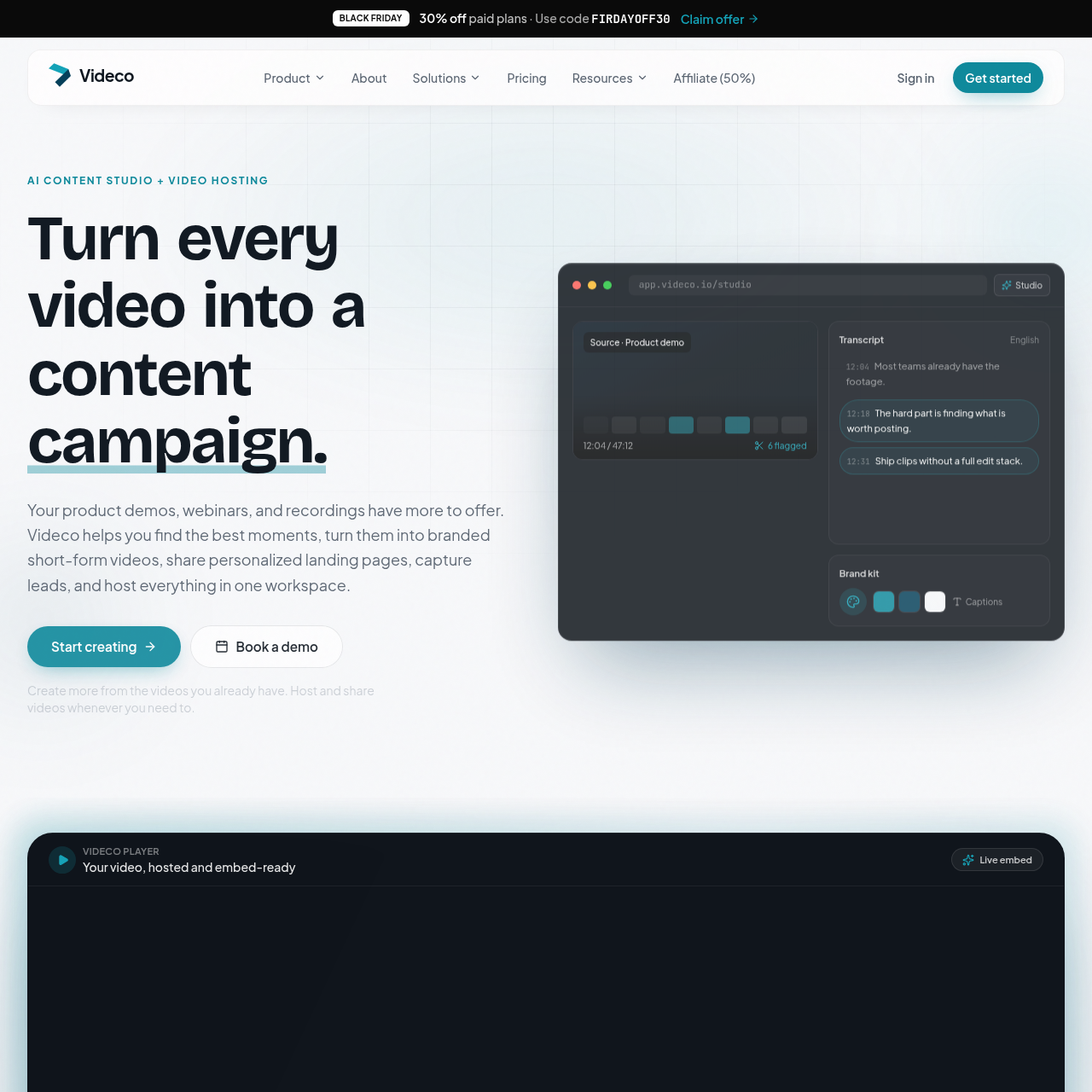
Videco combines automated video repurposing with native hosting to turn long recordings into social clips, text drafts, and personalized landing pages.

VideoAutomatic scoring and identification of…Transcript-based generation of blog…Personalized page rendering using query…Scheduled reveal of appointment booking…
Videco product interface screenshot
Listed on AIToolly

What Is Videco? Product Overview

What the product does and how it is positioned

Videco is a unified video hosting and content repurposing platform that extracts short-form media from longer video recordings such as webinars, product walkthroughs, and interviews. It automates the detection of standout moments and prepares vertical video clips with captions, framing, and branding.

In addition to video clipping, the platform generates written marketing copy such as article outlines and social posts, hosts recordings with embeddable players, and provides personalized landing pages with built-in lead forms and scheduling embeds.

What Can You Use Videco For?

Source-supported ways to use the product

Webinar and Demo Repurposing

Marketing teams convert long recordings into vertical short-form video clips, blog outlines, and social threads for multi-channel distribution.

Personalized Sales Outreach

Sales and outreach representatives deliver tailored video watch pages populated with recipient merge tags and embedded meeting booking tools.

Client Content Review

Agencies and creators distribute prepared content packs to external stakeholders for feedback and approval via passwordless magic links.

How to Use Videco

The documented workflow, where available

  1. 1

    Upload and Moment Discovery

    Upload a recording such as a webinar or demo, allowing the system to transcribe the audio and identify scored segments.

  2. 2

    Editing and Refinement

    Trim selected video clips, fine-tune framing, and edit transcript-derived captions inside the studio editor.

  3. 3

    Brand Customization

    Apply visual branding including brand colors, logos, motion templates, and custom caption styling across clips.

  4. 4

    Multi-Asset Generation and Export

    Generate accompanying blog drafts and social media posts, then export the finished vertical video assets.

  5. 5

    Hosting, Embedding, and Sharing

    Host videos in the library, deploy embeddable players or personalized landing pages with lead capture, and monitor engagement analytics.

Content Studio and Video Hosting Architecture

Videco combines automated media extraction with cloud video delivery. Rather than requiring distinct applications for transcription, video editing, social media copywriting, and hosting, the platform unifies these functions in a single library. Source files remain stored on the platform while generated short-form clips are produced alongside.

On the hosting side, the service deploys public watch pages equipped with automated schema.org VideoObject JSON-LD to assist search engine indexing. Embedded players remain lightweight for website performance, while personalized landing pages incorporate query string parameters to dynamically display customized recipient details and lead generation forms.

  • Generates vertical clips, article outlines, and LinkedIn threads from a single recording.
  • Provides schema.org VideoObject structured data on public watch pages.
  • Enables dynamic text replacement via query parameters on video landing pages.
  • Integrates appointment scheduling tools that can appear after specific watch thresholds.

What to Test Before Choosing Videco

Checks to run with your own material and workflow

  • Confirm that the automated clip scoring identifies relevant highlights accurately across your specific recording types.
  • Verify that public watch page schema markup satisfies your organization's technical SEO and search visibility criteria.
  • Check that the embedded meeting schedulers and CSV lead exports integrate smoothly with your existing CRM and sales workflows.
  • Review whether the caption styling and motion templates meet your brand's visual identity specifications.

Videco Sources and Last Checked

What was checked and when

Official source
https://videco.io/
Last checked
Category
Video

Videco Frequently Asked Questions

Answers based on the source-checked product record

What types of content can Videco extract from long-form video recordings?

Videco extracts scored short-form vertical video clips, blog article drafts, social media hooks, and LinkedIn threads from recordings such as demos and webinars.

How does Videco handle video search engine optimization?

Videco automatically adds schema.org VideoObject JSON-LD structured data to public watch pages, pulling title, description, thumbnail, and duration metadata directly from the video.

Can external clients review repurposed video clips without creating an account?

Yes, Videco generates client review links using magic links, which allow clients to review content packs, approve assets, or request revisions without logging in.

How do personalized video landing pages work in Videco?

Landing pages support query parameters that automatically inject merge tags such as name, company, or representative into copy, while also supporting lead capture forms and embedded schedulers.

Can Videco be used strictly for video hosting without the Content Studio tools?

Yes, Videco supports standalone video hosting, providing an embeddable branded video player, a developer Video API, and viewing engagement analytics without requiring Content Studio usage.

Explore other recently added tools in the same category.