TypingMind
TypingMind: The Ultimate Professional AI Workspace and Multi-Model Frontend for LLMs
TypingMind is a premier AI workspace and high-performance frontend for LLMs, offering a privacy-first environment for models like ChatGPT, Gemini, and Claude. With features such as custom AI agents, document-based RAG, and multi-model parallel chats, it empowers over 20,000 users to maximize productivity.
2026-06-12
877.0K
TypingMind Product Information
TypingMind: The Ultimate Professional AI Workspace and Multi-Model Frontend for LLMs
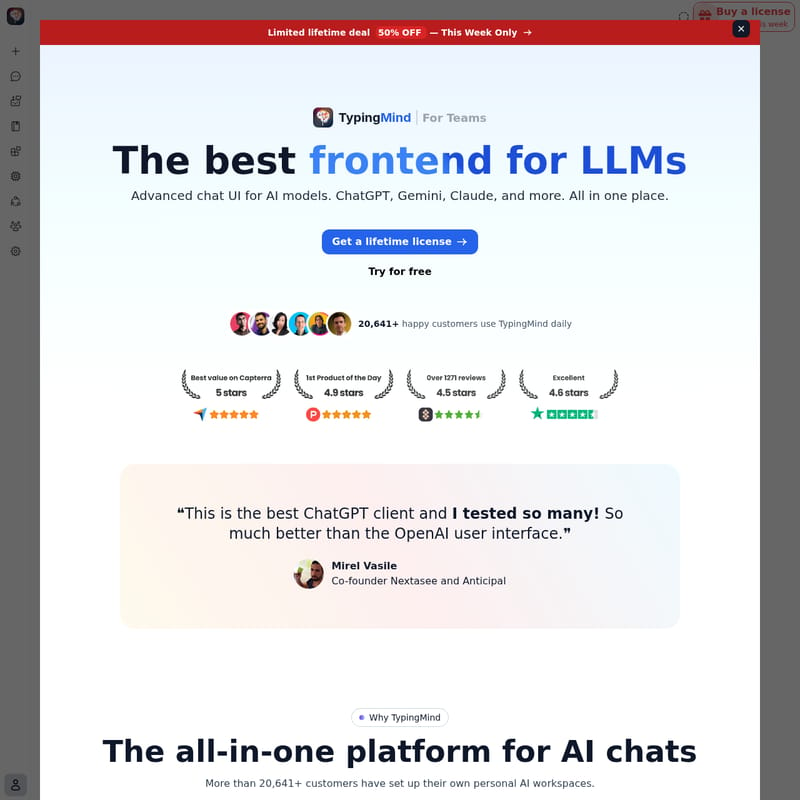
Welcome to TypingMind, widely recognized as the best frontend for LLMs available today. In an era where artificial intelligence is integrated into every workflow, TypingMind provides a comprehensive, all-in-one platform for AI chats that transcends the limitations of standard interfaces. Whether you are an individual power user or part of a global enterprise, TypingMind is designed to be your primary AI workspace, offering unparalleled control, privacy, and flexibility.
With over 20,641 happy customers and 5,000+ businesses using the platform daily, TypingMind has established itself as the go-to solution for those who demand more from their AI interactions. By allowing you to bring your own API keys, TypingMind ensures you only pay for what you use, eliminating restrictive monthly subscriptions while providing a suite of professional tools that double your productivity.
What is TypingMind?
TypingMind is an advanced chat UI for AI models, acting as a sophisticated frontend for LLMs including ChatGPT, Gemini, Claude, and many others. Unlike traditional AI platforms that lock you into a single provider, TypingMind serves as a centralized AI workspace where you can manage all your AI interactions in one place.
It is built for pro users who need more than just a basic chat box. TypingMind offers a "Bring Your Own Key" (BYOK) model, which means you connect your own API credentials from providers like OpenAI, Anthropic, or Google. This setup provides several advantages: no monthly fees, no usage limits imposed by the UI, and a purely usage-based cost structure. Essentially, TypingMind is the "AI Swiss Army Knife" that allows you to centralize your work across different Large Language Models (LLMs) seamlessly.
Key Features of TypingMind
TypingMind is packed with powerful features designed to bring more value to every token you spend. Here are the core capabilities that make it the premier AI workspace:
Multi-Model Support and Parallel Chats
TypingMind allows you to access ChatGPT, Claude, Gemini, and any other LLMs through a single, intuitive interface. One of its standout features is Multi-model parallel chats, which enables you to chat with multiple AI models simultaneously. This allows you to compare responses in real-time and leverage the unique strengths of different models for a single task.
Advanced Productivity Tools
- Artifacts: Generate interactive and editable outputs. Whether you are creating documents, images, or complex code, Artifacts make the content easy to manage.
- Interactive Canvas Editor: Collaborate with AI on writing and coding projects in a dedicated workspace that goes beyond basic chat.
- Project Folders: Build dedicated workspaces to organize your chat history, knowledge bases, and API content into structured folders.
- Deep Research: Go beyond basic web searches with comprehensive, multi-step analysis, source verification, and detailed report generation.
AI Agent Builder and Plugins
TypingMind includes a comprehensive AI Agent builder where you can design custom AI agents, develop plugins, and create specialized prompts. You can choose from over 50 pre-built specialized AI agents or build your own by adding training files (PDFs, text, etc.) to give the agent custom knowledge.
Furthermore, the platform features an extensive plugin system. You can use or build plugins for:
- Web Search & Discovery: Google Search, Perplexity Search, and Firecrawl Web Page Reader.
- Content Creation: PowerPoint Generator, Word Generator, and Mermaid Diagramming.
- Image Generation: DALL-E 3 and Stable Diffusion v3.
- Automation: Integration with Zapier and Slack Message Notifiers.
- Technical Tools: JavaScript Interpreter and Interactive Canvas for running code.
Retrieval-Augmented Generation (RAG)
With RAG (Retrieval-augmented generation), you can upload documents and connect external sources like GitHub, Notion, or Google Drive. TypingMind allows you to "Chat with documents," enabling the AI to securely analyze and discuss your specific data for highly contextual responses.
Privacy and Security
TypingMind is a privacy-first AI workspace. All your data is stored securely on your device by default (local storage). Your conversations are never used for AI training, ensuring complete confidentiality. Additionally, you can secure your API credentials with password encryption for an extra layer of protection.
Use Cases for TypingMind
TypingMind is versatile enough to support a wide range of professional applications. Here is how different sectors utilize this AI workspace:
- For Teams & Enterprises: Build a unified AI workspace with a centralized admin panel, custom branding, and role-based permissions. It helps teams save hours per week by sharing knowledge bases and prompts.
- For Marketing & Sales: Use specialized AI agents to generate copy, research market trends using the Deep Research tool, and automate notifications via Slack.
- For Product Development & Coding: Leverage the Interactive Canvas and JavaScript Interpreter to debug code in real-time. Use the MCP (Model Context Protocol) to connect AI models with external tools like GitHub and GitLab.
- For Educators & Learning: Create custom AI tutors by uploading specific curriculum documents and using the "Chat with PDF" feature to help students navigate complex materials.
- For Agencies & AI Consultants: Manage multiple client profiles and use prompt chaining to create complex, automated workflows that deliver high-value outputs.
How to Use TypingMind
Getting started with TypingMind is straightforward, designed to get you chatting in seconds:
- Enter API Key: To begin, enter your API key (OpenAI, Claude, Gemini, etc.) to connect your preferred LLM.
- Send Your First Message: Use the intuitive chat interface to start a conversation.
- Organize with Folders: Create Project Folders to keep different workstreams separated.
- Enable Knowledge Base: Upload your documents to the Knowledge Base to enable RAG capabilities for specific chats.
- Build Agents: Visit the AI Agent builder to create a specialized assistant with custom instructions and training files.
- Sync Data: Login to sync your data across devices while maintaining local-first privacy.
Frequently Asked Questions (FAQ)
Q: Is there a monthly fee for TypingMind? No. TypingMind offers a lifetime license model. You bring your own API keys and only pay the AI providers for your actual usage. There are no recurring subscriptions for the TypingMind interface itself.
Q: Where is my data stored? TypingMind uses privacy-first local storage. Your data remains on your device by default, ensuring that your sensitive information and API keys are not stored on external servers.
Q: Can I use multiple AI models at once? Yes. TypingMind supports multi-model parallel chats, allowing you to send one prompt to multiple models (like GPT-4 and Claude 3) at the same time to compare their outputs.
Q: Does TypingMind use my data to train AI models? Absolutely not. TypingMind guarantees that zero data is collected or transmitted for the purpose of training AI models. Your privacy and confidentiality are prioritized.
Q: What is the "Deep Research" feature? Deep Research is a plugin that performs comprehensive research through multi-step analysis and source verification, providing a detailed report rather than a simple search snippet.
Q: Can I share my chats? Yes, TypingMind includes a quick share feature, and you can also export/import chats and settings as JSON files for easy management.