TikTask
TikTask - Automate Messages, Polls, Likes, Comments and More
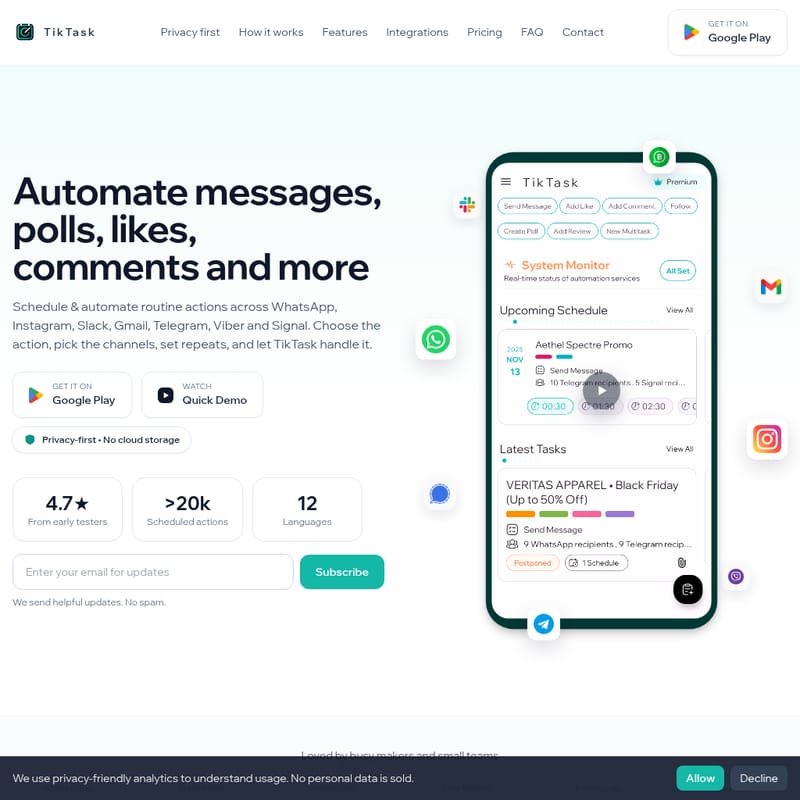
TikTask allows you to automate messages, polls, likes, comments, and other actions across platforms like WhatsApp, Instagram, Gmail, Telegram, and more. With advanced scheduling, smart variables, and local privacy-first design, TikTask is perfect for busy makers and small teams. Keep content on your device with optional Google Drive backup for easy restoration on a new phone.
2025-12-22
4.0K
TikTask Product Information
TikTask - Automate Messages, Polls, Likes, Comments and More
What's TikTask
TikTask is an automation tool designed to help users schedule and automate routine tasks across various platforms including WhatsApp, Instagram, Gmail, Telegram, Viber, Slack, and Signal. Whether you want to send a message, create a poll, like a post, add a comment, or follow someone, TikTask handles it for you. The app focuses on privacy by design, ensuring that no content is stored on the cloud, and only account and purchase records are retained.
Features
Key Features of TikTask
- One Workflow, Many Apps: Automate tasks across multiple platforms in one workflow.
- Repeatable Tasks: Set tasks to run once or on a daily, weekly, monthly, or yearly schedule.
- My Schedule Calendar: View all your scheduled and past tasks by day, week, month, or year.
- Buckets for Unique Texts: Personalize messages, polls, comments, and more at scale.
- Colored Labels: Organize tasks with color-coded labels for quick filtering.
- Recipient Lists: Save groups of recipients for easy reuse across tasks.
- Smart Variables: Auto-fill messages with dynamic content like names, dates, or times.
- Google Drive Backup: Backup your data to Google Drive and restore on a new phone.
Integrations
TikTask integrates with the following platforms:
- Telegram
- Slack
- Gmail
- Viber
- Signal
How to Use TikTask
- Create Task: Start by choosing the task type, such as sending a message, creating a poll, or adding a like.
- Select Recipients: Choose the platform (WhatsApp, Telegram, Instagram, etc.) and select your recipients.
- Schedule & Repeat: Set the first date and time, and specify any repeat rules. Save the task and let TikTask handle it.
Pricing
Free
- Basic scheduling
- Core automations (WhatsApp, Instagram, Slack, Gmail, Telegram, Viber, Signal)
- Schedule repeats
- Recipient lists
- Colored labels
- Smart variables
- Community support
Premium - $9.99/month
- All Free features
- WhatsApp Business & Instagram Direct automations
- Buckets (unique text per recipient)
- Unlimited actions and channels per task
- Advanced scheduling (multiple schedules per task)
- Google Drive backup & restore
- Ad-free experience
Lifetime - $149.99
- Everything in Premium
- All future updates
- Priority support
- No renewals or limits
FAQ
Q: Does TikTask store my personal data on its servers? A: No, TikTask keeps your content on your device. Only account and purchase records are stored for billing and support.
Q: Which actions and channels are supported? A: TikTask supports automations on WhatsApp, Instagram, Telegram, Slack, Gmail, Viber, and Signal.
Q: How reliable are automations? A: TikTask is designed to run reliably with system checks to ensure smooth execution.
Q: Can I restore my data on a new phone? A: Yes, you can back up your data to Google Drive and restore it on a new device.
Q: What are the Premium benefits? A: Premium benefits include WhatsApp Business and Instagram Direct automations, unlimited actions per task, advanced scheduling, and an ad-free experience.
Q: Do you offer refunds? A: Please contact our support team for refund inquiries.
Contact
For questions or feedback, reach us on:
- WhatsApp: +13658291613
- Email: [email protected]
Follow us on:
Privacy | Terms © 2025 TikTask. All rights reserved.