Sunrise
Sunrise: All-in-One Google Calendar and Google Tasks Sync for Focused Planning
Sunrise is a streamlined productivity app that brings together your Google Calendar events and Google Tasks into one calm interface. Featuring Kanban boards, a Today view, and seamless Google sync, Sunrise helps you manage your day without switching apps.
2026-07-08
2.0K
Sunrise Product Information
Sunrise: Your Day, in One Calm Place
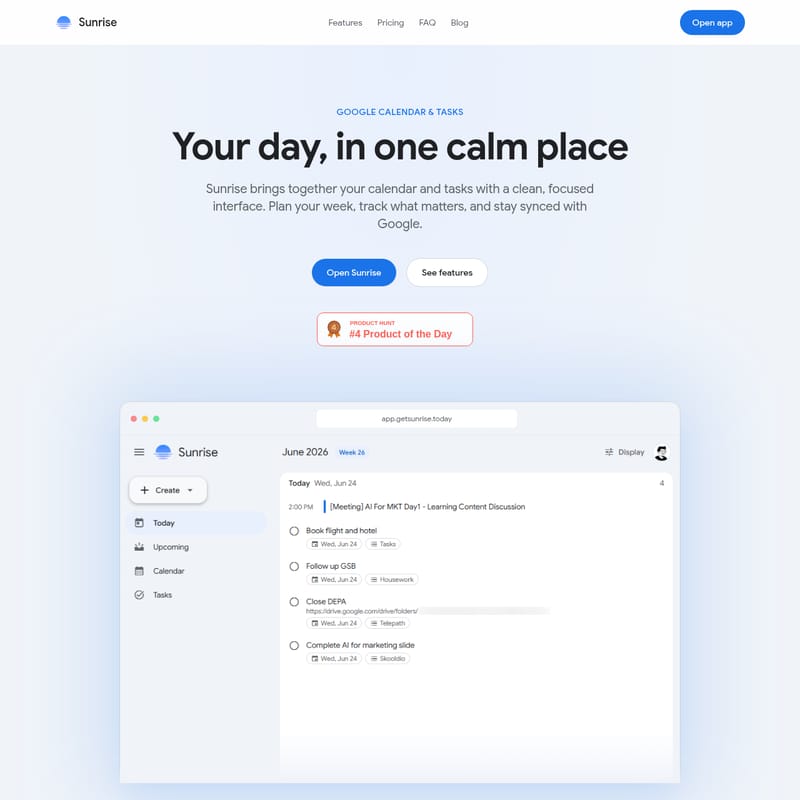
In the modern digital workspace, staying organized often requires jumping between multiple tabs and applications. Sunrise aims to solve this fragmentation by bringing together your Google Calendar and Google Tasks into one focused, clean interface. By integrating these two essential tools, Sunrise provides a unified environment where you can plan your week, track what matters, and stay synced with the Google ecosystem effortlessly.
What's Sunrise?
Sunrise is a specialized client interface built for how you actually plan your day. It is not a separate database that copies your information; rather, it is a dedicated tool that reads and writes directly to your Google Calendar and Google Tasks.
At its core, Sunrise is designed to eliminate the friction of switching between a calendar app and a to-do list. It offers a "calm place" for productivity, ensuring that your schedule and your tasks are always visible in one view. Whether you are navigating a busy work week or managing personal projects, Sunrise provides the clarity needed to stay on top of your responsibilities through a professional and focused web experience.
Features of Sunrise
Sunrise is packed with features designed to streamline your planning workflow. Each feature is crafted to maximize productivity while maintaining a clean aesthetic.
Today View
One of the standout components of Sunrise is the Today view. This feature allows you to see exactly what is on your calendar and your task list for the current day at a single glance. By centralizing this information, Sunrise ensures you never miss an appointment or a deadline, providing a clear roadmap for your day without the need to toggle between different Google services.
Upcoming Agenda
The Upcoming agenda in Sunrise is built for action. It allows users to scroll through overdue items, today's schedule, and upcoming tasks in a single, continuous feed. This chronological layout makes it easy to visualize your workload and prioritize tasks that are lagging behind.
Calendar Week View
For those who prefer a broader perspective, Sunrise includes a familiar Calendar week view. This layout allows you to navigate your entire week with ease, providing quick access to all your events. It combines the traditional calendar experience with the enhanced navigation tools of the Sunrise platform.
Kanban Tasks
Sunrise transforms how you interact with Google Tasks by offering a Kanban tasks board. This drag-friendly board mirrors your existing Google Tasks lists, allowing you to organize work across different columns. The visual nature of the Kanban board makes it simple to reorganize work and track progress across various stages of a project.
Google Sync and Security
Security and data integrity are central to the Sunrise experience. Sunrise uses Google sync to connect to your account securely. Because Sunrise acts as a client interface, your data stays in your Google account. It reads and writes directly to your events and lists, meaning any changes made in Sunrise appear instantly in Google, and vice versa.
Works Everywhere
Currently, Sunrise is available as a powerful web app at app.getsunrise.today. To ensure you can plan on the go, native iOS and Android apps are currently in development, promising a seamless transition between your desktop and mobile devices.
Use Case: Maximizing Productivity with Sunrise
Sunrise is built for users who live in their calendars but need a more integrated way to handle their to-do lists.
"Sunrise brings together your calendar and tasks with a clean, focused interface. Plan your week, track what matters, and stay synced with Google."
By using Sunrise, you can implement a more cohesive planning strategy. For example, a project manager can use the Kanban board to visualize the stages of a project while simultaneously checking the Calendar week view to ensure that deadlines do not clash with scheduled meetings. The Today view then serves as the daily dashboard, filtering out the noise and focusing only on the immediate tasks at hand.
Pricing Plans
Sunrise offers simple and honest pricing designed to help you start planning immediately without any financial barriers.
Free Tier
- Cost: $0/month
- Details: Start for free with everything you need to plan your day. No credit card is required.
- Included Features:
- Full access to Sunrise on the web.
- Complete Google Calendar & Tasks sync.
- Access to Today and upcoming views.
- Use of the Week calendar & kanban board.
- Data remains securely in your Google account.
Pro Tier (Coming Soon)
- Cost: Pricing to be announced at launch.
- Details: Power features designed for individuals who live in their calendar.
- Included Features:
- Everything included in the Free tier.
- Custom themes & accent colors to personalize your workspace.
- Advanced filters and saved views for deeper organization.
- Priority sync & offline support.
- Dedicated Email support.
Frequently Asked Questions (FAQ)
Does Sunrise sync with Google Calendar and Google Tasks? Yes. When you sign in with Google, Sunrise reads and writes to your Google Calendar events and Google Tasks lists. Any changes you make within the Sunrise interface appear in Google, and vice versa.
Is Sunrise free? Yes, Sunrise is free to use on the web with full calendar and task sync capabilities. While a Pro tier with advanced features is planned for the future, the core features remain accessible at no cost.
Where is my data stored? Your security is a priority. Your calendar and task data stay in your Google account. Sunrise is a client interface and does not copy your events or tasks to a separate database.
What platforms does Sunrise support? Currently, Sunrise is available as a web app. Native apps for both iOS and Android are actively in development to support mobile users.
Does Sunrise have a kanban board for tasks? Yes. Sunrise includes a dedicated kanban view that mirrors your Google Tasks lists. You can easily drag tasks between columns to reorganize your work visually.
How is Sunrise different from using Google Calendar and Tasks separately? Sunrise eliminates the need to switch between different apps or browser tabs. It combines your schedule and task list into a single, unified interface featuring a Today view, upcoming agenda, week calendar, and kanban board for a more holistic planning experience.