SavorApp_AI favicon

SavorApp_AI

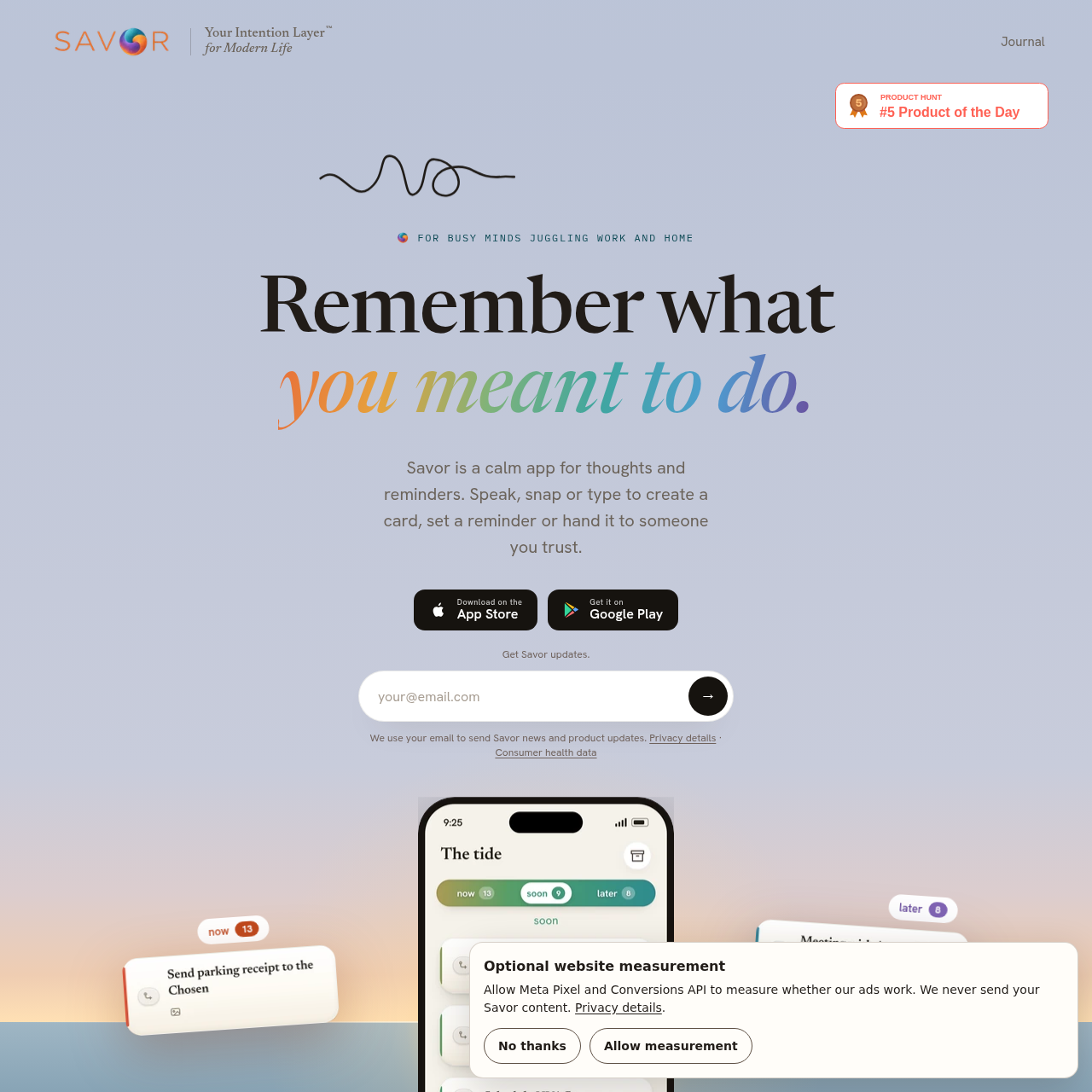
SavorApp_AI is a calm productivity and intention-tracking application for iOS and Android that enables users to capture thoughts via voice, text, or photos, organize them across temporal lanes, and collaborate through card delegation.

ProductivityTranscribing speech and extracting…Sorting cards into Now, Soon, and Later…Setting timed notifications, scheduled…Delegating cards or subcards with…
SavorApp_AI product interface screenshot
Listed on AIToolly

What Is SavorApp_AI? Product Overview

What the product does and how it is positioned

SavorApp_AI functions as an intention-management application designed to help individuals record thoughts, plans, and reminders without relying on traditional list structures or gamified engagement elements such as streaks and scoreboards. Users capture items through spoken audio, typed text, or device camera scans of paper materials like bills, flyers, and correspondence.

Captured items become editable cards placed into customizable timeline lanes designated as Now, Soon, and Later. Users can schedule individual notification alerts, export dates to calendars, or delegate cards to collaborators. The platform also includes a beta feature that generates automated action suggestions using language models under age-aware safety filters.

What Can You Use SavorApp_AI For?

Source-supported ways to use the product

Document and Paper Capture

Users capture photos of incoming paper mail, school forms, and bills to generate digital reminder cards containing extracted details.

Household Task Delegation

Users transfer specific cards or subcards to family members, shifting reminder delivery and editing rights while maintaining visibility through a read-only card and chat.

Intention Follow-Through

Users review AI-generated suggestions via the Take Action feature to break broad thoughts or unresolved intentions into practical next steps.

Temporal Organization and Card Handoff Mechanics

SavorApp_AI structures user entries into an intention-tracking layer divided across three chronological lanes: Now, Soon, and Later. By default, Now displays cards scheduled for the current day or overdue, Soon contains cards for the upcoming two days, and Later holds items beyond that window. Users can adjust these time thresholds in the application settings or move cards manually between lanes.

Collaboration functions through an explicit card delegation mechanism rather than shared global lists. A user can hand off an entire card or an individual subcard to another registered contact. If accepted, the recipient gains primary editing authority and receives all associated notifications, while the sender retains a read-only tracking view, an option to reclaim the card, and an embedded discussion thread.

  • Lanes default to Now (today and overdue), Soon (next two days), and Later (future items).
  • Lane time windows can be modified within application settings.
  • Delegation transfers editing control and notifications to the recipient upon acceptance.
  • Original senders retain read-only visibility, reclaim capabilities, and card chat access.

Teen Safety Guardrails and AI Processing

The platform enforces age-specific operating safeguards for users aged 13 and older, relying on operating system and app store account age signals rather than internal birth date forms. Store accounts reported under age 13 are prohibited from registering. For accounts identified in the 13 to 17 age range, AI-generated guidance from the Take Action tool is kept hidden until cleared by an output-safety filter.

The Take Action beta integrates Anthropic Claude Sonnet 5.5 for conversational processing and OpenAI GPT-5.6 Luna for public-information research. Input text across all accounts is monitored using an automated moderation service, and personal capture records are withheld from general model training and ad networks.

  • Registrations reported under age 13 by store age signals are blocked.
  • Take Action responses for users aged 13 to 17 require safety check clearance before display.
  • Inputs across all accounts are screened through automated moderation systems.
  • Private cards, audio recordings, and scanned photos are excluded from model training datasets.

What to Test Before Choosing SavorApp_AI

Checks to run with your own material and workflow

  • Verify that collaborating recipients have installed the application prior to initiating card delegation.
  • Confirm that family device profiles on Apple or Google Play accurately reflect age ranges for teen accounts.
  • Review the default time intervals for Now, Soon, and Later lanes to ensure alignment with personal planning habits.
  • Check configured notification times, daily reminder schedules, and quiet hours to fit routine preferences.

SavorApp_AI Sources and Last Checked

What was checked and when

Last checked
Category
Productivity

SavorApp_AI Frequently Asked Questions

Answers based on the source-checked product record

What capture methods are available to create cards in SavorApp_AI?

Cards can be created by typing text, speaking voice input, or taking camera photos of documents such as letters, bills, and flyers. On iPhone, cards can also be captured via Siri without opening the application.

How are the Now, Soon, and Later lanes structured by default?

By default, the Now lane contains items due today or overdue, the Soon lane holds items for the subsequent two days, and the Later lane holds all future items. Users can adjust these lane definitions in the settings.

What happens when a card is delegated to another user?

When a card or subcard is accepted by a recipient, they receive its reminders and exclusive editing rights. The original creator retains a read-only copy, access to in-card chat, and the ability to reclaim the card.

Which artificial intelligence models power the Take Action beta feature?

Take Action utilizes Anthropic Claude Sonnet 5.5 for conversational interactions and OpenAI GPT-5.6 Luna for public-information research, with inputs screened by an automated moderation service.

What safety guardrails apply to teenage accounts on the platform?

The platform requires users to be at least 13 years old based on store signals. For users aged 13 to 17, model-generated answers in Take Action are withheld if an output-safety check flags them or fails to execute.

Explore other recently added tools in the same category.