Runtime
Runtime: The Secure Sandbox Infrastructure for Your Team's Coding Agents
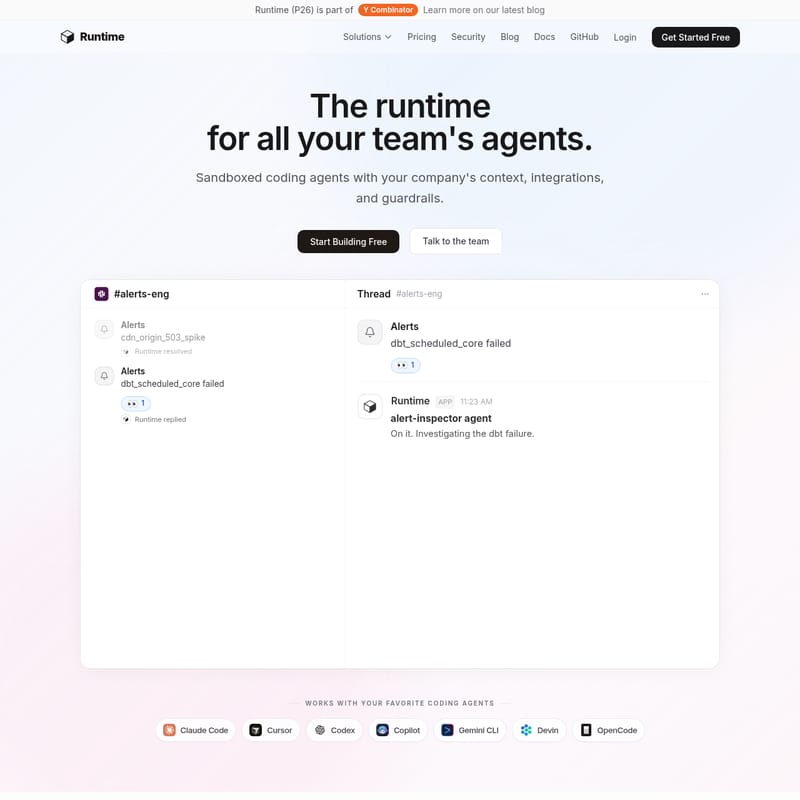
Runtime is a Y Combinator-backed platform providing sandboxed coding agents with built-in company context, integrations, and guardrails. It eliminates months of infrastructure work by offering a pre-configured runtime for AI agents like Claude Code and Cursor. With features such as Mission Control for observability, live collaboration, and specialized agents for engineering, marketing, and support, Runtime enables teams to deploy AI safely within Slack, GitHub, and Linear. Available as both a cloud service and a self-hostable solution, Runtime ensures secure, cost-effective, and scalable AI agent operations.
2026-05-22
5.0K
Runtime Product Information
Runtime: The Advanced Infrastructure for Your Team's Coding Agents
In the rapidly evolving landscape of artificial intelligence, Runtime emerges as the definitive solution for teams looking to deploy sandboxed coding agents with precision, security, and context. As a Y Combinator (P26) company, Runtime provides the essential infrastructure layer that allows your team's agents to work safely within your company's unique environment. Instead of spending months building internal agent infrastructure, Runtime offers a ready-to-ship platform that integrates seamlessly with your existing toolchain.
What's Runtime?
Runtime is a comprehensive runtime environment specifically designed for team-based AI agents. It provides a secure, sandboxed compute space where coding agents can operate with full access to your company's context, integrations, and guardrails. Whether you are using Claude Code, Cursor, Codex, Copilot, Gemini CLI, Devin, or OpenCode, Runtime acts as the foundational layer that manages the complexities of agent orchestration, observability, and security.
By utilizing Runtime, organizations can bypass approximately nine months of infrastructure development. The platform handles everything from pre-warmed sandboxed environments to complex integrations with tools like Slack, Linear, GitHub, and Jira, allowing your team to focus on building and shipping rather than managing agent overhead.
Core Features of Runtime
Runtime is packed with enterprise-grade features designed to make AI agents useful and safe for every department.
1. Sandboxed Compute Environments
Every session in Runtime boots in seconds thanks to pre-warmed, sandboxed environments. These environments are fully customizable, allowing you to install any CLI, API, service, or MCP server. You can connect your company’s entire environment—from massive monorepos to nimble microservices—and snapshot the configuration so every session is consistent.
2. Mission Control & Observability
The Runtime Mission Control dashboard provides a single pane of glass to monitor, manage, and deploy coding agents.
- Live Visibility: View every session in real-time, including tool calls, chain-of-thought processing, and file changes.
- Cost Tracking: Monitor spend per agent, per user, and per team to ensure budget adherence.
- Audit Logs: Maintain a complete history of agent activities for security and compliance.
3. Comprehensive Guardrails & Policy
Security is at the heart of the Runtime platform. It includes built-in approval gates, spend limits, and file-specific rules. You can set allowlists to ensure agents only interact with approved services and data, ensuring that your company's internal secrets and production data remain protected.
4. Collaborative AI Workflows
Runtime allows anyone on your team—from engineering to sales—to work alongside agents.
- Real-time Collaboration: Multiple users can join an agent session, providing feedback and prompts as the agent works.
- Live Previews: Watch changes happen in real-time with live preview functionality.
- Hand-off: Start a session in the terminal and hand it off to a teammate in the browser, or vice-versa.
5. Multi-Agent Orchestration
Runtime is model-agnostic, supporting a wide range of agents. It handles the difficult background tasks such as queuing, retries, and long-running background runs. If an agent hits a snag, Runtime can auto-pause or alert the team for intervention.
Use Cases for Every Team
Runtime isn't just for developers; it is a versatile tool that empowers every department through specialized agents.
Engineering
Engineers can use Runtime to multiply their output. Use an alert-inspector agent to investigate dbt failures or 503 spikes. These agents can run investigations, ship PRs, and post findings directly in Slack or GitHub without manual intervention.
Product & Design
Product managers can turn PRDs into working prototypes instantly. Designers can iterate on real pages and ship updates without needing to file a ticket, ensuring that the final product matches the vision exactly.
Marketing & Support
Marketing teams can have a "Growth Engineer" on demand in Slack to handle technical tasks. Support teams can use agents to ask data questions in plain English, getting answers and reports in seconds rather than waiting for an engineering sprint.
Finance & HR
Finance agents can handle reconciliations and dashboarding without engineering help, while HR teams can connect HRIS and payroll systems to answer employee questions instantly in a secure, sandboxed environment.
How to Use Runtime
Setting up Runtime is designed to be developer-friendly and integrates with the tools you already use.
Installation and Setup
You can install the Runtime toolchain from various sources including:
- mise
- npm
- brew
- GitHub
Once installed, you can connect your monorepo or microservices. Runtime allows you to layer in custom instructions and skills, ensuring the agent understands your specific coding standards and business logic.
Deploying Agents
- Define the Environment: Use a snapshot to ensure the agent has all necessary runtimes and internal tools.
- Tag Everywhere: You can trigger agents from where you already work. For example, in Slack, you might type
@runtime fix the login timeout bug. - Monitor in Mission Control: Use the dashboard to watch the agent as it writes code, runs tests, and prepares a PR.
- Review and Ship: Approve the agent's work and deploy it through your standard CI/CD pipeline.
Security: Cloud or Self-Hosted
Runtime offers the flexibility to use their secure cloud or to self-host the entire platform on your own infrastructure. This gives you full control over your models, secrets, and data. The CLI and shared libraries are open-source under the Apache 2.0 and MIT licenses, while the API and worker components are available under AGPL v3.
FAQ
Q: Who is Runtime for?
A: Runtime is designed for any team—from Engineering to Finance—that wants to leverage AI agents safely and efficiently within their existing workflows.
Q: How do agents work inside Slack? Do we always have to tag them?
A: You can tag specialized agents like
@runtimeor@alert-inspectordirectly in Slack channels. They can also be configured to trigger automatically based on specific alerts or events in tools like Linear or GitHub.
Q: What integrations come out of the box?
A: Runtime supports a wide range of integrations including Slack, Linear, GitHub, Jira, Datadog, Salesforce, Stripe, and NetSuite, plus anything else via API or MCP server.
Q: Does an agent ever touch our raw production data?
A: Runtime is built with strict guardrails and policy controls. You define what the agent can and cannot access, ensuring production data is handled according to your company's security policies.
Q: Can I self-host Runtime?
A: Yes, Runtime is self-hostable, allowing you to maintain full control over your infrastructure, models, and secrets.