QuakPit
Quakpit: A unique, highly visible flying duck calendar reminder for macOS and Windows.
Quakpit is a privacy-first productivity tool by Ooble Studio that replaces boring system notifications with a flying duck towing a calendar reminder banner. It floats above all apps, ensuring you never miss a meeting. It features iCal/iCloud sync, extensive customization, and a one-time Pro upgrade.
2026-05-29
--K
QuakPit Product Information
Quakpit: The Ultimate Visual Calendar Reminder That You’ll Never Miss
In the world of modern remote work and back-to-back digital appointments, the standard system notification often fails us. We have all experienced it: a small, grey "toast" notification slides into the corner of your screen, stays for three seconds, and disappears behind a fullscreen window or a presentation. By the time you realize you had a meeting, you are already five minutes late. Enter Quakpit, a revolutionary and charming calendar reminder app designed to ensure you never miss a meeting again.
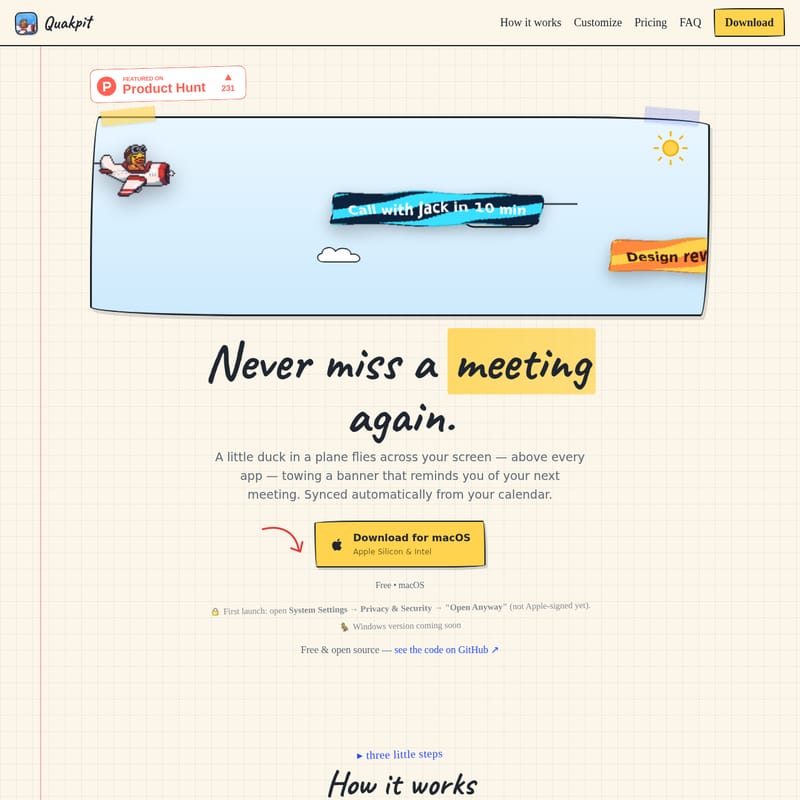
Created by the team at Ooble Studio, Quakpit turns your schedule into an unmissable event. Instead of a forgettable pop-up, a little duck in a plane flies across your screen—above every single app—towing a banner that reminds you of your next meeting. It is simple, effective, and impossible to ignore.
What is Quakpit?
Quakpit is a lightweight, menu-bar-based application for macOS (with a Windows version coming soon) that acts as a persistent, visual heads-up for your calendar events. The core concept is simple: a "fly-by" notification. When a meeting is approaching, Quakpit triggers an animation of a character piloting a plane across your workspace. This plane carries a banner displaying your custom message and the time remaining until your next engagement.
Unlike traditional notifications, Quakpit is designed to float above everything, including fullscreen apps and video calls. It is built for users who need a reminder that actually cuts through the noise of a busy digital desktop. Whether you are deep in a coding session, designing a masterpiece, or presenting to a client, the Quakpit duck ensures your schedule remains front and center.
How to Use Quakpit
Setting up Quakpit is designed to be a "set it and forget it" experience. You can get your first flight off the ground in just three simple steps:
1. Connect Your Calendar
To get started, you need to give Quakpit something to track. You can easily paste any iCal/ICS link (which requires no login) or sign in directly to Apple iCloud. The app operates on a read-only basis, pulling data straight from your machine to ensure your schedule is always up to date. While currently supporting iCal and iCloud, integrations for Google and Outlook are currently on the way.
2. Make It Yours
Customization is at the heart of the Quakpit experience. You can pick your favorite character, choose a plane color, and select a banner theme that matches your aesthetic. You can also write your own custom message and set a 5-minute or 10-minute heads-up warning. For those who want more, Quakpit Pro offers even more variety.
3. Get the Fly-By
Once configured, Quakpit works automatically in the background. Right on time, the plane will cross your screen above every app, flapping its banner and playing your character's unique sound. It’s a delightful yet firm reminder that it’s time to switch gears.
Pro Tip for macOS Users: Upon first launch, you may need to open System Settings → Privacy & Security and select "Open Anyway" as the app is currently a fresh, open-source project and not yet Apple-signed.
Key Features of Quakpit
Quakpit is packed with features that prioritize visibility, customization, and user privacy.
Above Everything Else
The most significant advantage of Quakpit is its ability to float over all apps. Even if you are in a fullscreen call or a high-stakes presentation, the duck will fly over the top. Most importantly, the animation is click-through, meaning it will never block your ability to interact with your computer while it is on screen.
Fully Automatic Operation
You only need to open Quakpit once. It quietly lives in your menu bar, watching your calendar and launching the flight exactly when needed. There is no window clutter and no spam—just the occasional flying duck to keep you on track.
Extensive Customization
With Quakpit, you can build your own flight. The app offers:
- Five Characters: Including the classic Duck, a Corgi, a Dino, a Pigeon, and a Capybara (Pro version).
- Five Plane Colors: Choose from various colors like Blue, Green, Pink, and Black (Pro version).
- Five Banner Themes: Options like Midnight, Sunset, Mint, and Bubblegum (Pro version).
- Custom Messages & Fonts: Personalize the text that follows your plane.
- Unique Sounds: Each character comes with its own sound, like a classic quack or a specific engine hum.
Privacy-First Architecture
In an era of data harvesting, Quakpit takes a stand for user privacy. The app has zero backend and no database. Your calendar data is read directly on your device, kept only in memory, and is never written to disk or sent to a server. There is no telemetry and no analytics. The only thing the app can store is an encrypted sign-in token (via Keychain or Windows DPAPI), and only if you explicitly ask it to.
Use Case: Why You Need Quakpit
Quakpit is ideal for various professionals and power users:
- The Fullscreen Worker: If you spend your day in fullscreen IDEs or design tools, you know how easily system notifications are missed. Quakpit ensures the reminder is literally in your line of sight.
- The Meeting-Heavy Professional: For those with back-to-back Zoom or Teams calls, the 5-minute fly-by serves as the perfect "wrap-up" cue.
- The Privacy-Conscious User: If you are wary of third-party apps accessing your calendar data on their servers, Quakpit’s local-only processing is the perfect solution.
- The Fun-Loving Creative: Sometimes, work should be a little more whimsical. Having a Corgi in a plane fly across your screen adds a moment of joy to a busy workday.
Quakpit Pricing: Free vs. Pro
Quakpit is free and open-source, but a Pro version is available for those who want to unlock the full potential of the app.
Free Plan ($0)
- The classic duck flies before each meeting.
- Connect one calendar source (iCal or iCloud).
- 5- or 10-minute heads-up notifications.
- Custom messages and 5 font options.
- Standard engine and quack sounds.
Quakpit Pro ($4.99 One-Time)
- Unlock 4 More Characters: Corgi, Dino, Pigeon, and Capybara.
- More Colors: 4 additional plane colors (Blue, Green, Pink, Black).
- More Themes: 4 additional banner themes (Midnight, Sunset, Mint, Bubblegum).
- Speed Controls: Faster fly-bys (1.5x and 2x speed).
- Multi-Calendar: Combine several calendars at once.
- Lifetime Access: A one-time payment for one device, yours forever.
FAQ
Q: Which calendars work with Quakpit? A: Currently, you can add any calendar via iCal/ICS link or connect your Apple iCloud. Support for Google and Outlook is coming soon. The free plan allows one source, while Pro allows multiple sources.
Q: Does it work over fullscreen apps? A: Yes! The plane is designed to float over everything, including fullscreen presentations and video calls. It is click-through, so it won't interfere with your work.
Q: Is my data safe? A: Absolutely. Quakpit has no backend. Your calendar is read straight from your device and is never sent to any servers. It uses no telemetry or analytics.
Q: What platforms are supported? A: Quakpit is currently available for macOS (both Apple Silicon and Intel). A Windows 10 & 11 build is coming soon.
Q: How do I uninstall Quakpit? A: On macOS, simply drag the app to the Trash. Because there is no server-side component, it leaves nothing behind.
Q: Who made Quakpit? A: It was made by hand at Ooble Studio, a small creative design studio known for crafting premium UX/UI and product strategy for tech teams.