Pixwit
Pixwit: All-in-One AI Video Creation Platform for Text-to-Video and Long-Form Storytelling
Pixwit is a comprehensive AI video generation platform that consolidates top-tier models like Sora 2, Kling, and Runway into one interface. It enables users to create professional-grade content through text-to-video, image-to-video, and AI avatar generation. Whether you are producing short UGC ads or multi-minute long-form videos with consistent characters, Pixwit provides the tools to transform ideas into cinematic reality. With features like 'Start End Image to Video' and 'Reference Image to Video,' creators can maintain visual consistency and artistic control across every frame. Pixwit offers a fast, user-friendly experience for everyone from social media marketers to digital storytellers.
2026-02-06
5.0K
Pixwit Product Information
Pixwit: The All-in-One AI Video Creation Platform
In the rapidly evolving world of digital content, Pixwit emerges as the premier all-in-one AI video creation platform. Designed for creators, marketers, and storytellers, Pixwit consolidates the world's most powerful AI video models into a single, intuitive interface. Whether you are looking to generate a quick social media clip or a complex, multi-scene narrative, Pixwit provides the tools to bring your vision to life.
What's Pixwit?
Pixwit is a comprehensive AI-powered tool that converts text or images into stunning video artworks. It serves as a centralized hub where users can access top-tier AI video generation models including Sora 2, Kling, Runway, Veo, Wan, and Seedance. By bridging the gap between imagination and visual execution, Pixwit allows anyone to create professional-grade video content for ads, avatars, and long-form storytelling without needing advanced technical skills.
Key Features of Pixwit
Pixwit is packed with advanced features that cater to every aspect of the video production process:
1. All-in-One AI Model Access
Access all the great AI video models in one place. Choose from various engines like Kling V2.5, Wan 2.5, Sora 2 Pro, and SeeDance V1 Lite to achieve specific visual styles or performance speeds.
2. Text to Video AI
Bring your prompts to life with best-in-class visuals. Simply enter a text description, and Pixwit will generate a high-quality video with perfectly synchronized audio. For example, you can prompt a "gorilla singing in a rock band" and watch the AI render the scene instantly.
3. Image to Video AI
Transform any photo into a jaw-dropping video. This feature adds stylistic consistency and cinematic audio to your static images, making them move with realistic motion.
4. AI Long Video Generator
Go beyond short clips. Pixwit allows you to create multi-minute, multi-scene videos with just one click. This tool handles story outlines, character designs, and scripts, allowing for interactive adjustments throughout the process.
5. Reference Image to Video
Maintain visual consistency across all frames. By providing reference images of your character or scene, Pixwit ensures that the elite soldier or whimsical character looks exactly the same in every shot.
6. Start End Image to Video
Create seamless transitions by uploading a starting image and an ending image. Pixwit intelligently fills in the frames to create a professional transition, such as the scientific visualization of the Big Bang.
7. AI Avatar Generator
Transform a single photo into a fully animated AI avatar. These videos can be up to 2 minutes long and feature realistic movement, lip sync, and expressive emotions.
8. Rich Effect Templates
Instantly enhance your videos with professional AI-powered effects like Muscle Surge, Zombie Mode, Thunder God, and Liquid Metal.
Use Cases
Pixwit is versatile enough to support a wide range of creative and professional projects:
- UGC Ad Videos: Automatically transform product images into engaging marketing videos. Perfect for social media ads with customizable durations and multiple aspect ratios (16:9, etc.).
- Social Media Content: Use the Short Video and Text to Video tools to create viral-ready clips for platforms like TikTok or Instagram.
- Professional Storytelling: Utilize the Long Video feature to produce cinematic tales with consistent characters and smooth transitions.
- Business Presentations: Create AI Avatar videos to deliver scripts with a personal touch, making corporate communications more engaging.
- Artistic Exploration: Explore landscapes, portraits, and abstract art styles using various AI models to find unique visual identities.
How to Use Pixwit
Creating with Pixwit is a streamlined process designed for efficiency:
- Choose Your Mode: Select from Text to Video, Image to Video, or Long Video options on the dashboard.
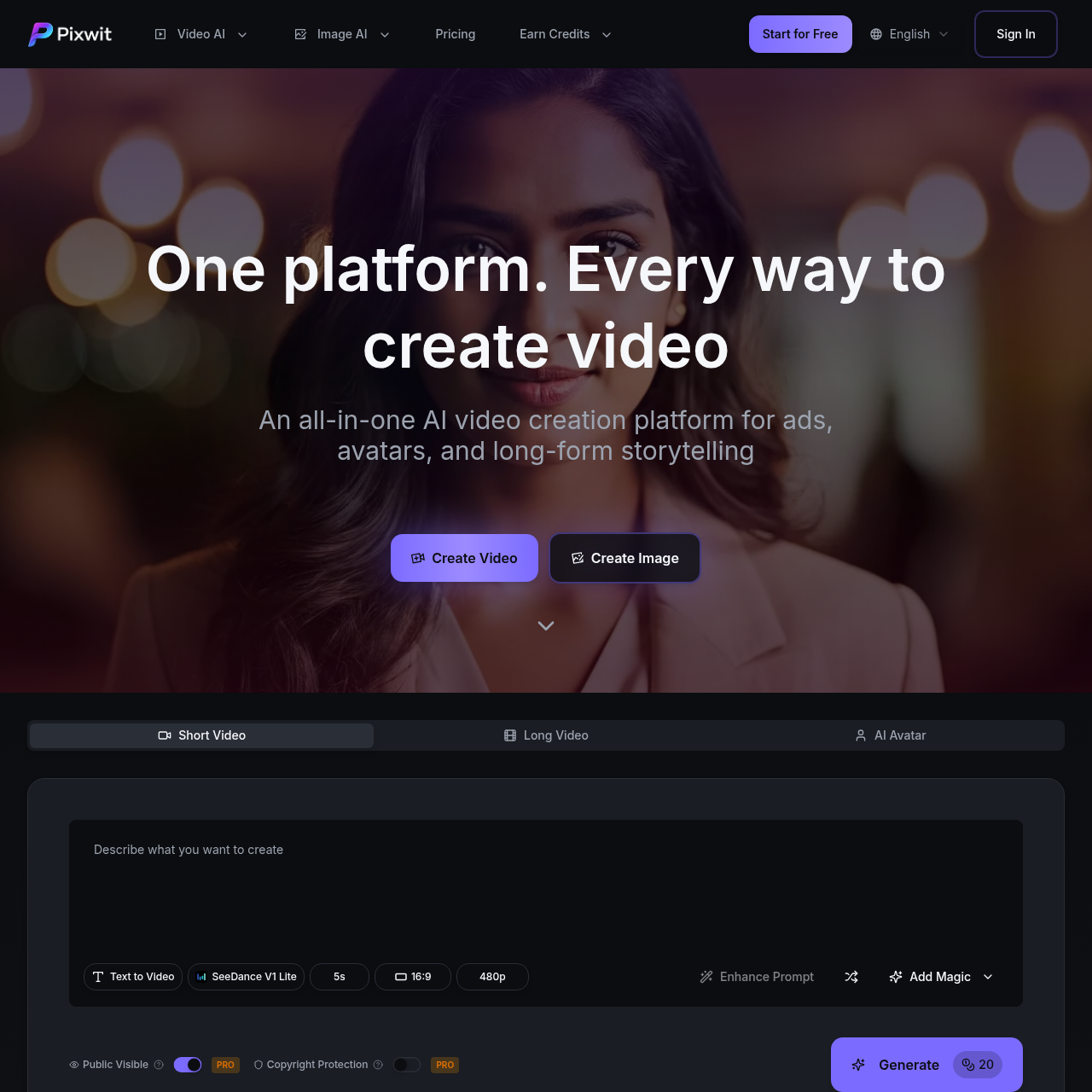
- Input Your Prompt: Type in a detailed description of your scene. You can use the Enhance Prompt feature to add more detail or "Add Magic" for creative flair.
- Upload References (Optional): If using Image to Video or Reference Image to Video, upload your source files to maintain character or background consistency.
- Adjust Parameters: Select your preferred model (e.g., SeeDance V1 Lite), set the duration (e.g., 5s), and choose the aspect ratio.
- Generate: Click the Generate button. Your video will be ready in typically 2-5 minutes.
- Review and Download: Once the generation is complete, you can view your video and share it. Note that PRO users enjoy copyright protection and no public visibility on their creations.
FAQ
What is Pixwit and how does it work? Pixwit is an AI-powered tool that converts text or images into stunning video artworks using advanced models like Sora and Kling.
Do I need technical skills to use Pixwit? Not at all! The interface is designed to be simple and user-friendly for everyone.
What are the limitations of the free version? The free version provides 21 credits on signup and limits video length to 15 seconds. Paid plans offer up to 5-minute videos and unlimited credits.
Can I use generated videos commercially? Yes! You own full rights to the videos you generate and can freely share or commercialize them.
How long does video generation take? Typically, it takes 2-5 minutes depending on the complexity and server load.
What AI models are supported? Pixwit supports Kling V2.5, Wan 2.5, Sora 2, Veo 3.1, Runway Gen 3, and more.