Persona.js
Persona: A Lightweight VanillaJS Agent UI Library for Seamless WebMCP-Native Agentic Experiences and AI Integration.
Persona is a high-performance, VanillaJS agent UI library designed to build agentic front-end experiences. As a WebMCP-native solution, Persona is lightweight, extensible, and compatible with any SSE backend, featuring Shadow DOM isolation and advanced theming.
2026-06-30
--K
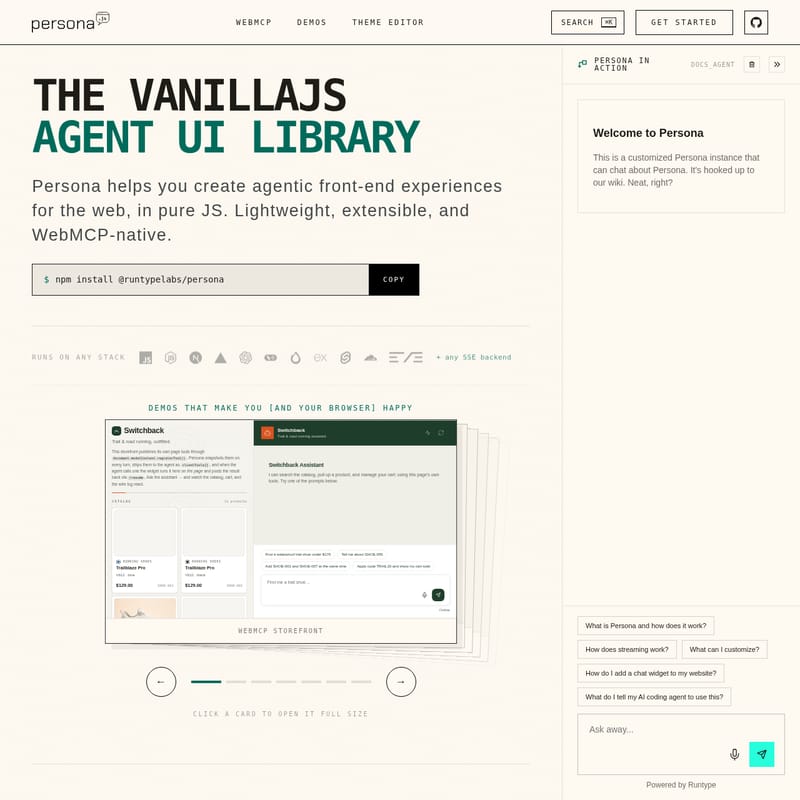
Persona.js Product Information
Persona: The Ultimate VanillaJS Agent UI Library for WebMCP-Native Experiences
In the rapidly evolving landscape of artificial intelligence, providing a seamless interface for users to interact with agents is paramount. Enter Persona, a cutting-edge VanillaJS agent UI library designed specifically to help developers create agentic front-end experiences for the web. Built to be lightweight, extensible, and inherently WebMCP-native, Persona offers a robust solution for integrating sophisticated AI interactions into any web application without the overhead of heavy frameworks.
What's Persona?
Persona is a specialized agent UI library that allows developers to build and deploy high-quality AI agent interfaces in pure JavaScript. Unlike monolithic frameworks that dictate your entire tech stack, Persona is designed to be "stack-agnostic," meaning it runs on any environment and integrates seamlessly with any Server-Sent Events (SSE) backend.
At its core, Persona is a WebMCP-native tool. WebMCP (Model Context Protocol for the Web) is a standard that allows browsers to provide a unified space for page tools. Persona leverages this standard to discover and interact with the tools already existing on your webpage. Whether you are building a support bot, a sales assistant, or an onboarding specialist, Persona provides the UI components necessary to turn your application into an agentic powerhouse.
As a VanillaJS agent UI library, Persona ensures that your site remains fast and responsive. It doesn't rely on heavy dependencies, making it the ideal choice for developers who prioritize performance and clean code. By using Persona, you can move from a simple chat interface to a fully functional agentic experience that can operate your app directly.
Key Features of Persona
Persona is packed with features that make it the premier choice for modern AI front-end development. Each feature is crafted to ensure maximum flexibility for developers and a frictionless experience for end-users.
1. WebMCP-Native Agentic Capabilities
Persona does more than just display text; it operates your app. By exposing page actions—such as search functions, shopping carts, bookings, and forms—as WebMCP tools, the agent can drive these actions directly. Importantly, Persona includes built-in user approval flows, ensuring that the agent only performs actions with the user's explicit consent. This "agentic" behavior requires no complex backend integration because it interacts with the tools already present on your front-end.
2. Complete Style Isolation
One of the biggest challenges in deploying third-party widgets is CSS leakage. Persona solves this using Shadow DOM rendering and prefixed CSS. This ensures that the Persona agent UI library styles remain fully separate from the host application. You can drop the widget into any page with the confidence that it won't break your existing layout, and your site's styles won't bleed into the agent interface.
3. Flexible Transport and Streaming
Persona is built for the real-time web. It supports SSE (Server-Sent Events) streaming out of the box. With pluggable parsers, you can adapt any request or event shape using customFetch and parseSSEEvent. While it is optimized for Runtype, it is not a requirement, allowing you to connect to virtually any backend architecture.
4. Advanced Theming and Customization
Persona features a sophisticated three-layer token tree (palette, semantic, and component) that allows for deep customization. Whether you need to match a specific brand identity or implement a sleek dark mode, Persona’s live theme editor makes it simple. You can style the widget so it feels like a native part of your application rather than a bolted-on extra.
5. Multiple Layout Options
Persona offers three distinct UX patterns to suit different use cases:
- Floating: A launcher in the corner that opens a panel, perfect for support or onboarding.
- Docked: A copilot experience that sits beside your main application content.
- Fullscreen: A dedicated assistant layout for immersive AI interactions.
How to Use Persona
Getting started with the Persona agent UI library is straightforward, whether you prefer using package managers or simple script tags.
Installation
To include Persona in your project via NPM, run the following command:
npm install @runtypelabs/persona
Alternatively, you can include it via a standard script tag for no-framework environments.
Initializing the Widget
To launch a floating assistant (the default configuration), you can initialize the agent widget with just a few lines of code:
import "@runtypelabs/persona/widget.css";
import { initAgentWidget } from "@runtypelabs/persona";

initAgentWidget({
  target: "#chat",
  config: {
    apiUrl: "https://your-api.com/chat",
  },
});
Registering WebMCP Tools
To enable the agent to interact with your application, you must register tools within the document.modelContext. Here is an example of how to register a search tool:
document.modelContext.registerTool({
  name: "search_products",
  description: "Search the catalog.",
  inputSchema: {
    type: "object",
    properties: {
      query: { type: "string" },
    },
    required: ["query"],
  },
  async execute({ query }) {
    return searchCatalog(query);
  },
});
Once registered, Persona will discover this tool automatically and can request user permission to execute it during a conversation.
Use Cases for Persona
Persona is versatile enough to handle a wide range of business and technical scenarios. Some of the most popular implementations include:
- WebMCP Storefront: Transform a standard e-commerce site into an AI-driven shopping experience where the agent can search for products and add them to the cart.
- SaaS Copilots: Use the docked panel layout to provide a persistent AI assistant that helps users navigate complex software interfaces.
- Interactive Calendars: Enable users to book appointments or check schedules through a conversational interface that interacts with a WebMCP-enabled calendar.
- Technical Documentation Agents: Deploy a floating launcher on documentation sites to help users find answers quickly using a customized Persona instance hooked up to a wiki.
- Onboarding Assistants: Guide new users through your platform features using a floating widget that triggers specific page actions.
FAQ
Does Persona work with my specific backend? Yes. Persona is designed to work with any SSE backend. It provides adapters for popular frameworks like Vercel AI SDK, OpenAI Agents, LangGraph.js, Hono, Express, and SvelteKit.
Will Persona mess up my website's CSS? No. Persona uses Shadow DOM isolation and prefixed CSS to ensure that its styles and your website's styles never interfere with one another.
What is WebMCP and why does Persona use it? WebMCP is a standard for exposing browser-side tools to AI models. Persona uses it to discover and call functions (like
search_products) already present on your page, making the agent truly interactive within your app's context.
Can I customize the look of the Persona widget? Absolutely. Persona includes a three-layer token-based theming system and a live theme editor, allowing you to match your brand's palette and typography perfectly.
Is Persona lightweight? Yes, Persona is a VanillaJS agent UI library, meaning it is built for speed and has minimal impact on page load times compared to framework-heavy alternatives.