PDFData - Extract Data from PDFs into Excel
PDFData - AI-powered PDF to Excel Converter
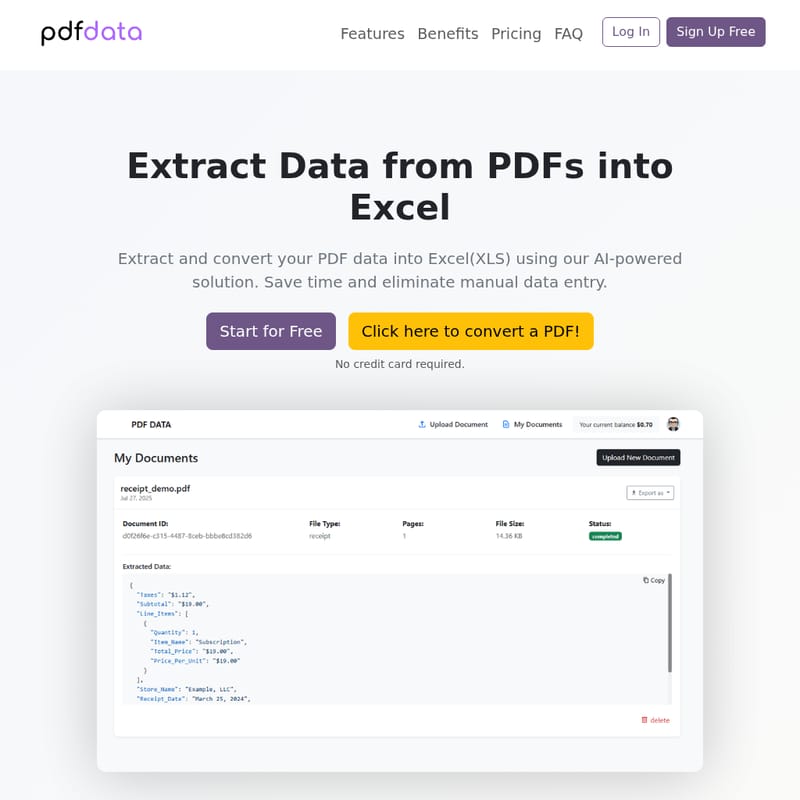
PDFData is an AI-driven solution for extracting and converting PDF data into structured Excel, CSV, and JSON formats. It automates the process of data extraction, ensuring speed, accuracy, and a significant reduction in manual data entry efforts. Whether you're working with bank statements, invoices, resumes, or any other PDF document, PDFData provides an easy-to-use, secure, and efficient platform for transforming your PDF data. It supports batch processing, custom templates, and ensures data validation, with flexible pricing based on usage. Ideal for businesses and professionals in accounting, HR, finance, and more.
2025-08-06
1.0K
PDFData - Extract Data from PDFs into Excel Product Information
PDFData - AI-Powered PDF to Excel Converter
What's PDFData
PDFData is a cutting-edge AI-powered tool designed to help users effortlessly extract and convert data from PDF files into structured formats like Excel, CSV, and JSON. Whether you're working with financial documents, HR records, or invoices, PDFData automates the entire data extraction process, saving you countless hours of manual work. It works with a variety of document types, ensuring high accuracy and efficiency in extracting relevant data from even complex or scanned PDF files.
Features
Automated Extraction
PDFData uses advanced AI algorithms to automatically identify and extract data from any PDF document, regardless of its format or structure. Whether it's a scanned document or a complex layout, PDFData handles it with ease.
Custom Templates
Create reusable templates for frequently used document types to streamline your workflow and ensure consistent accuracy with every extraction.
Data Validation
Built-in validation features help ensure the extracted data is accurate, with error detection and correction capabilities.
Multiple Export Formats
Export your data in a variety of formats including CSV, Excel, JSON, or directly to your preferred database or system.
Batch Processing
Process hundreds of PDF documents simultaneously, significantly boosting productivity and reducing manual labor.
Secure Storage
Your documents and extracted data are stored securely with enterprise-grade encryption and strict access controls to ensure data privacy and security.
Use Case
PDFData is versatile, and it's suitable for a variety of industries and use cases. From HR professionals processing resumes to accountants managing invoices and bank statements, PDFData has you covered.
- HR Professionals: Automatically extract relevant information from resumes and CVs to streamline recruitment processes.
- Accountants and Financial Analysts: Convert bank statements, invoices, receipts, and insurance claims into structured data for faster processing and analysis.
- Operations Managers: Batch-process large numbers of documents in minutes, saving significant time and effort.
FAQ
How secure is my data?
PDFData uses enterprise-grade encryption to secure your data. All documents are stored in a secure environment with strict access controls to prevent unauthorized access.
Do I need a credit card to get started?
No, you can start using PDFData for free with a $1 credit, and no credit card is required to get started.
How long do you keep my documents?
Your documents are stored securely for as long as needed for processing. Once processing is complete, you can choose to delete them from the system.
What types of PDF documents can I process?
PDFData supports a wide range of document types, including resumes, bank statements, invoices, receipts, insurance claims, and more.
How does the pricing work?
PDFData operates on a pay-per-use model, charging only $0.06 per page with no monthly fees or minimum usage requirements.
Is there an API available for integration?
Yes, PDFData offers an API for seamless integration with your existing systems.
How accurate is the data extraction?
PDFData provides highly accurate data extraction, with built-in validation features to ensure that your extracted data is correct.
How It Works
PDFData makes PDF data extraction easy. Here's how you can get started in three simple steps:
- Upload Documents: Upload your PDF files through the user-friendly interface.
- Automatic Processing: Our AI engine automatically processes and extracts all relevant data from your documents.
- Export: Export the extracted data in your preferred format, such as CSV, Excel, or JSON.
Pricing
Simple, Transparent Pricing
PDFData offers a straightforward, pay-as-you-go pricing model.
- $0.06 per page
- No monthly fees or minimum usage required.
- Transparent billing with no hidden charges.
- Start for free with $1 credit, no credit card required.
Examples of Cost
- Invoice (1-2 pages): $0.06 - $0.12
- Bank Statement (3-5 pages): $0.18 - $0.30
- Resume / CV (1-3 pages): $0.06 - $0.18
- Insurance Claim (2-4 pages): $0.12 - $0.24
Save Time and Boost Productivity
PDFData offers a significant reduction in manual work and helps businesses save time. With automated processing, users can reduce data extraction time by up to 95%, saving up to 20+ hours per week.
Ready to Get Started?
Join the growing number of businesses and professionals that rely on PDFData to transform the way they handle PDF data extraction. Start processing your PDFs today with no credit card required.