OpenComputer
OpenComputer: The Easiest Way to Deploy Managed AI Agents with Durable Sessions
OpenComputer is a premier platform for deploying managed AI agents with durable sessions, mid-run steering, and permanent URLs. It requires no infrastructure and integrates seamlessly with Claude Code and Cursor.
2026-07-27
6.0K
OpenComputer Product Information
OpenComputer: The Easiest Way to Deploy Managed AI Agents
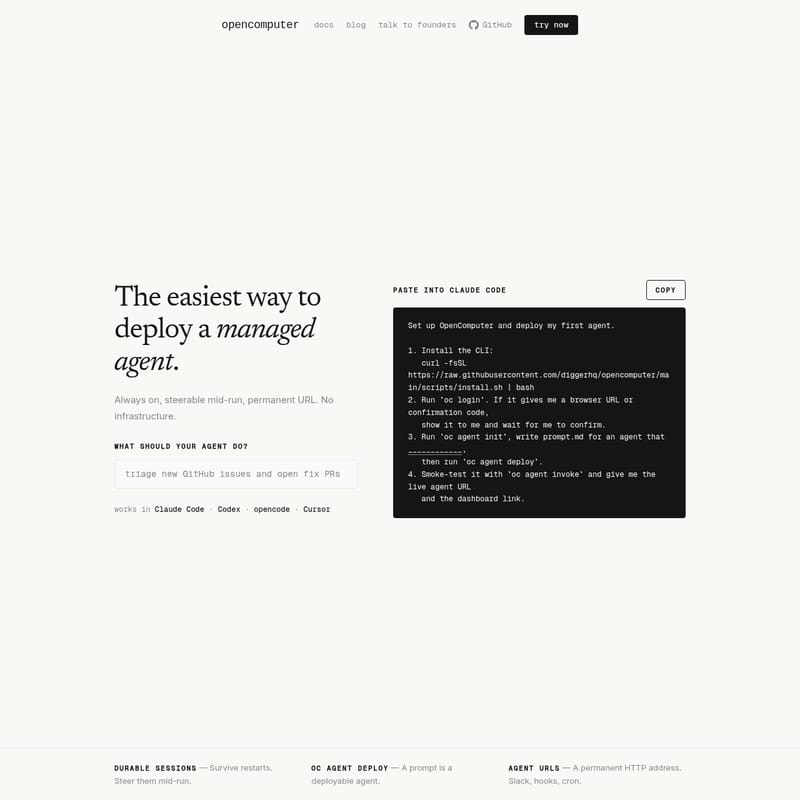
In the evolving landscape of artificial intelligence, OpenComputer emerges as the most streamlined solution for developers looking to deploy managed agents without the headache of managing underlying infrastructure. OpenComputer provides an environment where agents are always on, steerable mid-run, and accessible via permanent URLs, ensuring that your AI workflows are both persistent and highly functional.
What’s OpenComputer?
OpenComputer is a managed agent deployment platform designed to simplify the transition from a local prompt to a live, production-ready agent. By using OpenComputer, developers can bypass the complexities of infrastructure setup. The core philosophy of OpenComputer is to make agent deployment "the easiest way" possible, providing a reliable environment where agents can thrive without manual oversight of servers or scaling logic.
With OpenComputer, your agents are not just temporary scripts; they become permanent assets in your tech stack. Whether you are working with Claude Code, Codex, opencode, or Cursor, OpenComputer fits directly into your existing development workflow, allowing you to focus on the logic of your agent rather than the mechanics of its hosting.
Core Features of OpenComputer
OpenComputer is built with high-performance features that address the common pain points of AI agent management. Below are the standout features that define the OpenComputer experience.
Durable Sessions for Persistence
One of the most critical features of OpenComputer is its support for Durable Sessions. Unlike traditional ephemeral deployments, OpenComputer agents are designed to survive restarts. This persistence ensures that long-running tasks or state-heavy operations are not lost if a system update or a brief interruption occurs. With OpenComputer, your agent maintains its context and progress, providing a stable foundation for complex automations.
Mid-Run Steerability
OpenComputer empowers developers with the ability to steer their agents mid-run. This means that if an agent is performing a task and requires human intervention or a change in direction, OpenComputer allows you to provide guidance on the fly. This steerability ensures that your OpenComputer agents remain aligned with your goals throughout their execution cycle.
Permanent Agent URLs
Every agent deployed through OpenComputer is assigned a Permanent Agent URL. This is a persistent HTTP address that allows for seamless integration with external tools. These URLs make OpenComputer agents perfect for:
- Slack integrations
- Webhooks
- Cron jobs
- External API triggers
Prompt-Based Deployment
With OpenComputer, a prompt is a deployable agent. By utilizing the oc agent deploy command, developers can take their high-level instructions and turn them into a live service instantly. This reduces the barrier to entry, making OpenComputer the fastest path from ideation to deployment.
Compatibility and Integrations
OpenComputer is designed to work where developers work. It features deep integration with modern AI-assisted coding tools, ensuring a friction-free experience. OpenComputer works seamlessly in:
- Claude Code
- Codex
- opencode
- Cursor
You can simply paste commands and configurations directly into these environments to trigger OpenComputer workflows.
How to Use OpenComputer
Setting up OpenComputer and deploying your first agent is a straightforward process that takes place within your terminal via the OpenComputer CLI.
1. Install the OpenComputer CLI
To begin, you need to install the command-line interface. Use the following command in your terminal:
curl -fsSL https://raw.githubusercontent.com/diggerhq/opencomputer/main/scripts/install.sh | bash
2. Authentication
Once the CLI is installed, log into your OpenComputer account:
oc login
If the system provides a browser URL or a confirmation code, navigate to the link or enter the code to confirm your identity. The OpenComputer CLI will wait for this confirmation before proceeding.
3. Initialize and Write Your Agent
Run the initialization command to prepare your local environment:
oc agent init
At this stage, you will write your prompt.md file. This file contains the core instructions for your agent, defining what your OpenComputer agent should do. Once your prompt is ready, deploy it with:
oc agent deploy
4. Testing and Invocation
To ensure your agent is functioning correctly, you can perform a smoke test using the invoke command:
oc agent invoke
Upon successful invocation, OpenComputer will provide you with a live agent URL and a link to the dashboard, where you can monitor and manage your agent's performance.
OpenComputer Use Cases
The flexibility of OpenComputer makes it suitable for a wide range of applications. Because it provides permanent HTTP addresses and durable sessions, OpenComputer is ideal for:
- Slack Bots: Create agents that live in your Slack workspace and respond to triggers via the permanent URL.
- Automated Webhooks: Use OpenComputer to process incoming data from third-party services in real-time.
- Scheduled Cron Jobs: Set up agents to perform recurring tasks with the reliability of durable sessions.
- Interactive AI Assistants: Deploy agents in tools like Cursor or Claude Code to assist with complex development tasks.
FAQ
Q: Does OpenComputer require me to manage infrastructure? A: No. OpenComputer is a managed service, meaning there is no infrastructure to manage on your end. It is designed to be "always on" without manual server configuration.
Q: What happens if an agent session is interrupted? A: OpenComputer agents utilize durable sessions, which allow them to survive restarts and maintain their state.
Q: Can I change my agent's behavior while it is running? A: Yes, OpenComputer agents are steerable mid-run, allowing for real-time adjustments and guidance.
Q: How do I connect OpenComputer to Slack? A: You can use the permanent HTTP address (Agent URL) provided by OpenComputer to set up Slack hooks and other integrations.
Q: Which editors support OpenComputer? A: OpenComputer works natively in Claude Code, Codex, opencode, and Cursor.