Oasis Browser for Mac
Oasis Browser: A Privacy-First AI Browser by Kahana for Secure, Transparent, and Ad-Free Web Browsing
Oasis Browser is a privacy-first AI browser developed by Kahana, designed as a sanctuary for secure web browsing. It features built-in AI assistance, 100% ad-blocking controls, and transparent data collection policies that anonymize interaction data by default. Built for individuals and enterprise teams, Oasis Browser ensures your sensitive context stays local while providing an agentic, action-oriented experience. Trusted by 7,000+ users across 108 countries, it bridges the gap between high-level privacy and modern AI functionality.
2026-05-29
21.0K
Oasis Browser for Mac Product Information
Oasis Browser: Your Privacy-First AI Sanctuary for Secure Web Browsing
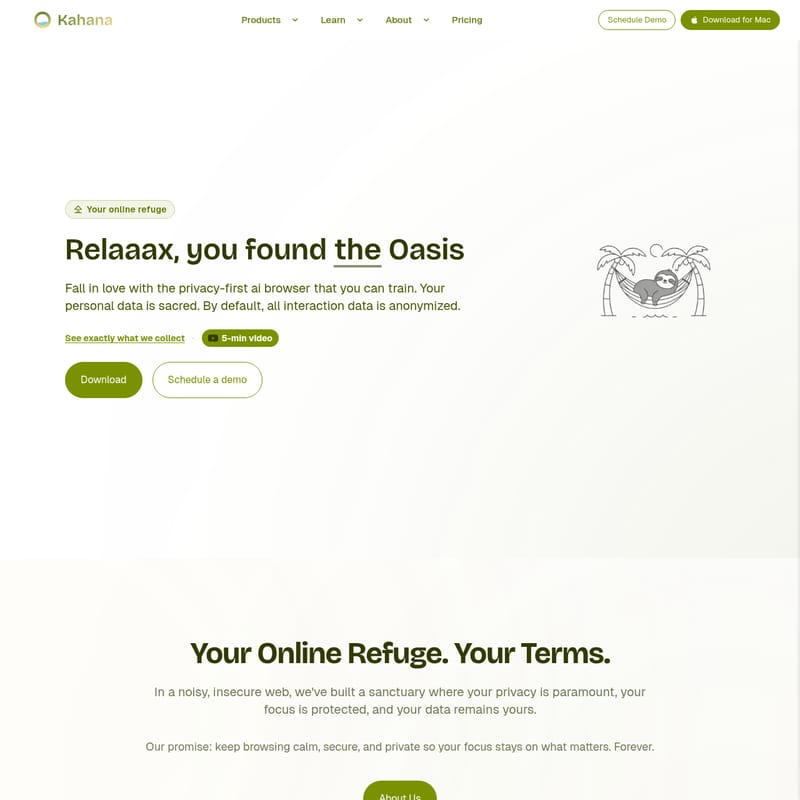
In an era where the digital landscape is increasingly noisy and insecure, finding a workspace that prioritizes your focus and security is essential. Oasis Browser, developed by Kahana, is designed to be your "online refuge." This privacy-first AI browser is built on the promise of keeping your browsing experience calm, secure, and private, ensuring that your focus remains exactly where it belongs: on what matters most.
As a secure web browser, the Oasis Browser provides a sanctuary where your personal data is treated as sacred. By default, all interaction data is anonymized, giving you the peace of mind to explore the web without the constant threat of intrusive tracking or data exploitation.
What is Oasis Browser?
Oasis Browser is a next-generation AI-driven browser that allows users to train their browsing environment while maintaining strict privacy standards. Unlike traditional browsers that often prioritize advertising revenue over user confidentiality, Oasis Browser is built for transparency and control. It serves as a personal refuge, offering a "privacy-first" architecture that keeps your browsing behavior entirely in your control.
Whether you are an individual looking for a cleaner web experience or an enterprise seeking to protect sensitive corporate data, Oasis Browser offers a unique blend of AI efficiency and robust security. It bridges the gap between the privacy-centric nature of platforms like Firefox and the innovative AI capabilities found in modern browsers, creating a seamless, action-oriented environment.
Key Features of Oasis Browser
1. Transparent Data Collection
One of the standout features of Oasis Browser is its "Transparent by Default" policy. Kahana collects minimal interaction data solely to improve the assistant, fix bugs, and measure latency. By default, payloads are anonymized, meaning no email or account IDs are attached to your data. You only share identifying fields if you explicitly opt-in through the settings.
2. Built-in AI Assistant
Oasis Browser integrates a powerful AI assistant directly into your workflow. This assistant is designed to be agentic and action-oriented, moving beyond passive searching. You can interact with the AI to summarize content, generate ideas, or manage tasks without leaving your tabs.
3. 100% Ad-Blocking Controls
Say goodbye to intrusive advertisements. Oasis Browser comes equipped with built-in ad-blocking controls, providing a cleaner, faster, and more focused browsing experience. By eliminating ads, the browser also reduces the risk of malicious scripts often found in ad networks.
4. Privacy-First Architecture
Unlike Chromium-based browsers that may gather broad behavioral signals in the background, Oasis Browser is explicit about what leaves your device. It does not build ad profiles based on your location, searches, likes, or purchases. Your sensitive context stays local on your device.
5. Enterprise-Grade Security
For organizations, the Oasis Enterprise Browser offers advanced security features. With SOC 2 certification in progress, it provides tools for Zero Trust security, privileged user management, and remote workforce protection.
Diverse Use Cases for Oasis Browser
Oasis Browser is a versatile tool designed to meet the needs of various professional and personal scenarios. Its features are particularly beneficial in the following use cases:
- Remote Workforce Security: Protecting employees who access company resources from various locations and networks.
- SaaS & Web Apps: Providing a secure environment for managing multiple cloud-based applications.
- Zero Trust Security: Implementing a security model that never trusts and always verifies, essential for modern digital infrastructures.
- VDI Reduction: Offering a secure browsing alternative that can reduce the need for expensive Virtual Desktop Infrastructure.
- External Workforce Access: Safely managing access for contractors and third-party vendors.
- Privileged User Management: Ensuring that users with high-level access are browsing within a protected and audited environment.
- Merger Integration: Streamlining the digital transition during corporate mergers by providing a standardized, secure browser.
Industry-Specific Solutions
Oasis Browser is trusted by over 7,000 users in 108+ countries, serving a wide range of markets including:
- Healthcare: Protecting sensitive patient data and complying with strict privacy regulations.
- Finance: Ensuring secure transactions and preventing data leakage in high-stakes environments.
- Government & Public Sector: Providing a secure platform for public service operations.
- Technology & Professional Services: Supporting innovation with a browser that keeps pace with AI evolution.
- Education & Manufacturing: Enhancing productivity while safeguarding intellectual property.
How to Get Started with Oasis Browser
Getting started with Oasis Browser is simple and designed to fit your specific needs:
- Download for Mac: Visit the official website to download the latest version of Oasis Browser for your Mac device.
- Schedule a Demo: For teams and organizations, scheduling a demo allows you to see how the Oasis Enterprise Browser can specifically benefit your IT infrastructure.
- Opt-in for Personalization: Once installed, you can choose to stay anonymous or opt-in to personalization in the settings to allow the AI to learn your specific preferences.
Frequently Asked Questions (FAQ)
Is Oasis Browser free to use? Yes, Oasis Browser offers a free tier for individual users. For teams requiring more advanced security and management features, there is an Enterprise version and specific pricing tiers available.
What kind of data does Oasis Browser collect? By default, Oasis Browser sends minimal, anonymized interaction data (such as OS, browser version, and prompt text) to Kahana to improve service. Personal data like your email or user ID is only collected if you explicitly opt-in to personalization.
Does Oasis Browser work on Windows? Currently, the primary download focus is for macOS. Please check the official website for updates regarding other operating systems.
How does Oasis Browser compare to Firefox or Chrome? Oasis Browser combines the privacy focus of Firefox with the integrated AI capabilities often found in Chrome, but with a stricter adherence to data anonymization and user control.
What is the Data Leakage Consortium? The Data Leakage Consortium is a community and think tank hosted by Kahana. It is dedicated to preventing data leakage through AI tools by sharing ideas, hosting events, and collaborating on practical security solutions.
Conclusion
Oasis Browser represents a shift in how we interact with the web. By prioritizing the user's peace of mind and data sovereignty, it transforms the browser from a data-gathering tool into a true online refuge. With its built-in AI assistant, ad-blocking, and transparent data policies, Oasis Browser is the ideal choice for anyone looking to reclaim their privacy and focus in a digital world. Join the 7,000+ users worldwide and experience a more elegant, secure, and agentic way to browse.