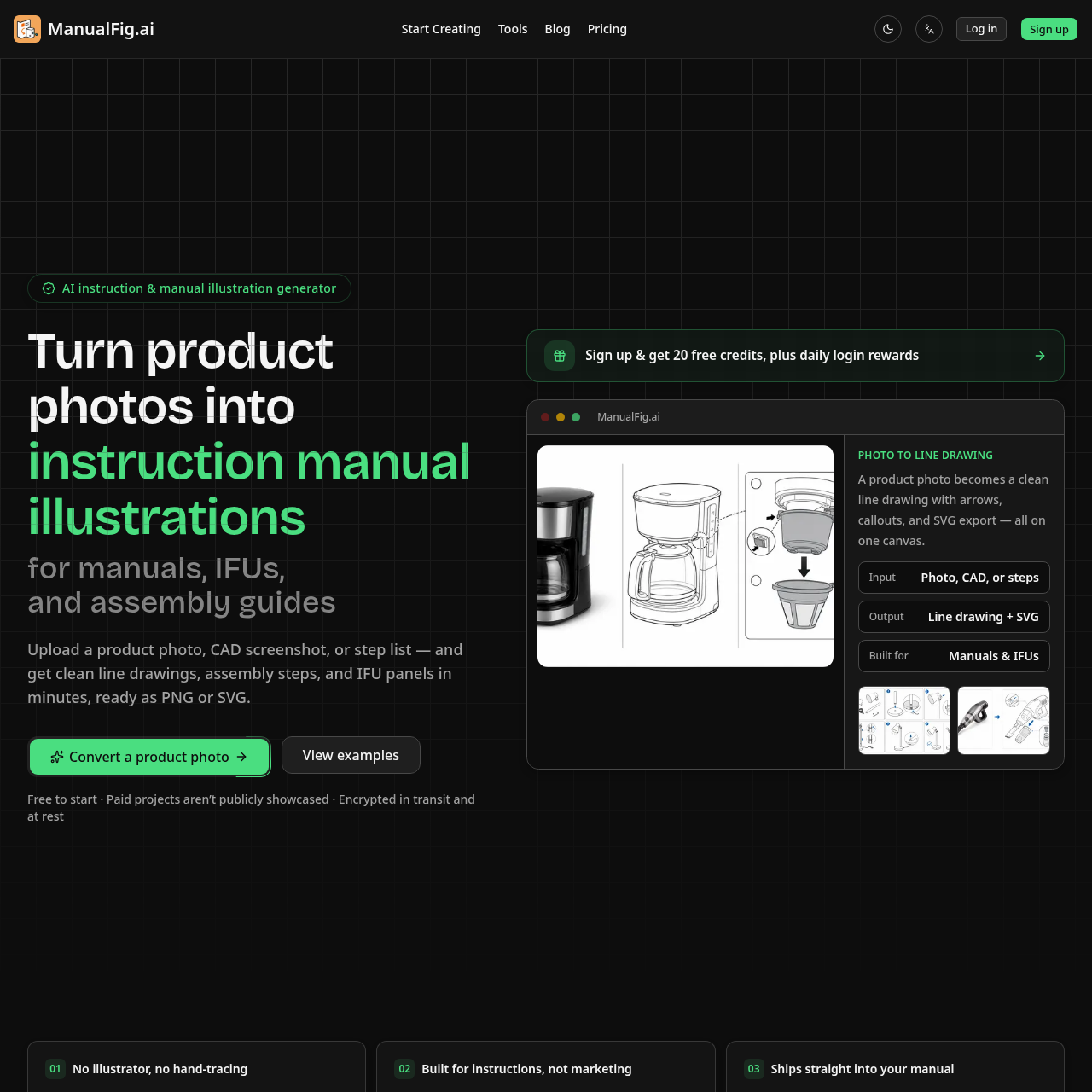
ManualFig is an AI instruction and technical illustration generator for technical writers, manufacturers, medical-device teams, and ecommerce brands. It turns product photos, CAD screenshots, step descriptions, and existing images into clean line drawings, assembly diagrams, instructional panels, callouts, arrows, and warnings. Unlike general image generators, ManualFig is purpose-built for repeatable documentation workflows and supports editable stroke-based SVG, PNG, and project exports, helping teams create consistent manuals and instructions for use without redrawing every step by hand.
ManualFig is an AI-powered illustration generator designed to produce technical figures, assembly instructions, and IFU panels from uploaded photos, CAD screenshots, or written steps.
The tool replaces manual line tracing by automatically generating step-by-step illustrations with callouts, arrows, and warnings, offering export options in PNG and stroke-based SVG.
What Can You Use ManualFig For?
Source-supported ways to use the product
Assembly Instructions and Furniture Guides
Generate numbered step panels, hardware callouts, anti-tip warnings, and wall-mount details directly from reference images or step lists.
Medical Device Instructions for Use
Produce preparation, operational, disposal, and risk panels featuring hazard symbols and clear operational guidance.
Consumer Electronics and Ecommerce Quick-Starts
Create unboxing, charging, pairing, and troubleshooting visuals such as correct and incorrect comparisons for quick-start cards and packaging inserts.
Technical Documentation and Exploded Views
Generate exploded views, part callouts, and installation figures to illustrate standard operating procedures and maintenance tasks.
How to Use ManualFig
The documented workflow, where available
1
Upload Reference or Procedure
Start by uploading a product photo, CAD screenshot, supplier image, sketch, existing manual page, or plain-text step list.
2
Generate Figures and Annotations
The system creates line art panels complete with numbered steps, directional arrows, callouts, and hazard or comparison indicators.
3
Refine and Export
Modify figures using text instructions, review side-by-side versions on the project canvas, and export the final output as PNG or SVG.
Instruction-Focused Illustration Generation and Export
ManualFig centers its generation process on technical documentation needs rather than decorative imagery. By accepting product photos, CAD captures, sketches, or plain-text instructions, it strips away visual distractions such as lighting reflections and background clutter while preserving core product contours and proportions.
The platform supports multi-panel technical workflows by adding standardized instructional elements like numbered sequences, directional motion arrows, zoom insets, and safety symbols. Results remain organized within a unified project workspace, allowing side-by-side version comparison and direct export to PNG or stroke-based SVG for layout integration.
Preserves physical shapes and proportions from uploaded source assets
Automates creation of callouts, direction arrows, and comparison panels
Retains editable stroke weights when exported as vector SVG
Maintains unified version tracking and side-by-side figure alignment across project revisions
ManualFig Pricing
Human-maintained commercial information
subscriptionfreemium
USD 10/month
Pricing can change. Confirm the current plan and billing terms on the official site before purchasing.
What to Test Before Choosing ManualFig
Checks to run with your own material and workflow
Confirm that uploaded product photos or CAD screenshots preserve critical component proportions in the resulting line art.
Verify whether exported stroke-based SVG files maintain editable line weights in your vector editing software.
Check that your workflow accommodates the difference in privacy terms between free usage and paid subscription tiers.
Review the clarity of generated directional arrows, hardware callouts, and hazard indicators before final document layout.
Answers based on the source-checked product record
What types of input can be used to generate figures?+
Users can upload product photos, CAD screenshots, supplier images, sketches, existing manual pages, or provide written procedures.
What export formats does the platform support?+
ManualFig supports exporting illustrations as raster PNG images or stroke-based SVG vector files.
Can existing generated illustrations be edited?+
Yes, figures can be edited by entering instructional sentences, and previous versions remain accessible on the project canvas.
What instructional markings can the tool add automatically?+
The platform can generate numbered steps, directional arrows, part callouts, zoom details, hazard symbols, and correct versus incorrect comparison panels.
How are project privacy and security handled?+
Project data is encrypted both in transit and at rest. Paid projects are kept private and are not publicly displayed in community galleries.
More Image Generator AI tools
Explore other recently added tools in the same category.