AI Art Create
AI Art Create: The All-in-One AI Image and Video Generator Platform for Professionals
AI Art Create is a revolutionary multi-model platform that consolidates world-class AI image and video generation tools into one interface. Featuring models like Kling 3.0 Pro, Seedance 2.5 Pro, Flux, and Ideogram, it offers a unified prompt box and credit system, making it the ultimate alternative to Midjourney and Runway for high-quality content creation.
2026-07-25
--K
AI Art Create Product Information
AI Art Create: The Ultimate AI Image and Video Generation Platform
In the rapidly evolving world of artificial intelligence, creators often find themselves juggling multiple subscriptions just to access the best tools. AI Art Create solves this fragmentation by offering a comprehensive ecosystem where every major AI image and video model is available under one roof. Whether you are looking for a powerful AI image generator or a cutting-edge AI video generator, AI Art Create provides a unified platform to describe your vision and generate results instantly—no credit card required to get started.
What is AI Art Create?
AI Art Create is a centralized hub designed for creators who have outgrown the limitations of single-model tools. While platforms like OpenArt, Higgsfield, Runway, or Midjourney offer specific strengths, they often force users to wait for proprietary roadmaps. AI Art Create changes the game by integrating every major AI model—including Seedance, Kling, Veo, Nano Banana Pro, GPT Image, Flux, Ideogram, and Recraft—into a single prompt box.
Built on the philosophy that creators shouldn't need five different subscriptions to stay at the cutting edge, AI Art Create allows you to switch between image and video models with a single click. Every time a new model release hits the market, it is quickly added to the AI Art Create catalog, ensuring you always have access to the latest technology without the overhead of multiple accounts.
Core Features of the AI Art Create Platform
One Prompt Box, Every AI Model
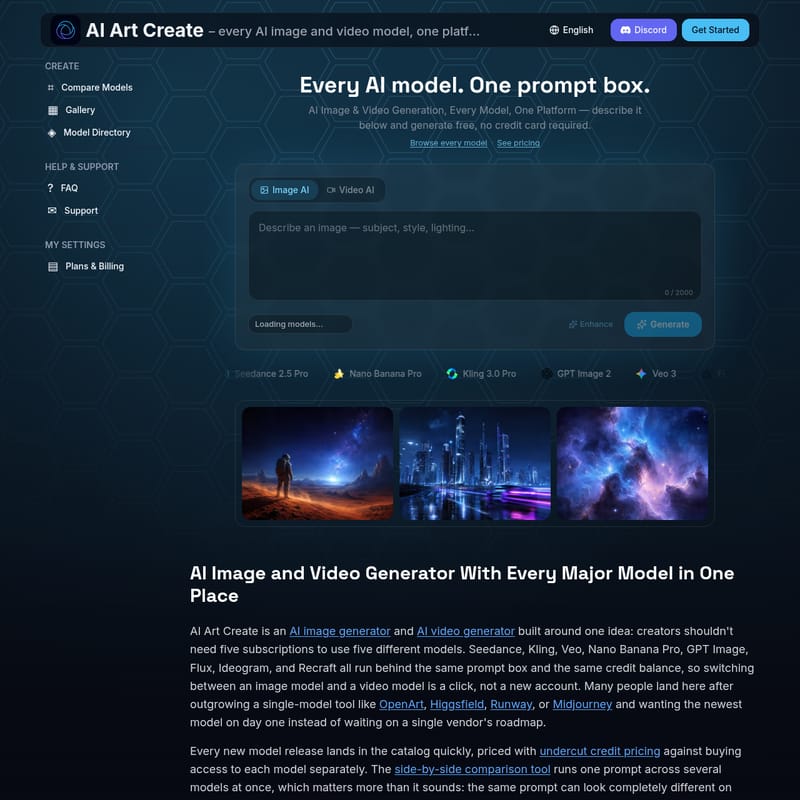
At the heart of the platform is the "Every AI model. One prompt box" experience. This eliminates the learning curve associated with switching platforms. You can input your description once and experiment with different engines to see which one interprets your vision most accurately.
Extensive Model Directory
AI Art Create hosts an impressive array of industry-leading models, including:
- Kling 3.0 Pro and Veo 3 for high-end video production.
- Seedance 2.5 Pro and Nano Banana Pro for versatile generations.
- FLUX.2 and Ideogram 3.0 for state-of-the-art image synthesis.
- Recraft V4, PixVerse v5, and Haiper 2.0 for specialized creative needs.
- Wan 2.2 and LTX Video for advanced motion and animation.
Side-by-Side Comparison Tool
One of the most powerful features of AI Art Create is the side-by-side comparison tool. Because the same prompt can yield drastically different results across models like Kling versus Veo, this tool allows you to run a single prompt across several models simultaneously. This ensures you find the perfect aesthetic without wasting credits on trial and error.
Comprehensive Credit System and Pricing
AI Art Create uses a unified credit balance designed to undercut the pricing of individual model subscriptions. Instead of paying for four separate tiers on four different sites, one plan on AI Art Create covers everything. This makes professional-grade AI creation more accessible and cost-effective.
Advanced Generation Settings
To cater to professional workflows, the platform supports various aspect ratios and reference tools:
- Aspect Ratios: 1:1 (Square), 16:9 (Widescreen), 9:16 (Vertical/Mobile), 4:3, and 3:4.
- Reference Photos: Upload a reference image to guide the AI in maintaining style or structure.
- Enhance Feature: Optimize your prompts for better results with a single click.
Real-World Use Cases for AI Art Create
Professional Product Photography
Skip the expensive studio bookings. Using AI Art Create as your primary AI image generator, you can create catalog-ready product shots using a simple text description or a reference photo. This is ideal for e-commerce brands needing high-quality imagery at scale.
Social Media Reels and Short-Form Content
With the integrated AI video generator capabilities, users can produce high-engagement clips for TikTok, Instagram Reels, and YouTube Shorts. You can animate a still image using the image-to-video feature or generate dynamic scenes from scratch using text-to-video models.
High-Converting Ad Creative
Marketing teams use AI Art Create to generate batches of on-brand image and video variations. This allows for rapid A/B testing across paid social channels, ensuring that the visual content resonates with the target audience.
Specialized Creative Projects
- Anime Art: Utilize specific models optimized for illustrative and stylized content.
- AI Headshots: Generate professional-grade portraits for LinkedIn or corporate bios.
- Logo Design: Conceptualize branding and logo ideas quickly with high-fidelity models like Recraft V4.
How to Use AI Art Create
Generating content on AI Art Create is a streamlined process designed for efficiency:
- Enter Your Prompt: Describe the image or video you want to create in the main prompt box (up to 2000 characters).
- Select Your Model: Choose from the dropdown menu featuring models like Nano Banana Pro, GPT Image 2, or Kling 3.0 Pro.
- Choose an Aspect Ratio: Select the format that fits your destination platform (e.g., 9:16 for TikTok or 16:9 for YouTube).
- Add a Reference (Optional): Upload an image if you want the AI to follow a specific visual guide.
- Generate: Click the generate button to use your credits and see your vision come to life.
Frequently Asked Questions (FAQ)
What is the best AI tool for generating both images and video? It depends on your specific needs. If you want the convenience of a single account instead of five separate subscriptions, a multi-model platform like AI Art Create is the best choice. It runs Seedance, Kling, Veo, Flux, and many more behind one balance, so you aren't limited by a single vendor’s roadmap.
Is AI Art Create cheaper than using Runway or Midjourney directly? Yes. Credit allocations are specifically priced to undercut most single-provider tiers. The primary saving comes from avoiding multiple subscriptions; one plan here replaces the need for separate OpenArt, Runway, and Kling accounts.
Can I turn a written prompt into images and video with consistency? Absolutely. You can use text-to-image for stills like product shots or concept art, then switch to a text-to-video generator to bring that idea to motion. For longer sequences, the platform offers models that maintain character and scene continuity, ensuring wardrobe, faces, and lighting remain coherent across different clips.
Do I need a credit card to get started? No. You can start generating for free to test the platform's capabilities before committing to a plan.