JoyFun: Free Image to Video
Joyfun AI: Free Unlimited AI Video Generator, Face Swap, and Artistic Effects Suite
Joyfun AI is an all-in-one creative platform offering free, unlimited AI video generation. Featuring advanced tools like Video Face Swap, Image to Video, and Text to Video, it utilizes premier models like Sora and Runway Gen-3 to deliver 1080p Full HD content. With a largely uncensored environment and no sign-up required, it empowers creators to explore diverse themes including dance, romance, and fashion without technical or financial barriers.
2026-01-31
2000.0K
JoyFun: Free Image to Video Product Information
Joyfun AI: The Ultimate Free AI Video Generator and Face Swap Platform
In the rapidly evolving landscape of digital creativity, Joyfun AI emerges as a premier all-in-one suite designed to transform your wildest ideas into stunning, high-quality videos. Joyfun AI bridges the gap between imagination and reality by offering a comprehensive set of tools including Face Swap, Image to Video, and Text to Video capabilities. By removing financial and technical barriers, this platform ensures that your creative flow remains uninterrupted.
What's Joyfun AI?
Joyfun AI is a cutting-edge, web-based creative platform that specializes in AI Video Generation. Built on advanced engines like Sora, Runway Gen-3, and Kling 2.1, Joyfun AI provides users with the ability to create professional-grade animations and realistic face swaps. Unlike many other platforms, Joyfun AI is committed to true creative freedom, offering a Free AI Video Generator experience that is genuinely unlimited, largely uncensored, and requires no registration or sign-up.
Core Features of Joyfun AI
1. Face Swap & Video Face Swap
Experience the magic of Face Swap technology with incredible realism. Joyfun AI allows you to effortlessly swap faces in both static photos and dynamic videos. Whether you are creating memes, personalized GIFs, or cinematic scenes, the Video Face Swap tool ensures seamless integration of lighting, expressions, and facial features.
2. Image to Video Generator
Give life to your static imagery. By uploading JPG, PNG, or WEBP files (up to 10MB), you can use the Image to Video tool to animate landscapes, portraits, or digital art. Directed by simple text prompts, your still images can transform into 1080p masterpieces with fluid motion.
3. Text to Video Generator
Act as the director of your own stories. The Text to Video feature allows you to describe a scene—such as a futuristic car chase or a cinematic dragon flight—and Joyfun AI will generate a complete video clip up to 10 seconds in length.
4. Specialized AI Effects
Joyfun AI offers a vast library of pre-trained models for specific animation needs, including:
- AI Dance Video & AI Twerk Video: Generate energetic routines or viral dance clips.
- AI Kissing Video & AI French Kiss: Create expressive and romantic character moments.
- AI Bikini Video & AI Cleavage: Ideal for fashion concepts and summer-themed visuals.
- AI Breast Expansion & AI Bouncing Boobs: Specialized artistic transformation models.
- Templates: Choose from styles like Ghibli, South Park, Cyberpunk, or Old Photo.
How to Use Joyfun AI
Creating with Joyfun AI is a straightforward process designed for speed and ease:
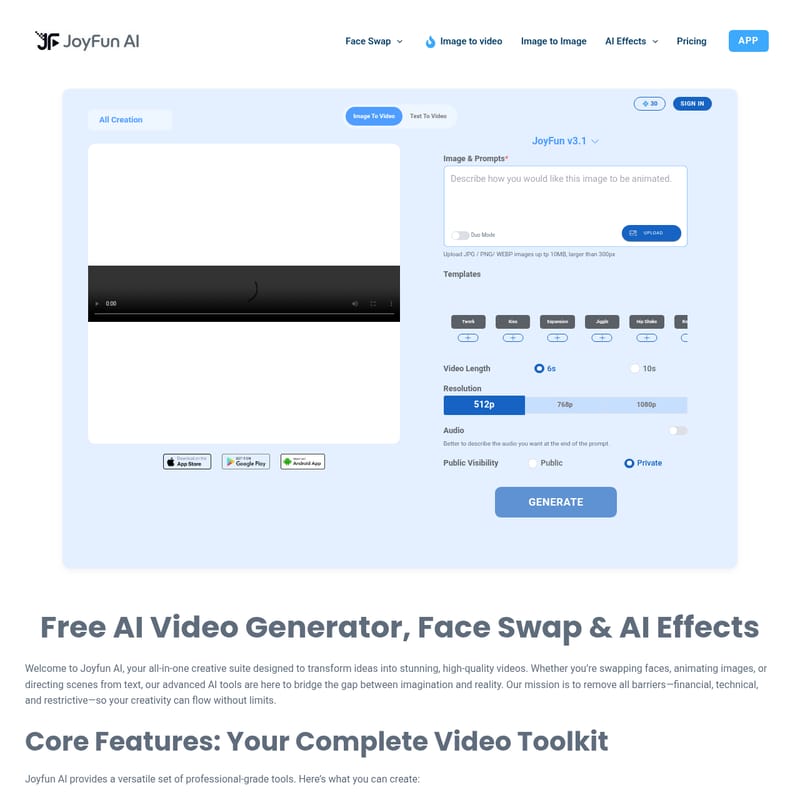
- Select Your Tool: Choose from Face Swap, Image to Video, or Text to Video on the Joyfun v3.1 dashboard.
- Upload Media: If using Image to Video, upload your image (ensure it is larger than 300px and under 10MB).
- Enter Prompts: Describe the action you want to see. You can even describe the Audio you want at the end of the prompt.
- Configure Settings: Select your Video Length (6s or 10s), Resolution (512p, 768p, or 1080p), and Public Visibility (Public or Private).
- Generate: Click the GENERATE button to receive your AI-powered creation instantly.
Use Cases
- Content Creators: Use the Video Face Swap tool to create engaging social media memes and viral clips.
- Digital Artists: Utilize Image to Video to add subtle motion to portfolios and character portraits.
- Music Producers: Generate AI Dance Videos to provide visual accompaniment for music tracks on social platforms.
- Storyboarding: Use Text to Video to visualize cinematic concepts and futuristic scenes quickly.
FAQ
Is Joyfun AI really free? Yes. Joyfun AI is 100% free with no hidden costs, subscriptions, or credit systems.
How do I generate a video without an account? Simply visit the site, choose your tool, upload your media, and click generate. No login is ever required.
Can I use Joyfun AI on my phone? Absolutely. The platform is fully optimized for mobile browsers on iOS and Android.
What is the content policy regarding NSFW? Joyfun AI provides a largely uncensored platform for artistic expression, including NSFW content, while strictly prohibiting illegal content.
What is the maximum video quality? You can generate videos in crisp 1080p Full HD with lengths up to 10 seconds.
Can I use the generated videos commercially? Yes, you are free to use your creations for personal and commercial projects like YouTube and social media ads.