JingleLark generates spoken radio imaging from typed scripts, selected voices, and mix elements such as intros, beds, and outros.
AudioGenerate spoken radio voiceovers from…Mix voiceovers with intros, background…Adjust voice pace from 0.7× to 1.2×Create cloned voices from short user…AI station ID generatorradio voiceover generatorAI jingle makerradio jinglesradio imagingDJ drops
Listed on AIToolly
What Is JingleLark? Product Overview
What the product does and how it is positioned
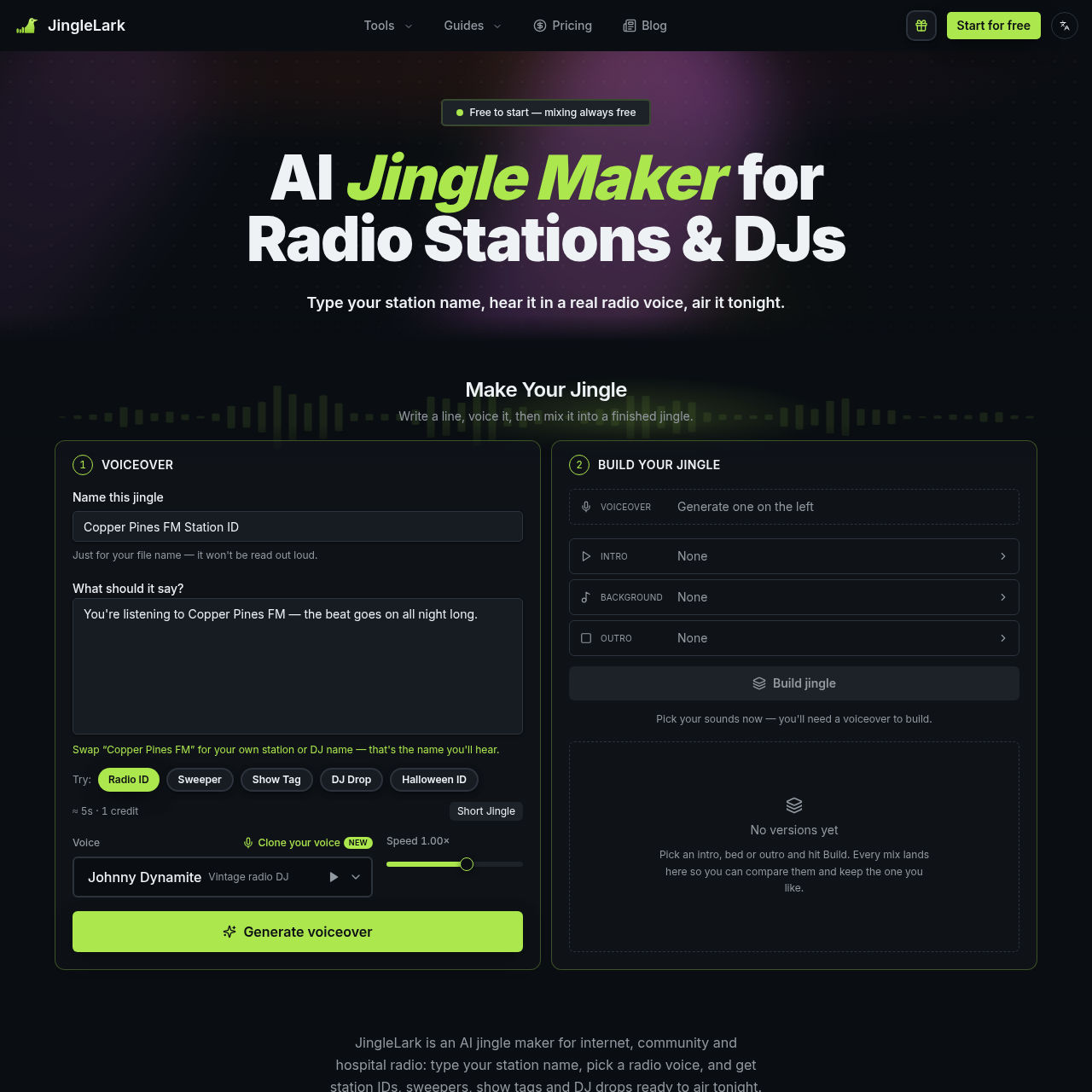
JingleLark (jinglelark.com) is an AI station ID and radio voiceover generator for small radio stations, including internet, community and hospital radio. You pay only for the voice; mixing, remixing and downloads are free. Type your station name or script, pick a radio voice, and combine it with an intro, music bed and outro to create an air-ready station ID, sweeper, show tag or DJ drop. Export the finished audio as MP3 or WAV. One-time credit packs start at $14.90, with no subscription.
JingleLark is an AI tool for creating spoken station IDs, sweepers, show tags, DJ drops, and related radio audio from user-written scripts.
Its workflow combines generated voiceovers with selectable sound elements, while templates and optional voice cloning support recurring station and presenter formats.
What Can You Use JingleLark For?
Source-supported ways to use the product
Small-station imaging
Create station IDs, sweepers, sponsor spots, and other spoken imaging for internet, community, or hospital radio.
Presenter and show branding
Prepare show intros, presenter tags, and segment stings using a selected radio voice or a permitted cloned voice.
DJ drops
Generate spoken DJ drops, name tags, and set openers from a DJ name, script, and selected voice.
How to Use JingleLark
The documented workflow, where available
1
Write the line
Type a station, presenter, or DJ script, or begin with a Radio ID, Sweeper, Show Tag, or DJ Drop template.
2
Generate the voiceover
Choose an on-air role or an available cloned voice, then generate the spoken version of the script.
3
Build and download
Add an intro, background bed, and outro, build the mix, compare versions, and download the selected result as MP3 or WAV.
Voice and mix workflow
The product separates voice generation from mix construction. A typed script is first rendered with a selected voice, after which the resulting voiceover can be combined with station-oriented sound elements.
The documented mix process includes sidechain-style ducking under the voice, trimming of silence inside sound effects, and loudness leveling to -16 LUFS.
Voice roles include vintage DJ, late-night announcer, hype announcer, British presenter, and warm narrator.
The documented library contains 45 intros, 28 background beds, and 15 outros.
Voice pace can be adjusted from 0.7× to 1.2×.
Voice cloning accepts an 8–30 second recording or upload.
JingleLark Pricing
Human-maintained commercial information
creditsfreemium
USD 14.9
Pricing can change. Confirm the current plan and billing terms on the official site before purchasing.
What to Test Before Choosing JingleLark
Checks to run with your own material and workflow
Confirm that the available voice roles and sound library fit the station's intended format.
Verify that the planned scripts fit the documented 900-character limit and produce the desired spoken length.
Check how non-English scripts sound before producing a larger set of station IDs.
Review voice-cloning permissions and recording conditions before creating a cloned voice.
Answers based on the source-checked product record
What kinds of radio audio can JingleLark create?+
The documented templates and examples cover station IDs, sweepers, show tags, DJ drops, show intros, news stings, and sponsor spots.
Can users add music or sound elements to a voiceover?+
Yes. The documented build workflow lets users add an intro, a background bed, and an outro to a generated voiceover.
Can JingleLark use a user's own voice?+
Yes. Users can record or upload 8–30 seconds of clear speech to create a cloned voice that reads the typed script.
How many voices and sounds are documented?+
The source documents 24 radio voices across six on-air roles, plus 88 sounds consisting of intros, background beds, and outros.
Which languages can the voices read?+
The source says the voices can read scripts in about 30 languages, while cloned voices are documented for English, Spanish, Portuguese, French, German, Italian, Russian, Chinese, Japanese, and Korean.
More Audio AI tools
Explore other recently added tools in the same category.