gpt-realtime-1.5 by OpenAI
OpenAI Realtime API: Low-Latency Multimodal LLM Applications with Speech-to-Speech Capabilities
The OpenAI Realtime API is a powerful interface designed for building high-performance, low-latency applications that support native speech-to-speech interactions. It allows developers to integrate multimodal inputs—including audio, images, and text—and receive multimodal outputs such as audio and text. With support for WebRTC, WebSocket, and SIP connections, it provides the flexibility needed to build sophisticated voice agents, realtime transcription services, and complex agentic workflows. Featuring the latest GPT-5.2 models and advanced context management like prompt caching and compaction, the Realtime API simplifies the process of creating responsive, human-like AI experiences in the browser, on servers, or via VoIP telephony.
2026-02-28
204300.0K
gpt-realtime-1.5 by OpenAI Product Information
OpenAI Realtime API: Building Multimodal, Low-Latency Applications
The OpenAI Realtime API is a cutting-edge interface designed for developers who need to build low-latency, multimodal LLM applications. It enables seamless communication with models that natively support speech-to-speech interactions, alongside multimodal inputs like audio, images, and text. Whether you are building sophisticated voice agents or implementing realtime audio transcription, the Realtime API provides the infrastructure to handle complex, high-speed data streams.
What's the Realtime API?
The Realtime API is a specialized interface within the OpenAI ecosystem tailored for instantaneous interactions. Unlike traditional REST APIs that follow a request-response pattern, the Realtime API supports persistent connections, allowing for a continuous flow of data. It is specifically optimized for models like GPT-5.2 and beyond, which are capable of processing and generating audio and text simultaneously. This makes the Realtime API the gold standard for developers creating interactive AI that needs to hear, see, and speak in real time.
Key Features of the Realtime API
Multimodal Capabilities
- Native Speech-to-Speech: Direct communication with models without needing separate STT (Speech-to-Text) or TTS (Text-to-Speech) intermediate steps.
- Multimodal Inputs/Outputs: Supports audio, images, and text inputs while delivering audio and text outputs.
- Realtime Transcription: High-accuracy transcription of audio streams as they happen.
Flexible Connection Methods
- WebRTC: Ideal for browser and client-side interactions, providing the lowest latency for end-users.
- WebSocket: Best for middle-tier server-side applications that require consistent low-latency network connections.
- SIP: Specifically designed for integrating AI into VoIP telephony systems.
Advanced Model Optimization
- Prompt Caching: Reduces latency and costs by caching frequently used prompt segments.
- Compaction: Efficiently manages conversation state to handle long-running interactions.
- Fine-Tuning: Supports supervised, vision, and reinforcement fine-tuning (RFT) to specialize model behavior.
Comprehensive Toolset
- Function Calling: Connect the Realtime API to external tools and APIs for dynamic responses.
- File Search and Retrieval: Access large datasets or documents during a live session.
- Code Interpreter: Execute code in real time to solve complex reasoning tasks.
Use Cases for the Realtime API
1. Interactive Voice Agents
By leveraging the Agents SDK for TypeScript, developers can build responsive voice agents in the browser. These agents can serve as customer support representatives, language tutors, or personal assistants that interact with users through natural speech.
2. Live Transcription and Translation
The Realtime API can be used to monitor audio streams via WebSocket to provide instant text transcripts. This is vital for accessibility, meeting summaries, or live media captioning.
3. Professional Telephony (VoIP)
Using the SIP connection method, businesses can integrate advanced reasoning models directly into their phone systems, enabling automated but highly intelligent IVR (Interactive Voice Response) systems.
4. Multimodal Deep Research
Combining the Realtime API with tools like Deep Research and Computer Use allows for agents that can navigate the web, analyze images, and discuss findings with a user in real time.
How to Use the Realtime API
To get started with the Realtime API, you can use the Agents SDK for a high-level implementation or connect directly via supported protocols.
Quick Start with Agents SDK
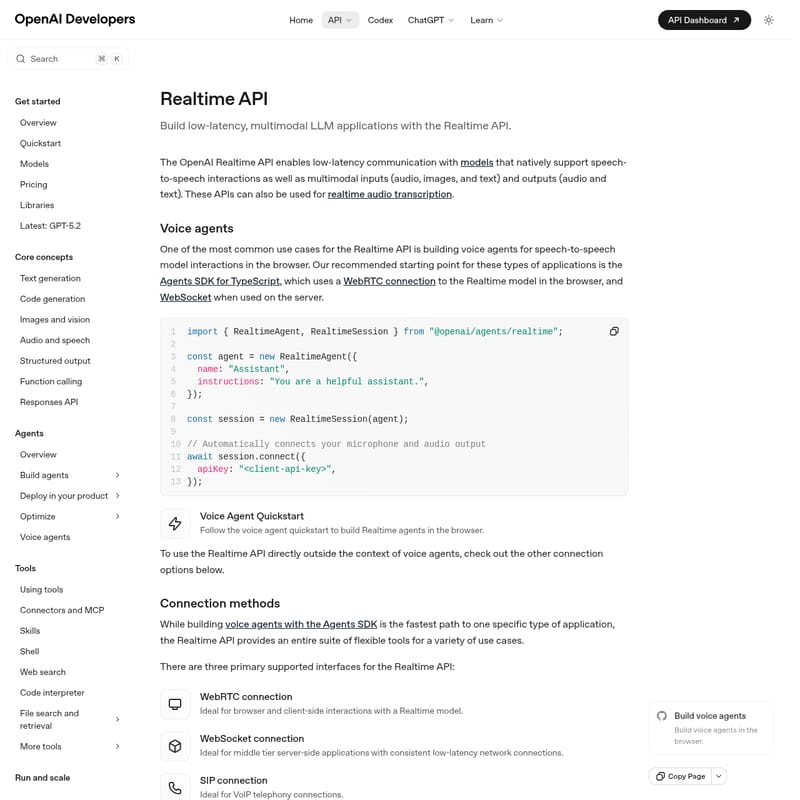
import { RealtimeAgent, RealtimeSession } from "@openai/agents/realtime";

const agent = new RealtimeAgent({
  name: "Assistant",
  instructions: "You are a helpful assistant.",
});

const session = new RealtimeSession(agent);

// Automatically connects your microphone and audio output
await session.connect({
  apiKey: "<client-api-key>",
});
Connecting via WebRTC
For client-side applications, obtain an ephemeral key using the /v1/realtime/client_secrets endpoint. Then, initialize a session using the /v1/realtime/calls URL for SDP data exchange to establish a secure peer connection.
Transitioning from Beta to GA
If you are migrating from the beta version, ensure you:
- Remove the
OpenAI-Beta: realtime=v1header. - Use the new
POST /v1/realtime/client_secretsendpoint for ephemeral keys. - Update event names (e.g., change
response.text.deltatoresponse.output_text.delta). - Explicitly define the
session.typeas eitherrealtimeortranscription.
FAQ
Q: What is the best way to manage costs with the Realtime API? A: You can monitor usage via the API Dashboard and utilize features like Prompt Caching and Batch processing for non-immediate tasks to optimize your spend.
Q: Can I use the Realtime API in a mobile app? A: Yes, ephemeral tokens generated via the client secrets endpoint are safe for use in mobile and browser environments.
Q: Does the Realtime API support vision? A: Yes, the Realtime API supports multimodal inputs, including images and vision-based reasoning.
Q: How do I handle long conversations? A: Use Context Management tools such as Compaction and Conversation State tracking to ensure the model retains relevant information without exceeding token limits.